
AudioThing miniBit
Professional music gear - detailed information and where to buy
AudioThing
miniBit
Product Info
* Prices may vary. Check retailer for current pricing and availability.
Product Description
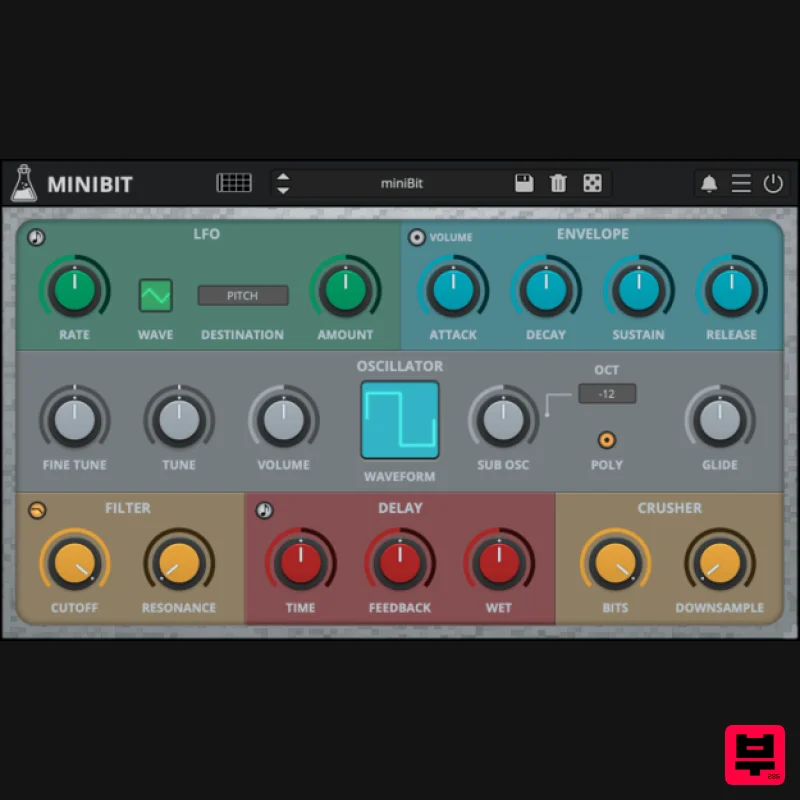
- 8bit Synthesizer Chiptune Synth miniBit is an 8-bit/chiptune style synthesizer plugin that emulates the sound of 80s game consoles and retro computers. It features a main oscillator with 18 waveforms paired with a sub oscillator (a square wave pitched one octave below). The waveforms are not bandlimited and will produce aliasing. Furthermore
- using the built-in bitcrusher
- you can create even more noisy and retro sounds. miniBit also features a synced 8 Steps Stepper/Sequencer with multiple destinations. From noisy
- snare-like steps to ambient subs
- miniBit has many uses beyond what one expects from a chiptune synth. <iframe allow="accelerometer; autoplay; clipboard-write; encrypted-media; gyroscope; picture-in-picture; web-share" allowfullscreen="" frameborder="0" height="315" src="https: //www.youtube.com/embed/pZ53lU9vi14?si=3kMF7FD-38owJhLD" title="YouTube video player" width="560"></iframe> Classic Consoles miniBit takes inspiration from the iconic sound of classic game consoles and retro computers of the 80s and 90s that AudioThing collected over the years. It delivers the unmistakable charm of vintage 8-bit sounds
- ideal for creating authentic chiptune music or adding a touch of nostalgic character to any production. To take your 8-bit creations even further
- explore miniVerb
- the companion effect plugin designed to enhance and transform your sounds with authentic chiptune-style effects. Custom Waveforms The Custom Waveform Editor features 32 steps and 8 waveform slots per preset. You can draw your waveforms by clicking and dragging on the editor. You can also use the built-in examples as a starting point. Each preset has its own set of custom waveforms
- if you want to use a custom wave with another preset you can use the Copy/Paste buttons
- or you can disable the Update Custom Waves in the global settings. To open the Custom Waveform Editor select one of the Custom Waveforms from the Waveform monitor and click on the Editor button. Step Sequencer miniBit features an 8 steps sequencer that can be used to automate several parameters: pitch
- volume
- cutoff
- resonance
- waveform
- and downsampling. Sequencing the waveforms will generate sounds reminiscent of early trackers and wavetable synthesizers. Each track can also be randomized using the dice buttons on the right. Windows Requires Windows 7 or higher VST2
- VST3
- CLAP
- Standalone (64bit only) Mac Requires macOS 10.13 or higher AU
- VST2
- VST3
- CLAP
- Standalone (64bit only) Linux Requires Ubuntu 20.04 or newer VST2
- VST3
- CLAP
- Standalone (64bit only) Note: Wave Box is used as the example. Windows 1. Visit the AudioThing Account Signup Page and enter your personal details to set up an account. Click the Verification and "I've read and agree to the Privacy Policy" > Click Sign Up. Note: If you already have an existing AudioThing account
- Login here and skip to step 3 of the installation process. 2. A confirmation email will now be sent to your registered email > click the link within the email to activate your account and Login here. 3. Once logged into your account
- visit the Redeem Page and enter Redeem Code from your Plugin Boutique User Account into the box > Click 'Redeem'. 4. Download the PC installer and the Offline Activation License. Note: Save the Offline Activation License to a memorable location on your computer for activating the software. 5. Double-click the downloaded .zip folder to extract its contents. 6. Double-click the extracted .exe file > click 'I accept the agreement and click 'Next'. 7. Click 'Next'. 8. Select the components that you wish to install > Click ‘Next’. 9. Click ‘Next’. 10. Click 'Install'. 11. Click ‘Finish’. Offline Activation 1. Open Wave Box inside of your DAW > Click 'Offline'. 2. Click 'Load Licence File' and navigate to your Offline Activation License. 3. Click the X to close the box. The software is now activated and ready to use inside your DAW! Online Activation 1. Open Wave Box inside of your DAW > Click 'Online'. 2. Enter your AudioThing email and password > Click 'Log In'. 3. Click the X to close the box. The software is now activated and ready to use inside your DAW! Mac 1. Visit the AudioThing Account Signup Page and enter your personal details to set up an account. Click the Verification and "I've read and agree to the Privacy Policy" > Click Sign Up. Note: If you already have an existing AudioThing account
- Login here and skip to step 3 of the installation process. 2. A confirmation email will now be sent to your registered email > click the link within the email to activate your account and Login here. 3. Once logged into your account
- visit the Redeem Page and enter Redeem Code from your Plugin Boutique User Account into the box > Click 'Redeem'. 4. Download the MAC installer and the Offline Activation License. Note: Save the Offline Activation License to a memorable location on your computer for activating the software. 5. Double-click the downloaded .dmg folder to extract its contents > Double-click the .pkg file to run the installer 6. Click 'Continue'. 7. Click ‘Continue’. 8. Click 'Continue'. 9. Click ‘Agree’. 10. Select the components you would like to install > Click 'Continue'. 11. Click ‘Install’. 12. Click 'Close'. Offline Activation 1. Open Wave Box inside of your DAW > Click 'Offline'. 2. Click 'Load Licence File' and navigate to your Offline Activation License. 3. Click the X to close the box. The software is now activated and ready to use inside your DAW! Online Activation 1. Open Wave Box inside of your DAW > Click 'Online'. 2. Enter your AudioThing email and password > Click 'Log In'. 3. Click the X to close the box. The software is now activated and ready to use inside your DAW!
Additional Information
About the AudioThing miniBit
Discover the distinctive sound and feel of the AudioThing miniBit, a standout choice among Synth.
Why Choose the AudioThing miniBit?
- •Authentic AudioThing craftsmanship and design
- •Versatile sound suitable for multiple musical genres
- •Professional build quality and reliable performance
- •Part of AudioThing's respected Synth lineup
Compare & Explore
Browse our complete selection of AudioThing instruments or explore other Synth options. Use our comparison tools to find the perfect match for your musical style and budget.
Similar Products

discoDSP OPL
Synth
$30
The OPL is a digital sound synthesis chip developed by Yamaha in the mid 1980s. Among other products, it was used in...

discoDSP OB-Xd
Synth
$30
OB-Xd is based on the Oberheim OB-X. It attempts to recreate its sound and behavior, but as the original was very...

discoDSP Discovery Pro
Synth
$30
discoDSP’s Discovery was one of the company’s first and finest efforts. Heavily inspired by Clavia’s Nord Lead...

Reflekt Audio Xonex
Synth
$30
Xonex is a futuristic plugin that we have used time and time again to make a variety of beats. Xonex has offered me a...

Thenatan Audio Poizen VST
Synth
$30
Thenatan and Global Audio Tools have teamed up again to bring music makers across the globe a jam packed powerful tool...

discoDSP Discovery
Synth
$30
Discovery is a virtual analog Nord Lead 2 inspired synthesizer featuring multi-layering, a morphing engine, high...

AngelicVibes ELITE PIANIST
Synth
$30
Your next go-to virtual instrument. Real piano recordings with unique sound and effects 50 high-quality presets for...

ThaLoops Templetone
Synth
$30
The Ultimate Hip-Hop Production Plugin – Featuring a Vast Collection of Hip-Hop Sounds. Choose between wild drums,...
Frequently Asked Questions
The AudioThing miniBit stands out for its exceptional AudioThing craftsmanship and innovative design.
Yes! With its affordable price point and quality construction, it's perfect for learning synth.
Browse the similar products section to see how it stacks up against other synth.

