
AudioThing Bells
Professional music gear - detailed information and where to buy
AudioThing
Bells
Product Info
* Prices may vary. Check retailer for current pricing and availability.
Product Description
- From Brass to Iron Important Note: This is a software instrument designed for the full version of the NI Kontakt engine
- and is not a physical product! As the name suggests
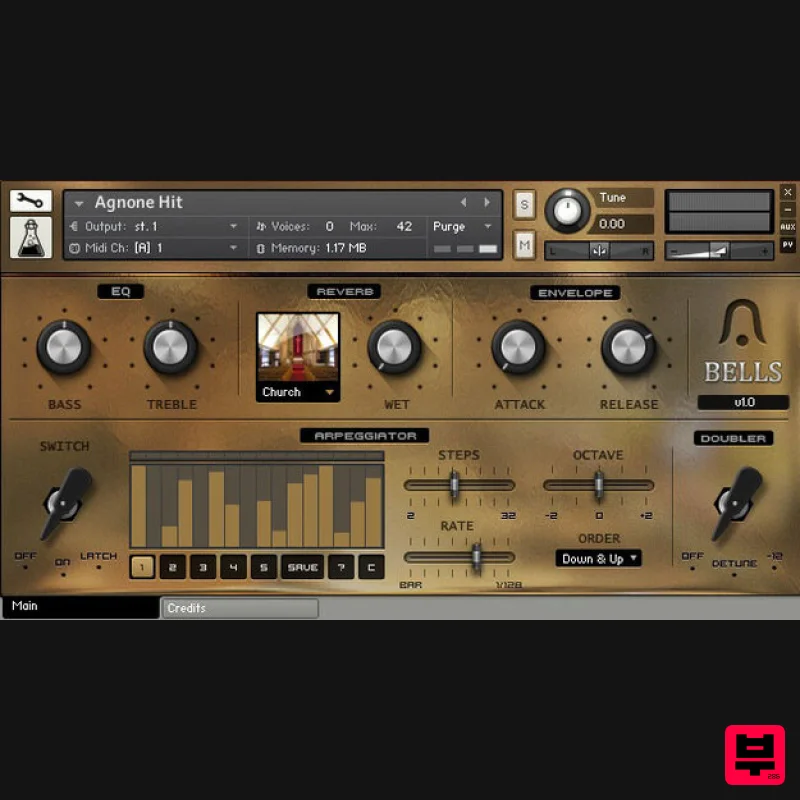
- Bells is a collection of samples derived from many different kinds of bells. After visiting Pontificia Fonderia Marinelli in Agnone
- Italy – the largest bells company and one of the oldest family-owned businesses worldwide – we started collecting many different kinds of bells
- including: an Agnone souvenir bell
- three different cowbells
- a hotel desk-bell
- a Perko fog bell
- a classic school bell
- a singing bowl
- and old telephone bells. All the bells are made from different materials such as bronze
- brass
- and iron
- and we sampled them with different articulations and techniques to provide a wide range of sounds. Features 30 Kontakt Instruments (.nki) 7 Kontakt Multis (.nkm) Up to 7 Round Robin samples Up to 3 Velocity layers 200 Samples (44.1kHz / 24Bit) Size: 430 MB 7 Custom Reverb IRs Formats: Kontakt and WAV Sample sets including Agnone Bell
- Cowbells
- Hotel Desk-Bell
- Perko Fog Bell
- School Bell
- Singing Bowl
- Old Telephone Bells System Requirements The full version of Kontakt 4.2.4 or higher is required to run this instrument Important note: The full version of Kontakt 4.2.4 or higher is required to run this software. Note: Tank Drum is used as the example. 1. Download the compressed .zip folder from your User Account and double-click it to reveal the installer file. 2. Extract and save the software folder e.g ‘AudioThing_TankDrum’ to a memorable computer destination of choice
- e.g 'Documents' or on an external hard drive. 3. Launch Kontakt and click the ‘File’ tab that is located at the top left corner of its interface. 4. Navigate to the computer destination where you extracted/saved the software folder to
- and double-click the ‘AudioThing_TankDrum’ > then ‘Instruments’ folder to open the .nki files within Kontakt. Note: Refer to step 2 of the installation process if you are unable to locate the folder. 5. Double-click the individual .nki instruments to load them into Kontakt’s interface. Notes: Kontakt will ask for the new path the first time you run the instrument It is advisable to preserve the internal folder structure
- but you can also place the instruments and samples into separate folders Your AudioThing Kontakt Instrument is now Ready for Use!
Additional Information
About the AudioThing Bells
The AudioThing Bells represents excellent craftsmanship in the Kontakt Instrument category.
Why Choose the AudioThing Bells?
- •Authentic AudioThing craftsmanship and design
- •Versatile sound suitable for multiple musical genres
- •Professional build quality and reliable performance
- •Part of AudioThing's respected Kontakt Instrument lineup
Compare & Explore
Browse our complete selection of AudioThing instruments or explore other Kontakt Instrument options. Use our comparison tools to find the perfect match for your musical style and budget.
Similar Products

The Beat House LE HITS THE ESSENTIALS
Kontakt Instrument

HD Instruments ZoneMatrix
Kontakt Instrument

Audiofier Aerkord
Kontakt Instrument

Ecliptiq Audio Hexa Rhythm Designer
Kontakt Instrument

Audiofier Sequi2r EX
Kontakt Instrument

Aria Sounds Hybrichord
Kontakt Instrument

Rigid Audio Retrocade
Kontakt Instrument

DoubleBang Software Plugged
Kontakt Instrument

