
Audio Damage Ratshack Reverb 3
Professional music gear - detailed information and where to buy
Audio Damage
Ratshack Reverb 3
Product Info
* Prices may vary. Check retailer for current pricing and availability.
Product Description
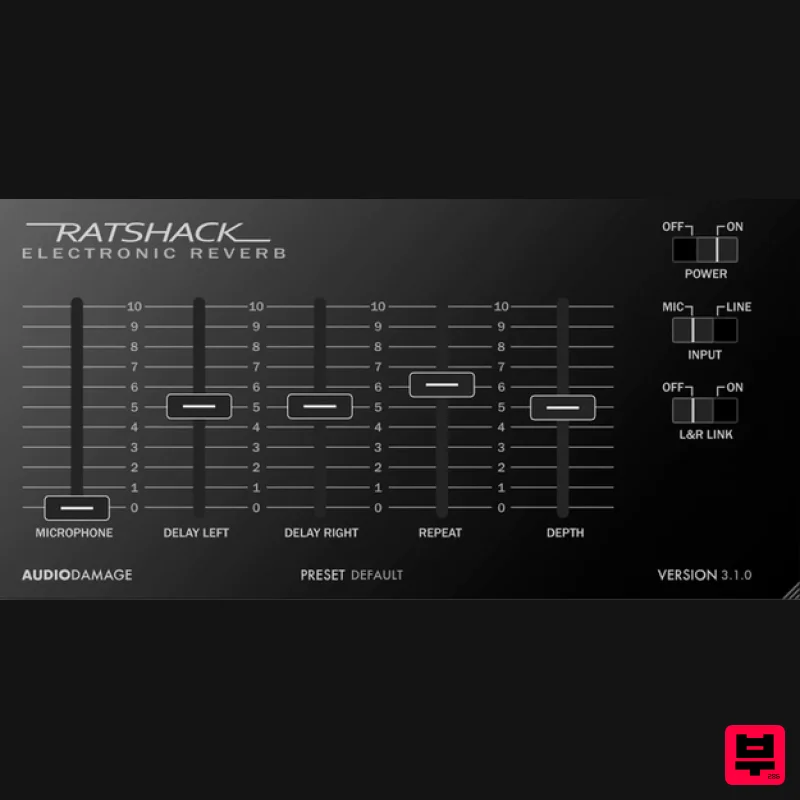
- Ratshack Reverb is a detailed model of that classic of classics
- the Realistic Electronic Reverb. Now
- you can have the sound of everyone's first analog delay unit
- without ever having to change batteries! As anyone who has owned this unit (which is just about everyone...) knows
- it was actually an analog delay
- not a reverb at all
- and Audio Damage has done its best to exactly replicate the sound and quirks of the original. Audio Damage even modelled the distortion that occurs by running a line signal into the mic inputs. Features Accurate analog "bucket-brigade" style delay model. Change the delay time
- and the signal pitches accordingly. Both mic and line inputs are modelled
- for overdriving the delay section if desired. XML-based cross-platform preset manager
- with copy and paste. (You can even move presets between the iOS version and the desktop version with Handoff.) Entirely vector-based resizable high-resolution user interface. System Requirements Mac macOS 10.12 or newer (64-bit only) VST
- VST3
- AAX Windows Windows 8.1 or newer (64-bit only) VST
- VST3
- AAX Linux Ubuntu 18 or newer (64-bit only) VST
- VST3 Important Note: This product is available as 64-bit only. Note: Quanta is used as the example. Mac Installation 1. Download the .pkg file from within your Plugin Boutique User Account > Double-click it to run the installer. 2. Click 'Continue'. 3. Read the Software License Agreement > Click 'Continue'. 4. Click 'Agree'. 5. Click 'Continue'. 6. Click 'Install'. 7. Enter your computer's Username and Password > Click 'Install Software'. 8. Click 'Close'. Your software is now ready to use within your DAW! Windows Installation 1. Download the .zip file from within your Plugin Boutique User Account > Double-click it to extract the contents and double-click the .exe file to run the installer. 2. Click 'Next'. 3. Read the License Agreement > Click 'I Agree'. 4. Choose which components to install > Click 'Install'. 5. Click 'Next'. 6. Click 'Finish'. Your software is now ready to use within your DAW!
Additional Information
About the Audio Damage Ratshack Reverb 3
The Audio Damage Ratshack Reverb 3 represents excellent craftsmanship in the Reverb category.
Why Choose the Audio Damage Ratshack Reverb 3?
- •Authentic Audio Damage craftsmanship and design
- •Versatile sound suitable for multiple musical genres
- •Professional build quality and reliable performance
- •Part of Audio Damage's respected Reverb lineup
Compare & Explore
Browse our complete selection of Audio Damage instruments or explore other Reverb options. Use our comparison tools to find the perfect match for your musical style and budget.
Similar Products

Initial Audio AR1 Reverb
Reverb
$30
Quality Algorithmic Reverb Plugin AR1 is an algorithmic reverb plugin designed to sound great on all types of...

XHUN Audio ShineVerb
Reverb
$30
Creative Reverb Processor ShineVerb is a creative tool specially designed for reverberation, spatialization and sound...

PSP Audioware PSP EasyVerb
Reverb
$30
PSP EasyVerb is a reverberation effect plug-in (VST, RTAS and AAX for Windows; VST, AudioUnit, RTAS and AAX for Mac OS...

Vegas Audio Fabricverb
Reverb
$30
Get the signature sound of the UK’s most famous nightclub on your digital audio workstation! Our new convolution...

PSP Audioware PSP Nexcellence
Reverb
$30
PSP Nexcellence is a rich-sounding, spring reverb emulation inspired by and modeled after classic “necklace-type”...

PSP Audioware PSP Pianoverb 2
Reverb
$30
PSP PianoVerb2 is a redesigned and improved creative resonant reverb plug-in based on our famous and beloved freeware...

DDMF MagicVerb
Reverb
$30
MagicVerb is the latest result of the collaboration between MagicDeathEye aka Ian Sefchick and DDMF. This journey was...

DDMF Envelope
Reverb
$30
Envelope is a true stereo reverb plugin featuring 8 different room simulations, all of which can be adjusted for size,...
Frequently Asked Questions
The Audio Damage Ratshack Reverb 3 stands out for its exceptional Audio Damage craftsmanship and innovative design.
Yes! With its affordable price point and quality construction, it's perfect for learning reverb.
Browse the similar products section to see how it stacks up against other reverb.

