
Audio Damage Enso
Professional music gear - detailed information and where to buy
Audio Damage
Enso
Product Info
* Prices may vary. Check retailer for current pricing and availability.
Product Description
- With decoupled recording and playback
- multiple overdub styles and modes
- four discrete loop Sectors and much more
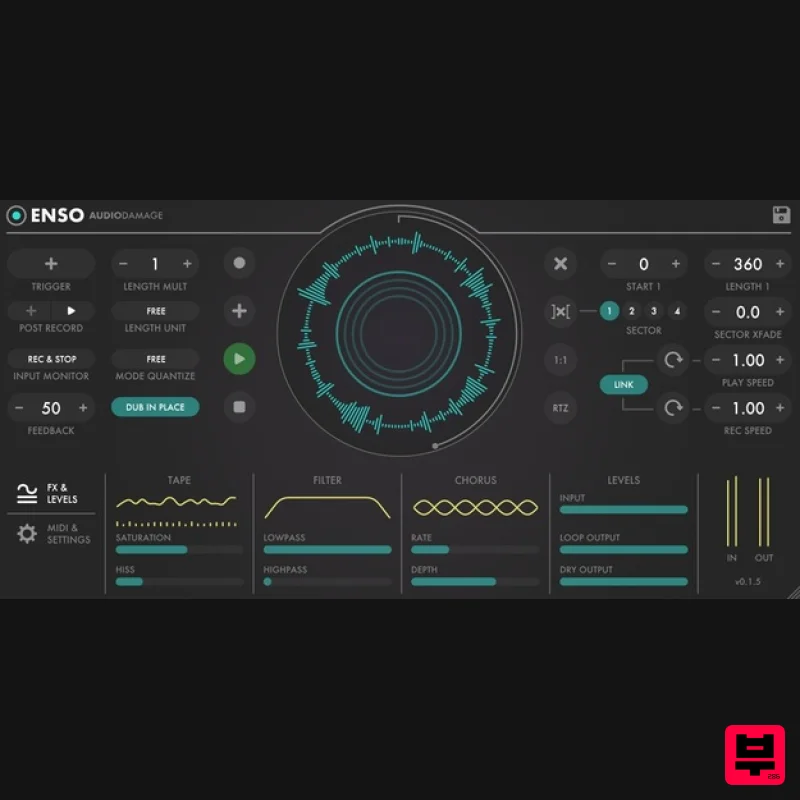
- it's the last word in creative looping. Enso has an architecturally unique and sonically characterful looping toolkit for producers and live performers
- inspired by both modern looper pedals and vintage tape-based setups
- Enso combines elegant and intuitive UI design with a deep but accessible feature set and stellar sound quality. Giving you everything you need for limitlessly creative looping
- on stage and in the studio
- Enso is one of Audio Damage’s most beautifully realised plugins yet
- and an empowering addition to any musician’s arsenal of effects. Loop! Enso can record up to 10 minutes of stereo audio (at 48kHz sample rate; 5 minutes on iOS) and play it back in both directions at any speed
- with one-button control to duplicate your favorite looper pedal workflow. Create! Enso's play and record heads are entirely decoupled. This means you can play in one direction and speed
- while recording in another direction and speed. Make amazing and unique looping beds with unlinked overdubbing. Effect! Enso has a suite of effects for tape simulation
- filtering
- and chorus
- making it a completely self-contained looping station for 'tronic-style tape looping. Control! Enso has a sophisticated MIDI learn system
- for easily using a foot controller or other MIDI device to access the appropriate controls. Store your MIDI learn layout with your preset
- for instant access to your preferred controller layout. Features Full Automatic Looping Engine: Enso's looping engine is simple to learn
- but exceedingly powerful
- with "one button" looping control
- both host-synced and free time. Dub In Place: Enso can either work like a traditional digital looper
- where the input is mixed with the buffer contents
- then sent to effects
- or like a tape looper
- where the effects and speed changes are included in the feedback path. Sector Crossfading: Define four different start and end points. Crossfade between them
- and overdub or re-record within them. Effects Section: Enso has user-controllable "tape style" saturation and hiss
- high- and low-pass filters
- and a stereo chorus for thickening and carving your loop. Full MIDI CC Implementation: Enso has an assignable MIDI CC page for controlling most features of the looping engine. It is tuned for foot control
- but will work with any MIDI CC source. Independent Play And Record Head Control: Both the play and record heads have a through-zero speed control
- from -4x to +4x
- with text entry values and selectable inc and dec values. Multi-Format Audio Loader: Enso can load AIFF
- Broadcast WAV
- FLAC
- and Ogg in any sample rate
- bit depth
- and channel configuration. Buffer Save: Enso can save its buffer contents as a WAV file. Extra Long Loops: Enso can record or load up to 10 minutes of audio (5 minutes in iOS version) in Long Memory mode. Cross-Platform Preset Format: Enso utilizes an XML-based preset manager
- and optionally stores the buffer within the preset for easy asset management. Work between multiple systems without troubles
- make a preset on your desktop machine and paste it to the iOS version with Handoff
- easily share your creations with your friends
- or make a preset bundle to sell
- no asset management required. Fully Resizable Hi-Dpi/Retina GUI: Enso's vector-based GUI is resolution-agnostic
- and displays the same on every system and resolution. Easily resize the UI (per instance) to match your visual needs
- from postage stamp to poster-sized. System Requirements Mac macOS 10.13 High Sierra or newer (M1 Apple Silicon supported) (64-bit only) VST
- VST3
- AAX Windows Windows 10 or newer (64-bit only) VST
- VST3
- AAX Linux Ubuntu 20 or newer (64-bit only) VST
- VST3 Important Note: This software is 64-bit compatible ONLY and will NOT function on 32-bit systems. Installation Instructions Important Note: Quanta is used as the example. macOS: Installation 1. Download the .pkg file from within your Plugin Boutique User Account > Double-click it to run the installer. 2. Click 'Continue'. 3. Read the Software License Agreement > Click 'Continue'. 4. Click 'Agree'. 5. Click 'Continue'. 6. Click 'Install'. 7. Enter your computer's Username and Password > Click 'Install Software'. 8. Click 'Close'. Your software is now ready to use within your DAW! Windows Installation 1. Download the .zip file from within your Plugin Boutique User Account > Double-click it to extract the contents and double-click the .exe file to run the installer. 2. Click 'Next'. 3. Read the License Agreement > Click 'I Agree'. 4. Choose which components to install > Click 'Install'. 5. Click 'Next'. 6. Click 'Finish'. Your software is now ready to use within your DAW!
Additional Information
About the Audio Damage Enso
Discover the distinctive sound and feel of the Audio Damage Enso, a standout choice among Multi Effect .
Why Choose the Audio Damage Enso?
- •Authentic Audio Damage craftsmanship and design
- •Versatile sound suitable for multiple musical genres
- •Professional build quality and reliable performance
- •Part of Audio Damage's respected Multi Effect lineup
Compare & Explore
Browse our complete selection of Audio Damage instruments or explore other Multi Effect options. Use our comparison tools to find the perfect match for your musical style and budget.
Similar Products

Jungle Audio DUKE
Multi Effect

Jonas Eriksson Tape Fiasco
Multi Effect

UVI Xtreme FX 2
Multi Effect

UVI Whoosh FX
Multi Effect

Quantum DSP Q-Series Invader
Multi Effect

UVI Click
Multi Effect

UVI Asteroid
Multi Effect

Sinevibes Cache
Multi Effect

