
Aberrant DSP Tectonic
Professional music gear - detailed information and where to buy
Aberrant DSP
Tectonic
Product Info
* Prices may vary. Check retailer for current pricing and availability.
Product Description
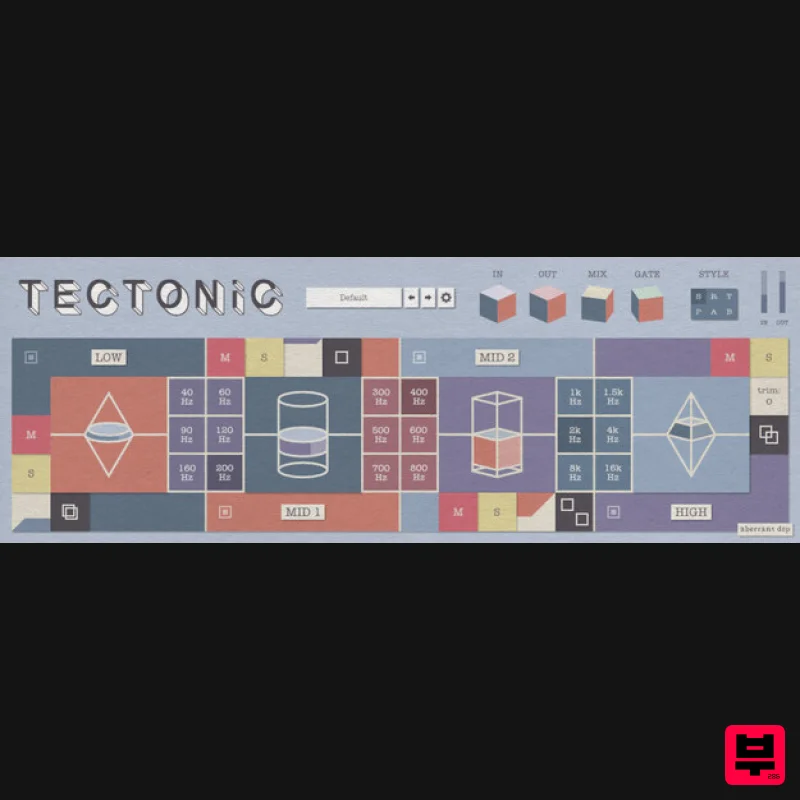
- Tectonic is a multi-band toneshaping channel strip. Combining equalization
- imaging
- and dynamics processing
- Tectonic is a complete sonic toolkit for anything from subtle sweetening to total tonal transformation. Features 4 bands of upward / downward compression Boosting a band applies upward + downward compression Cutting a band applies only downward compression -12 dB to 12 dB trim gain per band Selectable transition frequency between each set of adjacent bands Per band Mute
- Solo
- and processing Bypass Mid / Side panner per band
- allowing independent stereo narrowing and widening of each frequency range Master mix
- input gain
- and output gain Six style selections to adjust the feel and intensity of the dynamics processing Custom preset system with 65 factory presets illustrating Tectonic’s wide range of toneshaping abilities System Requirements Windows 10 or later – VST3 and AAX at 64-bit macOS 10.12 Sierra through macOS 13 Ventura – Intel or Apple Silicon – AU
- VST3
- and AAX at 64-bit Restart your digital audio workstation before loading in the plugin to a project. On macOS
- you may need to restart your computer for new plugins to appear in some hosts Note: ShapeShifter is used as an example. Mac 1. Download the .zip file from within your Plugin Boutique User Account and double-click it to extract the contents > Open the .pkg file to begin the installation > Click 'Continue'. 2. Click 'Continue'. 3. Click 'Agree'. 4. Click 'Continue'. 5. Click 'Install'. 6. Enter your computer username and password > Click 'Install Software'. 7. Click 'Close'. 8. Open the plugin within your DAW. Your software is now installed and ready to use within your DAW. Windows 1. Download the .zip file from within your Plugin Boutique User Account and double-click it to extract the contents > Open the .exe file to begin the installation > Select 'I accept the agreement' and click 'Next'. 2. Click 'Next'. 3. Click 'Install'. 4. Click 'Finish'. 5. Open the plugin within your DAW. Your software is now installed and ready to use within your DAW.
Additional Information
About the Aberrant DSP Tectonic
Discover the distinctive sound and feel of the Aberrant DSP Tectonic, a standout choice among Multi Effect .
Why Choose the Aberrant DSP Tectonic?
- •Authentic Aberrant DSP craftsmanship and design
- •Versatile sound suitable for multiple musical genres
- •Professional build quality and reliable performance
- •Part of Aberrant DSP's respected Multi Effect lineup
Compare & Explore
Browse our complete selection of Aberrant DSP instruments or explore other Multi Effect options. Use our comparison tools to find the perfect match for your musical style and budget.
Similar Products

Quantum DSP Q-Series Invader
Multi Effect

Jungle Audio DUKE
Multi Effect

UVI Xtreme FX 2
Multi Effect

UVI Click
Multi Effect

Sinevibes Cache
Multi Effect

Jonas Eriksson Tape Fiasco
Multi Effect

UVI Whoosh FX
Multi Effect

UVI Asteroid
Multi Effect

