
2Rule TugGlicento 3
Professional music gear - detailed information and where to buy
2Rule
TugGlicento 3
Product Info
* Prices may vary. Check retailer for current pricing and availability.
Product Description
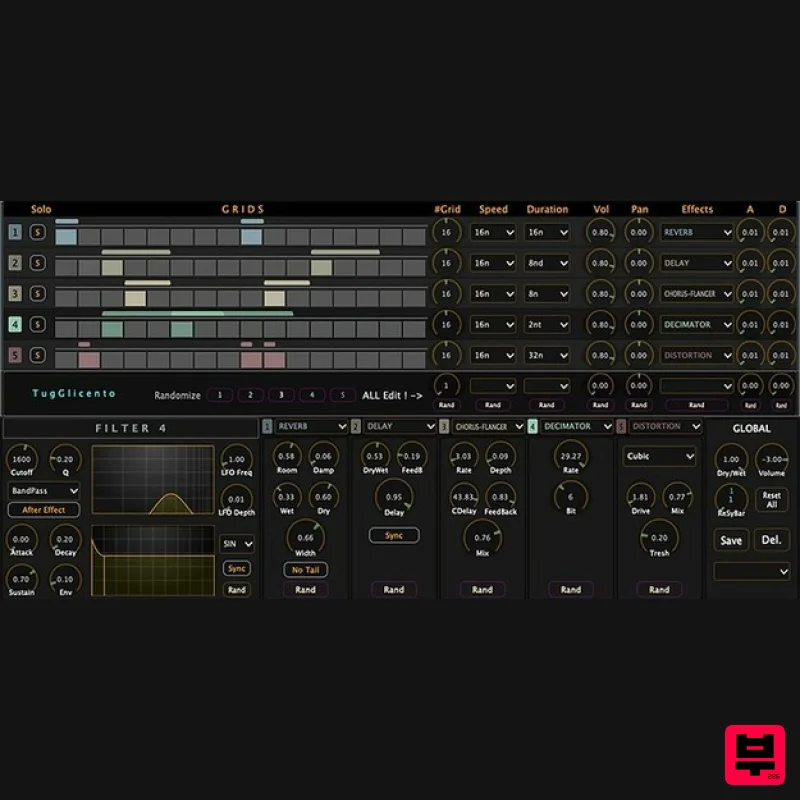
- TugGlicento is an audio effect plugin for Windows (VST3)
- and Mac (VST AU). It can play multiple effects simultaneously
- by triggering boxes. TugGlicento can be as gentle or as noisy as you like Features Variable speeds for each line 5 Band independent moog filter (edge of self resonance) 5 band ADSR and LFO (syncable) for filter Effects for each line Variable beats for each line Variable duration for each line Matrix-based interface Randomisation REVERB
- DELAY
- CHORUS
- DECIMATOR
- DISTORTION
- PHASER
- PITCHSHIFTER
- COMBFILTER
- REPEATER
- VIBRATO
- TREMOLO
- RING MODULATOR
- adjustable through many parameters System Requirements macOS 10.15 or higher Windows 10 or higher 64-bit only Available Formats: VST3 & AU Windows 1. Download the .zip file from within your Plugin Boutique User Account > Double-click it to extract the contents. 2. Select 'TuGlicento.vst3' and 'TuGlicentoPresets.json' > copy the necessary files. 4. Navigate to the file path C:\Program Files\Vstplugins > Paste the files into this folder. Your software is now installed and ready to use within your DAW. Mac 1. Download the .zip file from within your Plugin Boutique User Account > Double-click it to extract the contents. 2. Navigate to the contained AU and VST3 components > copy the necessary files. 3. Navigate to the file path Macintosh HD:/Library/Audio/Plug-Ins/Components/ > Paste the component in this folder. 4. Navigate to the file path Macintosh HD:/Library/Audio/Plug-Ins/VST 3 > Paste the .vst3 file in this folder. Your software is now installed and ready to use within your DAW. Additional Information for Mac Users In the case that your system/DAW prevents TuGlicento 2 from opening upon installation
- please complete the following steps. 1. Open the Apple menu
- and click System Preferences. 2. Click Security & Privacy. 3. Click the General tab. 4. Click the lock in the bottom corner of the window. 5. Enter your username and password when prompted
- and click Unlock. 6. Click the App Store and Identified Developers radial button. 7. Look for “(App Name) was blocked from opening because it is not from an identified developer” and click Open Anyway. (In older versions of macOS
- you could click Anywhere and then click Allow From Anywhere.) 8. Re-load your DAW.
Additional Information
About the 2Rule TugGlicento 3
Discover the distinctive sound and feel of the 2Rule TugGlicento 3, a standout choice among Multi Effect .
Why Choose the 2Rule TugGlicento 3?
- •Authentic 2Rule craftsmanship and design
- •Versatile sound suitable for multiple musical genres
- •Professional build quality and reliable performance
- •Part of 2Rule's respected Multi Effect lineup
Compare & Explore
Browse our complete selection of 2Rule instruments or explore other Multi Effect options. Use our comparison tools to find the perfect match for your musical style and budget.
Similar Products

Jonas Eriksson Tape Fiasco
Multi Effect

UVI Xtreme FX 2
Multi Effect

Quantum DSP Q-Series Invader
Multi Effect

Jungle Audio DUKE
Multi Effect

UVI Asteroid
Multi Effect

UVI Whoosh FX
Multi Effect

UVI Click
Multi Effect

Sinevibes Cache
Multi Effect

