
ZAK Sound Sapphire Guitar 2 Max
Professional music gear - detailed information and where to buy
Product Description
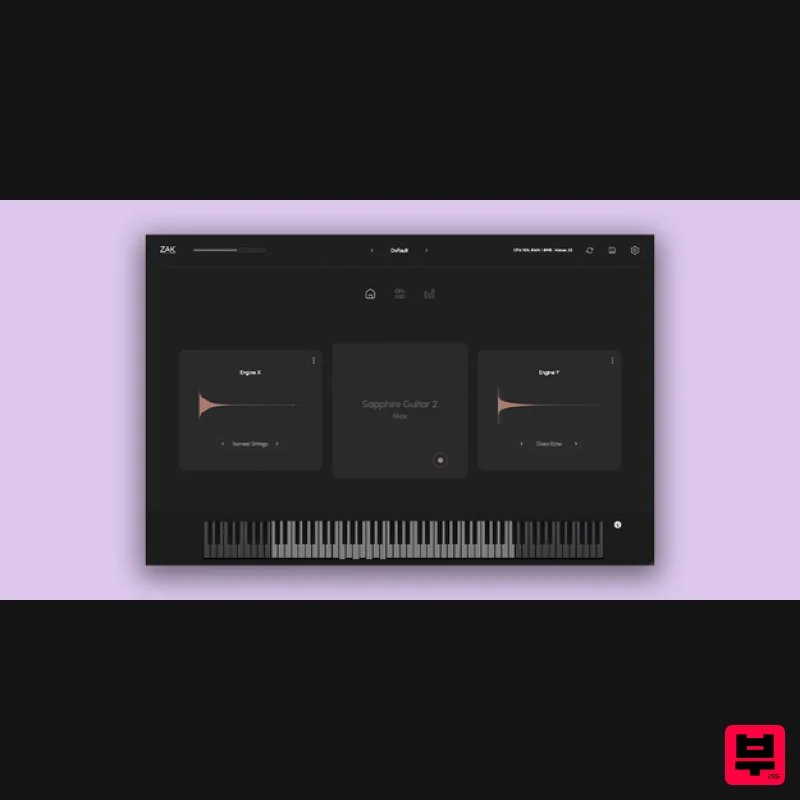
- Sapphire Guitar 2 Max is an advanced instrument designed for transforming guitar samples into lush atmospheres and intricate textures. Whether you're crafting ambient soundscapes
- cinematic backdrops
- or ethereal pads
- Sapphire Guitar 2 Max provides an expansive array of tools to bring your musical vision to life. At its core
- the instrument features a powerful dual-layer engine
- allowing you to blend and shape sound layers for complex
- evolving textures that move effortlessly from subtle to deeply immersive. With 122 premium presets and 58 unique sound layers
- Sapphire Guitar 2 Max offers nearly unlimited creative potential. The customizable arpeggiators and comprehensive effects suite open new pathways for dynamic
- evolving patterns. Plus
- the preset randomizer and save options make it easy to stay inspired and manage your unique sounds
- ensuring you have everything you need for intuitive and expressive sound design. Features 122 Premium Presets: Curated for ambient
- atmospheric
- and textural sounds 58 Unique Sound Layers: Mix and match for boundless sound creation Dual-Layer Engine: Build complex
- layered sounds with ease Customizable Arpeggiators: Create evolving
- dynamic patterns Comprehensive Effects Suite: Shape your sound with high-quality effects Preset Randomizer: Generate instant inspiration with one click Custom Preset Management: Save and access your own crafted sounds System Requirements Windows Compatible with Windows 7 or higher (64 bit only) VST3 macOS Compatible with macOS 10.11 or higher (Intel & Native Apple Silicon support) VST3/AU Please Note: Colorwoods Piano is used as the example macOS 1. Download the .zip from your Plugin Boutique User Account 2. Extract the contents > open the folder 3. Select the .component file 4. Navigate to Library > Audio > Plug-Ins > Components 5. Paste the Colorwoods Piano .component file to the Components folder 6. Return to the original Colorwoods Piano extracted folder 7. Select the .vst3 file 8. Navigate to Library > Audio > Plug-Ins > VST3 8. Drag and drop the Colorwoods Piano .vst3 file to the VST3 folder 9. Once this is complete
- move the original Colorwoods Piano folder to any location on your computer or external hard drive- for example; a) Navigate to Documents b) Create a new folder named ZAK Sound c) Move the Colorwoods Piano folder to the new folder 10) Open your DAW > Rescan plugins if necessary 11) Open Colorwoods Piano on a new track 12) Select the folder you moved the Colorwoods Piano folder to in Step 9 13) Enter the serial number found in your Plugin Boutique User Account Your plugin is activated and ready for use! Please Note: Skyridge is used as an example. PC 1. Download the .zip from your Plugin Boutique User Account. 2. Extract and run the .exe file. 3. Click 'I accept the agreement' > Click 'Next'. 4. Click 'Next'. 5. Click 'Next'. 6. Click 'Install'. 7. Click 'Finish'. 8. Open your DAW > Open Skyridge. 9. Enter the serial number found in your Plugin Boutique User Account > Click 'Activate'. Your product is now activated and ready to use! Your product is now activated and ready to use!
Additional Information
About the ZAK Sound Sapphire Guitar 2 Max
The ZAK Sound Sapphire Guitar 2 Max represents excellent craftsmanship in the Synth category.
Why Choose the ZAK Sound Sapphire Guitar 2 Max?
- •Authentic ZAK Sound craftsmanship and design
- •Versatile sound suitable for multiple musical genres
- •Professional build quality and reliable performance
- •Part of ZAK Sound's respected Synth lineup
Compare & Explore
Browse our complete selection of ZAK Sound instruments or explore other Synth options. Use our comparison tools to find the perfect match for your musical style and budget.
Similar Products

discoDSP OB-Xd
Synth
$30
OB-Xd is based on the Oberheim OB-X. It attempts to recreate its sound and behavior, but as the original was very...

Thenatan Audio Poizen VST
Synth
$30
Thenatan and Global Audio Tools have teamed up again to bring music makers across the globe a jam packed powerful tool...

ThaLoops Templetone
Synth
$30
The Ultimate Hip-Hop Production Plugin – Featuring a Vast Collection of Hip-Hop Sounds. Choose between wild drums,...

Reflekt Audio Xonex
Synth
$30
Xonex is a futuristic plugin that we have used time and time again to make a variety of beats. Xonex has offered me a...

discoDSP Discovery
Synth
$30
Discovery is a virtual analog Nord Lead 2 inspired synthesizer featuring multi-layering, a morphing engine, high...

discoDSP Discovery Pro
Synth
$30
discoDSP’s Discovery was one of the company’s first and finest efforts. Heavily inspired by Clavia’s Nord Lead...

discoDSP OPL
Synth
$30
The OPL is a digital sound synthesis chip developed by Yamaha in the mid 1980s. Among other products, it was used in...

AngelicVibes ELITE PIANIST
Synth
$30
Your next go-to virtual instrument. Real piano recordings with unique sound and effects 50 high-quality presets for...
Frequently Asked Questions
The ZAK Sound Sapphire Guitar 2 Max stands out for its exceptional ZAK Sound craftsmanship and innovative design.
Yes! With its affordable price point and quality construction, it's perfect for learning synth.
Browse the similar products section to see how it stacks up against other synth.

