
ZAK Sound Colorwoods Piano
Professional music gear - detailed information and where to buy
Product Description
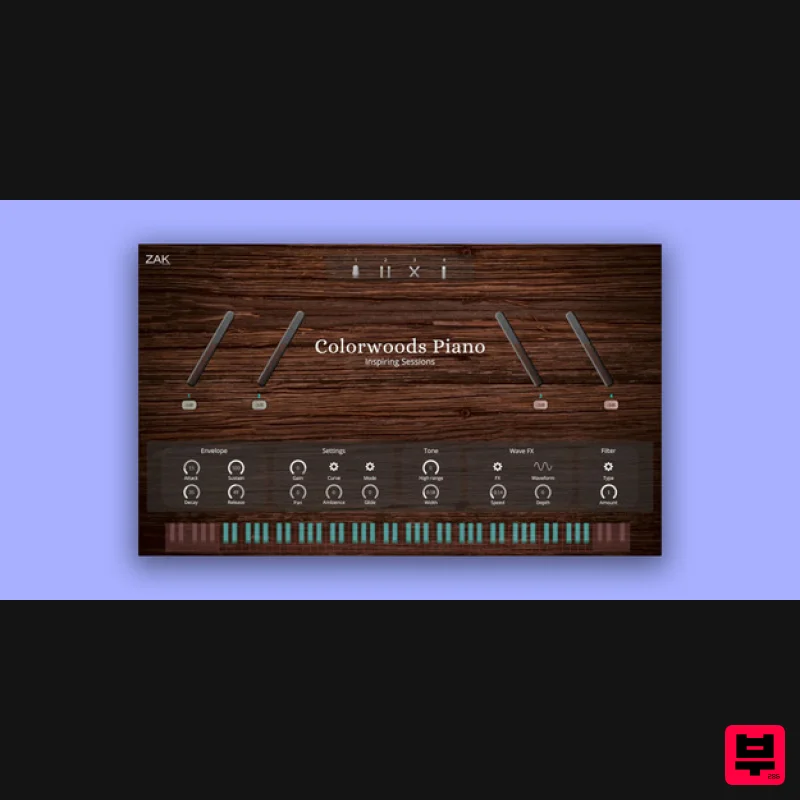
- Colorwoods Piano is an acoustic piano with a natural and serene taste but also powerful and crisp when you push it to the limit. It is based on an upright piano and was recorded with five gradual velocities. Microphone Positions To get a full sound
- ZAK Sound used 6 microphones to record this piano: a centered large-diaphragm condenser microphone
- a pair of condensers in XY
- another pair of condensers in the front position
- and a dynamic microphone. When all mic positions are active simultaneously
- the sound is super full and complete. But it is also possible to control each microphone position with an individual gain knob. This is why Colorwoods Piano can have a soft and relaxed sound with the selection of some microphones
- or it can also become more powerful with the most potent microphones. Features Control for each microphone position: gain knobs for the four positions of the six microphones (two stereo and two singulars) Envelope: Attack
- sustain
- decay
- and release Settings: Gain
- curve selection
- mode (polyphonic
- monophonic
- legato)
- gain
- ambience
- and glide (for legato) Tone: High range and width Wave FX: LFO with different waveforms and depth/speed controls Lowpass and highpass filter System Requirements Windows Compatible with Windows 8 / 10 / 11 (64 bit only) VST3 8GB RAM (Recommended) 4.3GB of free space macOS Compatible with macOS 10.11 to 12 (native Apple Silicon support) VST3/AU 8GB RAM (Recommended) 4.3GB of free space macOS 1. Download the .zip from your Plugin Boutique User Account 2. Extract the contents > open the folder 3. Select the .component file 4. Navigate to Library > Audio > Plug-Ins > Components 5. Paste the Colorwoods Piano .component file to the Components folder 6. Return to the original Colorwoods Piano extracted folder 7. Select the .vst3 file 8. Navigate to Library > Audio > Plug-Ins > VST3 8. Drag and drop the Colorwoods Piano .vst3 file to the VST3 folder 9. Once this is complete
- move the original Colorwoods Piano folder to any location on your computer or external hard drive- for example; a) Navigate to Documents b) Create a new folder named ZAK Sound c) Move the Colorwoods Piano folder to the new folder 10) Open your DAW > Rescan plugins if necessary 11) Open Colorwoods Piano on a new track 12) Select the folder you moved the Colorwoods Piano folder to in Step 9 13) Enter the serial number found in your Plugin Boutique User Account Your plugin is activated and ready for use! Please Note: Skyridge is used as an example. PC 1. Download the .zip from your Plugin Boutique User Account. 2. Extract and run the .exe file. 3. Click 'I accept the agreement' > Click 'Next'. 4. Click 'Next'. 5. Click 'Next'. 6. Click 'Install'. 7. Click 'Finish'. 8. Open your DAW > Open Skyridge. 9. Enter the serial number found in your Plugin Boutique User Account > Click 'Activate'. Your product is now activated and ready to use! Your product is now activated and ready to use!
Additional Information
About the ZAK Sound Colorwoods Piano
Experience the quality and tone that makes the ZAK Sound Colorwoods Piano a popular choice for musicians.
Why Choose the ZAK Sound Colorwoods Piano?
- •Authentic ZAK Sound craftsmanship and design
- •Versatile sound suitable for multiple musical genres
- •Professional build quality and reliable performance
- •Part of ZAK Sound's respected Synth lineup
Compare & Explore
Browse our complete selection of ZAK Sound instruments or explore other Synth options. Use our comparison tools to find the perfect match for your musical style and budget.
Similar Products

discoDSP OB-Xd
Synth
$30
OB-Xd is based on the Oberheim OB-X. It attempts to recreate its sound and behavior, but as the original was very...

discoDSP Discovery
Synth
$30
Discovery is a virtual analog Nord Lead 2 inspired synthesizer featuring multi-layering, a morphing engine, high...

ThaLoops Templetone
Synth
$30
The Ultimate Hip-Hop Production Plugin – Featuring a Vast Collection of Hip-Hop Sounds. Choose between wild drums,...

AngelicVibes ELITE PIANIST
Synth
$30
Your next go-to virtual instrument. Real piano recordings with unique sound and effects 50 high-quality presets for...

Thenatan Audio Poizen VST
Synth
$30
Thenatan and Global Audio Tools have teamed up again to bring music makers across the globe a jam packed powerful tool...

Reflekt Audio Xonex
Synth
$30
Xonex is a futuristic plugin that we have used time and time again to make a variety of beats. Xonex has offered me a...

discoDSP OPL
Synth
$30
The OPL is a digital sound synthesis chip developed by Yamaha in the mid 1980s. Among other products, it was used in...

discoDSP Discovery Pro
Synth
$30
discoDSP’s Discovery was one of the company’s first and finest efforts. Heavily inspired by Clavia’s Nord Lead...
Frequently Asked Questions
The ZAK Sound Colorwoods Piano stands out for its exceptional ZAK Sound craftsmanship and innovative design.
Yes! With its affordable price point and quality construction, it's perfect for learning synth.
Browse the similar products section to see how it stacks up against other synth.

