
XLN Audio Addictive Keys: Studio Grand
Professional music gear - detailed information and where to buy
XLN Audio
Addictive Keys: Studio Grand
Product Info
* Prices may vary. Check retailer for current pricing and availability.
Product Description
- The Grand Master of Pianos The response
- dynamics and character of this instrument capture the very essence of a great grand piano. It will inspire your creativity. About Studio Grand The Studio Grand features a classic Steinway Model D concert grand piano. The first choice of many pianists
- Steinways are famous for their character and unrivaled sound. The included ExploreMaps offer presets in a variety of styles ranging from open and natural to processed and strange. The variety of sounds makes Studio Grand perfect for both production and stage duties. The Instrument and its Presets Steinway Model D Grand Piano: Our Studio Grand features a Steinway Model D Concert Grand piano. At 8' 11 3/4" (274cm) in length
- this majestic instrument is the overwhelming choice of the world's greatest pianists. More than ten Steinway Grand Pianos were auditioned before finding the one with the most desirable character: a crystal clear and open timbre with a perfectly balanced resonance. We approached Studio Grand with production in mind. We found that fitting a grand piano in a mix can be hard and often results in a compromise of the sound quality in order to make it fit with the other instruments and vocals. By offering the exact recording setup in Addictive Keys and the option of mixing and matching microphones
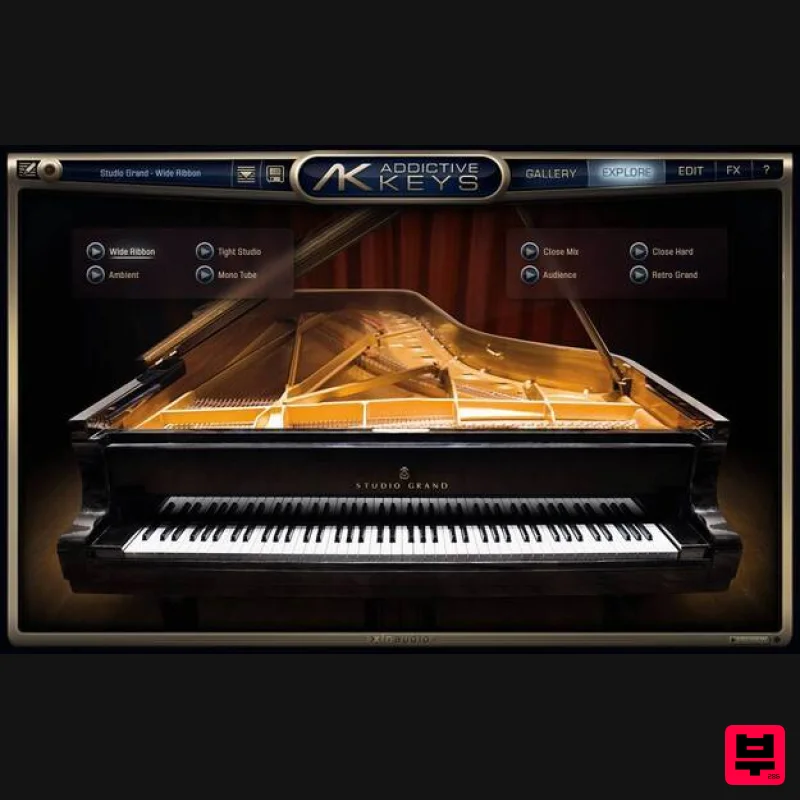
- Studio Grand is sure to fit nicely into any production style. Studio Grand was recorded in a large recording studio at the Swedish Broadcasting Corporation. The studio is famous for being extremely quiet and for having a controlled acoustic ambience; for such a large room the reverberation still sounds tight and airy which is a rare combination and the perfect condition for recording a grand piano. The recordings were done using rare vintage tube and ribbon microphones capturing the instrument at several different perspectives. From close up perspective with microphones next to the soundboard to far away perspective with natural room ambience. The end result is a warm and vibrant sound that goes from intimate to larger-than-life. The vintage microphones used were hand picked from the studios impressive collection. We Recorded Using the Following: Close (Stereo XY): Neumann M269 Close (Stereo Wide): Coles 4038 Close (Mono): RCA 6203 Mid (Stereo Wide): Neumann M250 Ambient (Stereo Wide): Neumann M269 Body (Mono): Sela T25 About Galleries and Exploremaps Helping you Learn and Discover Sounds: Our Gallery page (accessed by pressing the "Gallery" button) shows general information about the installed Addictive Keys instruments as well as those available in the online shop. The bottom of the Gallery page shows thumbnails of the available ExploreMaps for the currently selected instrument. The ExploreMap page (accessed by pressing the "Explore" button) contains a selection of presets that you can easily preview and select with one click. This makes it easy to explore the various possible sounds. Many ExploreMaps also contain convenient macro controllers for fast/easy editing. Features Steinway Model D Grand Piano Warm tone and unique sound Six selectable mic perspectives System Requirements Mac macOS 10.13 or later (M1 Native & macOS 12 Monterey supported) (64-bit only) 2 GB RAM (4 GB recommended) Internet connection (during installation only) Formats: VST
- AAX (64-bit only) Standalone Application (64-bit only) Windows Windows 7 - 11 (64-bit only) 2 GB RAM (4 GB recommended) Internet connection (during installation only) Formats: VST
- AAX (64-bit only) Standalone Application (64-bit only) Hosts: This product should run on any host supporting 64-bit VST
- or AAX plugins. XLN Audio actively tests on the host applications listed below: Ableton Live 9 or later Apple Logic Pro 9 & 10 Avid Pro Tools 11 or later (Pro Tools First is not supported) Cakewalk by Bandlab Propellerhead Reason 10.3 or later Reaper 4 & 5 Steinberg Cubase 8 or later Please Note: This software is 64-bit only and will not function on 32-bit systems. Awards Please note: RC-20 is used as an example. Account Registration (If you have already created an XLN Audio account previously
- please skip this part). 1. Go to the XLN Audio registration page (where you can now register for an account
- and register your product key at the same time). 2. Enter your details
- click 'I have a product key to register' and enter the code found in your Plugin Boutique account (displayed as Serial Number). 3. Click 'I agree to the Terms & Conditions' and then click REGISTER. You have now created an XLN Audio account and registered your product key. Product Registration (If you registered your product earlier when creating an account
- skip this part). 1. Log in to your XLN Audio account. 2. over My Account and select Register Product Key. 3. Enter the product key found in your Plugin Boutique account and click REGISTER PRODUCT KEY. Your product has now been added to your XLN Audio account. Mac XLN Online Installer Installation 1. Download the Mac XLN Online Installer from your Plugin Boutique account and open it. 2. Double-click to install the XLN Online Installer. 3. Click Open (depending on your version of macOS
- you may not encounter this security message). 4. Enter your password and click OK. 5. Click Open to finalise the security prompt. 6. Log in to your XLN Audio account. 7. Enter a name for your Mac and click Register Computer. The XLN Online Installer is now installed. Product Installation 1. Make sure your new product is selected and click 'Click to start - Install: 1'. 2. Your software will now install. Your software is now activated and ready for use within your DAW. Windows Online Installer Installation 1. Download the Windows XLN Audio Online Installer from your Plugin Boutique account and open it. 2. Click Yes to allow the application to run. 3. Log into your XLN Audio account. 4. Enter a name for your computer and click Register Computer. The XLN Online Installer is now installed. Product Installation 1. Make sure your new product is selected and click 'Click to start - Install: 1'. 2. Your software will now install. Your software is now activated and ready for use within your DAW.
Additional Information
About the XLN Audio Addictive Keys: Studio Grand
The XLN Audio Addictive Keys: Studio Grand represents excellent craftsmanship in the Virtual Instruments category.
Why Choose the XLN Audio Addictive Keys: Studio Grand?
- •Authentic XLN Audio craftsmanship and design
- •Versatile sound suitable for multiple musical genres
- •Professional build quality and reliable performance
- •Part of XLN Audio's respected Virtual Instruments lineup
Compare & Explore
Browse our complete selection of XLN Audio instruments or explore other Virtual Instruments options. Use our comparison tools to find the perfect match for your musical style and budget.
Similar Products

MeldaProduction Electric Keys - Tines
Virtual Instruments

Safari Audio Cubby
Virtual Instruments

ZAK Sound Lyra
Virtual Instruments

ZAK Sound Asteroid
Virtual Instruments

MNTRA Instruments Nagual
Virtual Instruments

Audiomodern Opacity 2: Soundbox Instrument
Virtual Instruments

Boom SWAMPS - 3D Surround
Virtual Instruments

UJAM BEAUTYFLUTE Pro
Virtual Instruments

