
XILS Lab XILS 505
Professional music gear - detailed information and where to buy
Product Description
- Paraphonic Strings
- Synthesizer
- Bass Synth It's a String Machine
- It's a Synthesizer
- It's a Bass Synth. And it can be the three of them simultaneously
- which is why the original unit was advertised as 'The Analog Orchestra'. XILS Lab have also added: A Vintage Analog Human Choir Machine (as an alternative oscillator source for the Synthesiser part) and exposed numerous hidden parameters of the vintage String Machine model. The X-505 offers all the layering and tweaking possibilities of its glorious ancestor
- including its precious balance between the Strings registers
- and precise balance for all the inputs of the quadruple BBD Chorus unit. Also
- a lot of hidden parameters are now exposed and available to tweak in the different X-505 panels for a much wider sound palette. A juicy sounding analogue Phaser and the vintage reverb have also been added to the pile. Features Oscillator: The mother of all sources. One faithfully emulated
- aliasing free
- TOD (Top Octave Divider) Oscillator providing up to 49 voices of polyphony. A String Section
- with its own filter
- Waveform mangling
- AR settings. A Synthesiser Section with dedicated ADSR
- 24db Analog Filter with envelope and LFO modulations
- various sound sources (Rocker switches) and the Second Touch special retrigger feature. A Human Voice Section with custom formant and balance settings. A Bass Section with three cumulative waveforms. Each waveform can be filtered in the BASS panel. One Main LFO to control the Vibrato and another LFO freely assignable in the Mod Matrix. Several Envelope Parameters for each section. A global ADSR for the Synth Section. And still another DADSR envelope assignable in the Mod Matrix. A thick sounding quadruple BBD Chorus/Ensemble unit. (Each section has it's own send level). A raw analogue Phaser effect. A vintage natural sounding reverb. A true Stereo Space effect. A Modulation Matrix
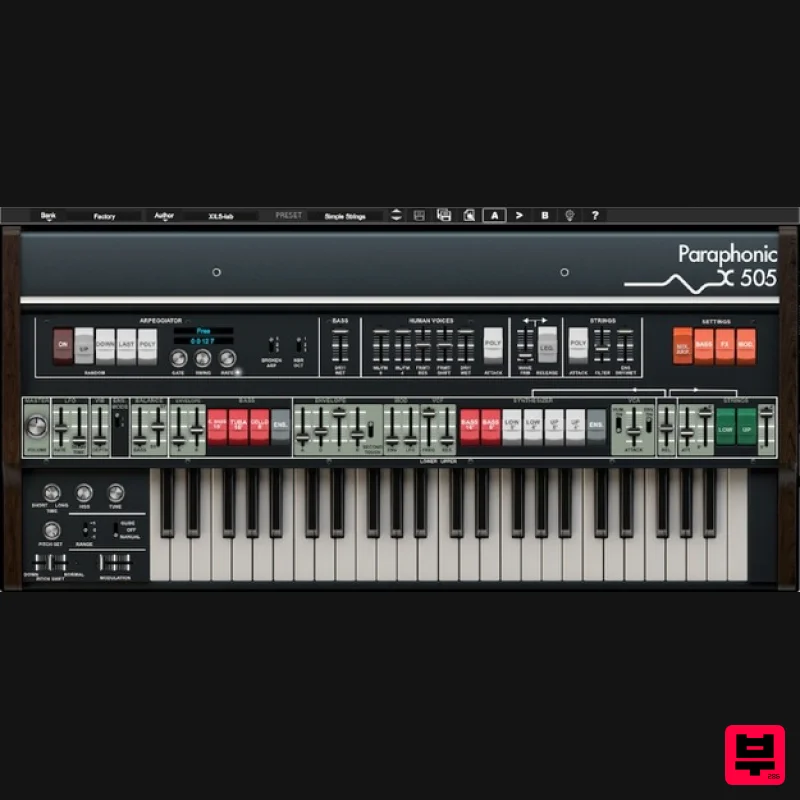
- with 6 nodes addressing 14 sources and 24 destinations. As well as access to a lot of secret hardware parameters. A special Glide section. All parameters can be controlled via MIDI CC in your DAW. Main Panel The main panel offers the same setting than the original unit. It is always visible. Click the Rocket switches to activate/deactivate oscillators for each of the three sections. Use the ADSR to control the VCA and VCF of the Synthesiser section
- where you can switch between human voices and standard oscillator. The SECOND TOUCH toggle was one of the secret weapons of this string machine: When engaged
- You can retrigger the monophonic ADSR envelope
- allowing one of the specific play modes these vintage units offered
- and impossible to recreate with later polyphonic synthesisers. Advanced Settings The upper panel is tabbed
- giving you access to additional parameters not exposed in the original machines
- as well as new effects (Phaser
- Reverb
- True Stereo Space etc). Mixer/ARP Panel The mixer panel offers you the possibility to finely tune the internal sound generators. From the relative level of the Male 8 and Male/Female 4 Human voices to the Ensemble dry/wet
- you can also tweak the voice's formant
- the T.O.D waveform as well as the Strings filter shape.. you can also select a Polyphonic attack for the strings
- which wasn't possible on the original unit... The release
- on the original machine
- was reset for each new note played. This can be a very musical feature for long release times so that it doesn't blur previous chords. In some cases
- you might prefer standard release behaviour
- using the "Legacy" white rocket switch. A build-in Arpeggio is also provided
- with a special feature to play "broken" arpeggios
- providing more complex patterns. Bass Panel The Bass panel allows you to adjust the width of the bass 8' waveform as well as the various filters available to customise the Tuba
- Contra Bass and Cello sound. Effects The XILS 505 provides three built-in effects. Our usual True Stereo Space effect
- based on the XILS-lab True Stereo Dynamic Engine
- a simple but efficient Reverb and an analogue-like resonant Phaser. Modulations The X-505 provides a Modulation Matrix (over 14 sources and 24 destinations)
- an additional monophonic LFO and a secondary polyphonic envelope that can be used as modulation sources. The Preset Manager Panel The X-505 benefits of the same advanced Preset Manager window developed by Xils for its other instruments. Find the right preset in seconds
- create your own tags
- multi-criteria search: Everything is possible
- fast and intuitive. More on the Top Octave Divider Technology Like the XILS V+
- The XILS 505 is based on a Top Octave Divider Oscillator. Under this strange name is hidden the heart of almost every electronic organ or strings machine built in the 70s/80's. A very clever concept to get 49 notes or more of polyphony without having to manage 49 or more stable oscillators
- or the nightmare of having to tune them in those days! Only one square oscillator
- oscillating at a very high frequency (the "Top Octave")
- has to be designed and adjusted. This oscillator is then "divided" to provide the 12 standard tempered frequencies over 4 (or more) octaves. These frequencies are then used to build the waveform of each of the 49 or more available notes. As a result
- all the notes are kept in phase
- hence no drift between octaves (see the videos comparison between the hardware and the software) Another benefit is that there is only one single tuning circuit for the whole keyboard: all the notes are modulated in the same manner when you sue the envelope Glide (So it's a 'special Glide' here gain). This is a limitation which gave the very special and recognisable effect used by a lot of electronic music artists. Two other consequences: First
- the attack is done after the summation of the notes. This means that after a note have been played the following notes will get the level reached by the first one. In other words
- No polyphonic attacks in the original machine
- but XILS-lab
- thanks to the computer world
- offers you the best of both worlds: monophonic OR polyphonic attacks. Also known as "paraphonic" ! Second
- all the filters settings are also done after the summation of the notes. The filters (Strings
- Human Voices
- Basses) are therefore monophonic
- which lead to a whole new
- or in this case ancient
- way of playing techniques
- with unique sonic results that can't be replicated by later polyphonic analogue synthesizers
- which had one filter per voice. On a side note: 49 voices of polyphony wouldn't be possible even on today's' computers if the 49 specific filters had to be polyphonic too (human voices are done with up to 14 filters
- strings involve 7 filters
- so up to 1029 filters would have to run simultaneously ...). So
- as the real machine
- the XILS 505 has monophonic filters. System Requirements Mac OSX 10.8 and later. VST
- Audio Unit
- AAX (32&64 bits
- native). PC Windows 7
- 8 and 10. VST
- AAX (32 & 64 bits
- native). Please Note: The XILS 505 is not a stand-alone application
- but a plug-in to be inserted into a music software application. Note: ChorX is used as the example. Mac Registration/Installation 1. Select the Apple icon from your User Account
- and click the DOWNLOAD tab to obtain your Mac installer. Note: You can also download and install the most recent version of your software from the XILS Lab Download Area. 2. Visit XILS Lab to log into/create your user account > enter your email address and password when creating a new account
- then click 'Validate Form.' Note: If you already have an existing XILS Lab account
- skip to step 4. 3. Enter your the required details that are marked with an asterix (*) symbol and click 'Save.' 4. Visit the XILS Lab Redemption Page and copy and paste/manually enter the serial number that is provided within your User Account > click 'Redeem Code.' 5. The serial number has successfully been redeemed
- and the software licence (AC code) has been sent to the inbox of your registered XILS Lab email. 6. Log into your XILS Lab registered email inbox to locate the licence code
- or alternatively find it within the 'My downloads
- My Products' area of your XILS Lab account. Note: If the message and licence fails to be delivered via email
- check your junk/spam folders. 7. Locate the software .dmg installer file from the downloads section of your computer
- and double-click it to launch the .mpkg installer application. 8. Double-click on the .mpkg file to begin the installation process > click 'Continue.' 9. Read through the Terms & Conditions of the Licence Agreement > click 'Continue' > click 'Agree.' 10. Review the installation and click 'Install.' 11. The installation of your software has successfully completed > click Close. Activation 1. Locate and open the software within your DAW. Note: Restart your DAW and/or rescan its Plugin selection
- in order to show the new installation (in the event that it fails to appear). 2. Copy and paste the Software Licence from the 'My downloads
- My Products' area of your XILS Lab account
- into the tab provided > click 'OK.' 3. The activation of your software has successfully been authorised > close and relaunch the VST to complete the process. The Software is Now Activated and Ready for Use Within Your DAW! PC Registration/Installation 1. Select the Windows icon from your User Account
- and click the DOWNLOAD tab to obtain your PC installer. Note: You can also download and install the most recent version of your software from the XILS Lab Download Area. 2. Visit XILS Lab to log into/create your user account > enter your email address and password when creating a new account
- then click 'Validate Form.' Note: If you already have an existing XILS Lab account
- skip to step 4. 3. Enter your the required details that are marked with an asterix (*) symbol and click 'Save.' 4. Visit the XILS Lab Redemption Page and copy and paste/manually enter the serial number that is provided within your User Account > click 'Redeem Code.' 5. The serial number has successfully been redeemed
- and the software licence (AC code) has been sent to the inbox of your registered XILS Lab email. 6. Log into your XILS Lab registered email inbox to locate the licence code
- or alternatively find it within the 'My downloads
- My Products' area of your XILS Lab account. Note: If the message and licence fails to be delivered via email
- check your junk/spam folders. 7. Locate the .exe software installer file from the downloads section of your computer and double-click it to begin the installation process > click 'Next.' 8. Read through the info and select 'I accept the agreement' > click 'Next.' 9. Select the software component (s) / compatible DAW format (s) that you wish to install
- and click 'Next.' 10. Select the folder in which to install the 32-bit version of your software to > click 'Next. 11. Select the folder in which to install the 64-bit version of your software to > click 'Next. 12. Review the installation and click 'Install.' 13. The installation of your software has successfully completed > click 'Finish.' Activation 1. Locate and open the software within your DAW. Note: Restart your DAW and/or rescan its Plugin selection
- in order to show the new installation (in the event that it fails to appear). 2. Copy and paste the Software Licence from the 'My downloads
- My Products' area of your XILS Lab account
- into the tab provided > click 'OK.' 3. The activation of your software has successfully been authorised > close and relaunch the VST to complete the process. The Software is Now Activated and Ready for Use Within Your DAW!
Additional Information
About the XILS Lab XILS 505
The XILS Lab XILS 505 represents excellent craftsmanship in the Synth category.
Why Choose the XILS Lab XILS 505?
- •Authentic XILS Lab craftsmanship and design
- •Versatile sound suitable for multiple musical genres
- •Professional build quality and reliable performance
- •Part of XILS Lab's respected Synth lineup
Compare & Explore
Browse our complete selection of XILS Lab instruments or explore other Synth options. Use our comparison tools to find the perfect match for your musical style and budget.
Similar Products

AngelicVibes ELITE PIANIST
Synth
$30
Your next go-to virtual instrument. Real piano recordings with unique sound and effects 50 high-quality presets for...

discoDSP OPL
Synth
$30
The OPL is a digital sound synthesis chip developed by Yamaha in the mid 1980s. Among other products, it was used in...

discoDSP Discovery Pro
Synth
$30
discoDSP’s Discovery was one of the company’s first and finest efforts. Heavily inspired by Clavia’s Nord Lead...

Reflekt Audio Xonex
Synth
$30
Xonex is a futuristic plugin that we have used time and time again to make a variety of beats. Xonex has offered me a...

ThaLoops Templetone
Synth
$30
The Ultimate Hip-Hop Production Plugin – Featuring a Vast Collection of Hip-Hop Sounds. Choose between wild drums,...

discoDSP Discovery
Synth
$30
Discovery is a virtual analog Nord Lead 2 inspired synthesizer featuring multi-layering, a morphing engine, high...

discoDSP OB-Xd
Synth
$30
OB-Xd is based on the Oberheim OB-X. It attempts to recreate its sound and behavior, but as the original was very...

Thenatan Audio Poizen VST
Synth
$30
Thenatan and Global Audio Tools have teamed up again to bring music makers across the globe a jam packed powerful tool...
Frequently Asked Questions
The XILS Lab XILS 505 stands out for its exceptional XILS Lab craftsmanship and innovative design.
Yes! With its affordable price point and quality construction, it's perfect for learning synth.
Browse the similar products section to see how it stacks up against other synth.

