
XILS Lab KaoX
Professional music gear - detailed information and where to buy
Product Description
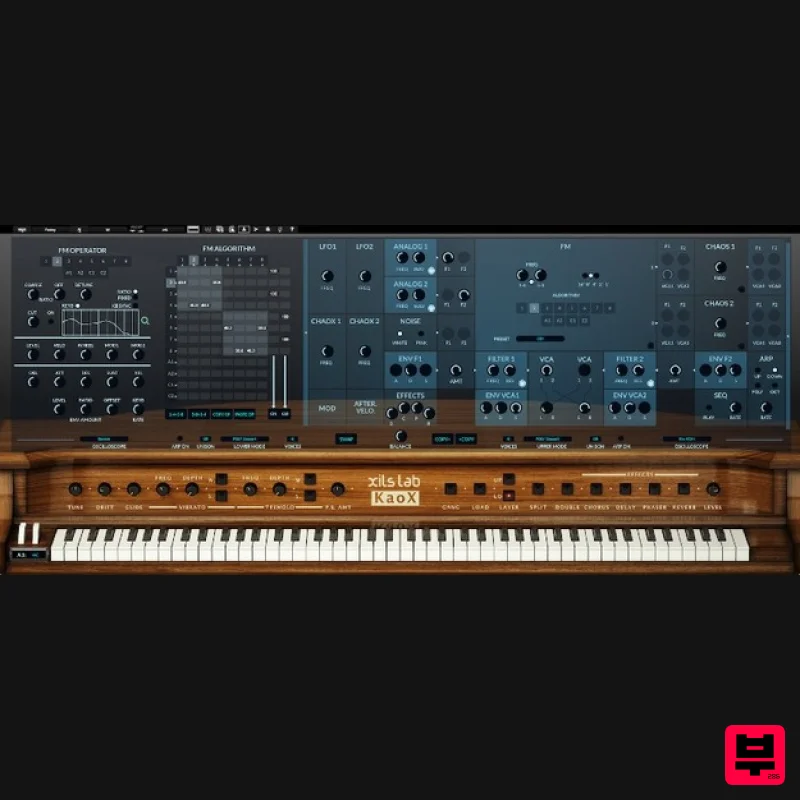
- Inspired by a Legendary FM Synthesizer Reinforced by Analog Oscillators and Filters and Sublimated by Chaotic Algorithms. The Versatility and the Brilliance of the FM Synthesis 8 operators
- 2 outputs
- 2 banks with independent pitch
- easy programming of the FM algorithms
- XILS-lab worked hard at sublimating the FM synthesis to a new level. A clear
- brilliant and deep sound with a vibe that can be sourced from the other available Analog or Chaotic oscillators. The Power and Warmth of the Analog Synthesis 2 continuous waveform oscillators
- 2 zero-delay like filters
- drawing on the vast experience of XILS-lab. A Deep
- Warm and living sound. The Organic Life of the Chaotic Algorithms 2 chaotic oscillators and 2 chaotic modulators Create sounds that you had never thought possible. The Easy Graphic Interface makes your preset faster to tweak Advanced parameters
- contextual help and global view with easy access to main parameters. Audio path easily understood through the use of illuminated modules. Features Two layers
- Four effects
- Easy to tweak The layers can be played Single
- Double or Split. Two independent Arpeggiators
- Playing mode or Unison. Easy access to Vibrato or Tremolo. Four deep and warm effects with independent routing. All main parameters at a glance One Advanced Panel for tweaking the various modules. FM Algorithm Matrix
- always available when needed. Contextual help windows. Global view with active modules illuminated. FM Synthesis On each of the two available layers you will find: 8 operators. 2 outputs. The 8 operators are grouped into 2 banks with independent pitch. This typical architecture is useful for creating chorus like FM sounds or punchy stereo presets. Each operator features: One LFO. One envelope. Wheel and Aftertouch access. Two user define external modulators (to be assigned to any KaoX modulation sources). Keyboard follower 2D pad. Ratio or absolute frequency. Low pass filter. Analog Synthesis On each of the two available layers
- you will find: 2 continuous waveform analog oscillators. 2 zero-delay like analog filters. 4 envelopes D-ADSR. 4 outputs VCA. For a Deep
- Warm and living sound. The Organic Life of the Chaotic Algorithms 2 chaotic oscillators and 2 chaotic modulators. Create sounds that you had never thought possible. 4 Tracks Sequencer Each track can be assigned to the lower and/or upper layer. Each track can have independent sustain/gating. Each track can be used as a source of modulation. Preset Manager Single Window integrated Preset Manager: Find the right patch in seconds
- manage presets
- soundbanks and create your own tags. More than 500 presets created by fantastic sound designers Nori Ubukata
- Soundsdivine
- Tom Wolfe
- Zensound
- Mikael Adle
- Xenos
- Status
- Yuli-Yolo and others.... System Requirements Mac Mac OSX 10.9 and later (64-bit only) (Compatible on macOS 11 Big Sur with Rosetta) (M1 Apple Silicon compatibility available soon) VST
- Audio Unit
- AAX (Native) Windows Windows 7
- 8 and 10 (32 / 64-bit) VST
- AAX (Native) Please Note: KaoX is protected with iLok (PACE antipiracy system) allowing up to 2 independent locations: iLok 2 & 3 and soft (meaning without any hardware key) KaoX is NOT a standalone application and requires a VST/AU/AAX compatible host DAW to function correctly. Registration / Installation Please Note: ChorX is used as an example. Mac: 1. Select the Apple icon from your User Account
- and click the DOWNLOAD tab to obtain your Mac installer. Note: You can also download and install the most recent version of your software from the XILS Lab Download Area. 2. Visit XILS Lab to log into/create your user account > enter your email address and password when creating a new account
- then click 'Validate Form.' Note: If you already have an existing XILS Lab account
- skip to step 4. 3. Enter your the required details that are marked with an asterix (*) symbol and click 'Save.' 4. Visit the XILS Lab Redemption Page and copy and paste/manually enter the serial number that is provided within your User Account > click 'Redeem Code.' 5. The serial number has successfully been redeemed
- and the software licence (AC code) has been sent to the inbox of your registered XILS Lab email. 6. Log into your XILS Lab registered email inbox to locate the licence code
- or alternatively find it within the 'My downloads
- My Products' area of your XILS Lab account. Note: If the message and licence fails to be delivered via email
- check your junk/spam folders. 7. Locate the software .dmg installer file from the downloads section of your computer
- and double-click it to launch the .mpkg installer application. 8. Double-click on the .mpkg file to begin the installation process > click 'Continue.' 9. Read through the Terms & Conditions of the Licence Agreement > click 'Continue' > click 'Agree.' 10. Review the installation and click 'Install.' 11. The installation of your software has successfully completed > click Close. Activation 1. Open the iLok Licence Manager from your computer’s Start Menu (located at the bottom left corner of your desktop). Once the application is open
- click ‘Sign In'. 2. Enter your User ID and password that you previously created on registration of your account > click ‘Sign In'. 3. Once you are signed in
- click the ‘Redeem’ icon which is located at the top-right corner of the iLok Licence Manager’s interface. 4. Copy and paste/manually enter the 30-digit code from your online Xils Lab account into the available Activation Code boxes
- and then click ‘Next'. 5. Select your computer as the activation location (or your iLok dongle) and then click ‘Activate'. 6. Confirm you are happy to activate your license > click ‘OK'. 7. Click 'OK'. 8. Your product is now activated on your computer. You can proceed and close the iLok Licence Manager. Registration/Installation PC: 1. Select the Windows icon from your User Account
- and click the DOWNLOAD tab to obtain your PC installer. Note: You can also download and install the most recent version of your software from the XILS Lab Download Area. 2. Visit XILS Lab to log into/create your user account > enter your email address and password when creating a new account
- then click 'Validate Form.' Note: If you already have an existing XILS Lab account
- skip to step 4. 3. Enter your the required details that are marked with an asterix (*) symbol and click 'Save.' 4. Visit the XILS Lab Redemption Page and copy and paste/manually enter the serial number that is provided within your User Account > click 'Redeem Code.' 5. The serial number has successfully been redeemed
- and the software licence (AC code) has been sent to the inbox of your registered XILS Lab email. 6. Log into your XILS Lab registered email inbox to locate the licence code
- or alternatively find it within the 'My downloads
- My Products' area of your XILS Lab account. Note: If the message and licence fails to be delivered via email
- check your junk/spam folders. 7. Locate the .exe software installer file from the downloads section of your computer and double-click it to begin the installation process > click 'Next.' 8. Read through the info and select 'I accept the agreement' > click 'Next.' 9. Select the software component (s) / compatible DAW format (s) that you wish to install
- and click 'Next.' 10. Select the folder in which to install the 32-bit version of your software to > click 'Next. 11. Select the folder in which to install the 64-bit version of your software to > click 'Next. 12. Review the installation and click 'Install.' 13. The installation of your software has successfully completed > click 'Finish.' Activation 1. Open the iLok Licence Manager from your computer’s Start Menu (located at the bottom left corner of your desktop). Once the application is open
- click ‘Sign In'. 2. Enter your User ID and password that you previously created on registration of your account > click ‘Sign In'. 3. Once you are signed in
- click the ‘Redeem’ icon which is located at the top-right corner of the iLok Licence Manager’s interface. 4. Copy and paste/manually enter the 30-digit code from your online Xils Lab account into the available Activation Code boxes
- and then click ‘Next'. 5. Select your computer as the activation location (or your iLok dongle) and then click ‘Activate'. 6. Confirm you are happy to activate your license > click ‘OK'. 7. Click 'OK'. 8. Your product is now activated on your computer. You can proceed and close the iLok Licence Manager.
Additional Information
About the XILS Lab KaoX
Experience the quality and tone that makes the XILS Lab KaoX a popular choice for musicians.
Why Choose the XILS Lab KaoX?
- •Authentic XILS Lab craftsmanship and design
- •Versatile sound suitable for multiple musical genres
- •Professional build quality and reliable performance
- •Part of XILS Lab's respected Synth lineup
Compare & Explore
Browse our complete selection of XILS Lab instruments or explore other Synth options. Use our comparison tools to find the perfect match for your musical style and budget.
Similar Products

discoDSP Discovery Pro
Synth
$30
discoDSP’s Discovery was one of the company’s first and finest efforts. Heavily inspired by Clavia’s Nord Lead...

discoDSP OB-Xd
Synth
$30
OB-Xd is based on the Oberheim OB-X. It attempts to recreate its sound and behavior, but as the original was very...

discoDSP OPL
Synth
$30
The OPL is a digital sound synthesis chip developed by Yamaha in the mid 1980s. Among other products, it was used in...

Thenatan Audio Poizen VST
Synth
$30
Thenatan and Global Audio Tools have teamed up again to bring music makers across the globe a jam packed powerful tool...

Reflekt Audio Xonex
Synth
$30
Xonex is a futuristic plugin that we have used time and time again to make a variety of beats. Xonex has offered me a...

AngelicVibes ELITE PIANIST
Synth
$30
Your next go-to virtual instrument. Real piano recordings with unique sound and effects 50 high-quality presets for...

ThaLoops Templetone
Synth
$30
The Ultimate Hip-Hop Production Plugin – Featuring a Vast Collection of Hip-Hop Sounds. Choose between wild drums,...

discoDSP Discovery
Synth
$30
Discovery is a virtual analog Nord Lead 2 inspired synthesizer featuring multi-layering, a morphing engine, high...
Frequently Asked Questions
The XILS Lab KaoX stands out for its exceptional XILS Lab craftsmanship and innovative design.
Yes! With its affordable price point and quality construction, it's perfect for learning synth.
Browse the similar products section to see how it stacks up against other synth.

