
Waves TrueVerb
Professional music gear - detailed information and where to buy
Product Description
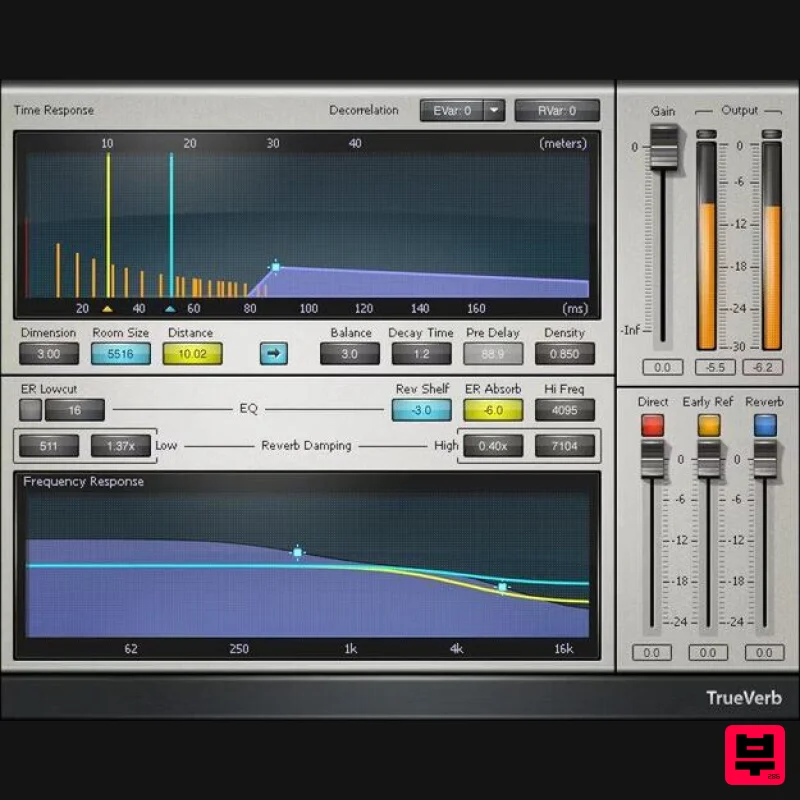
- TrueVerb Create Natural-Sounding Reverb Spaces with Quick Early Reflection Editing TrueVerb splits reverb controls into 4 clearly defined sections: early reflections
- reverb tail
- and damping. In addition to being a complete reverb solution in itself
- the detailed early reflections editing—and low CPU power—also make it an ideal “front end” to augment early reflections for convolution reverbs. 30 included presets get you started quickly
- but don’t stop there—the streamlined interface and straightforward parameters encourage customizing the settings for your own needs. Features Optimize early reflections and reverb tail separately Link button changes reflections and reverb proportionately Reflections and reverb can have independent frequency responses Shelving filter trims highs going into reverb
- for tails Low-frequency cut before early reflections minimizes “mud” Dual controls for low- and high-frequency damping Open
- transparent clarity fits well with vocals Differentiate early reflections when using multiple TrueVerbs System Requirements Mac macOS Monterey 12
- Ventura 13
- Sonoma 14
- Sequoia 15 VST / AU / AAX PC Windows 10+ VST / AAX 1. Head to https: //www.waves.com/create-account 2. Enter your email and choose a password to create an account (if you already have a Waves account
- choose Log in
- enter your details and head to Step 5) > click 'Submit' 3. Open your email inbox > click the activation link in the email from Waves 4. Click 'Log in here' > Log in to your Waves account 5. Click 'Register New Products' 6. Enter the Serial Number found in your Plugin Boutique user account > click 'Submit' 7. Click download in your Plugin Boutique user account or head to https: //www.waves.com/downloads/central > download the Waves Central app for your operating system 8. Install Waves Central > Open Waves Central 9. Click 'Log in' > enter your log in details 10. Click the 'Install Products' tab 11. Tick the blue dot on all products you wish to install or click the top dot to install all products > click 'Install & Activate' 12. Click 'OK' 13. Open your DAW > open the Waves plugin Your Waves plugins are installed and ready to use
- enjoy!
Additional Information
About the Waves TrueVerb
The Waves TrueVerb combines traditional design with modern performance for Reverb enthusiasts.
Why Choose the Waves TrueVerb?
- •Authentic Waves craftsmanship and design
- •Versatile sound suitable for multiple musical genres
- •Professional build quality and reliable performance
- •Part of Waves's respected Reverb lineup
Compare & Explore
Browse our complete selection of Waves instruments or explore other Reverb options. Use our comparison tools to find the perfect match for your musical style and budget.
Similar Products

XHUN Audio ShineVerb
Reverb
$30
Creative Reverb Processor ShineVerb is a creative tool specially designed for reverberation, spatialization and sound...

PSP Audioware PSP EasyVerb
Reverb
$30
PSP EasyVerb is a reverberation effect plug-in (VST, RTAS and AAX for Windows; VST, AudioUnit, RTAS and AAX for Mac OS...

DDMF MagicVerb
Reverb
$30
MagicVerb is the latest result of the collaboration between MagicDeathEye aka Ian Sefchick and DDMF. This journey was...

DDMF Envelope
Reverb
$30
Envelope is a true stereo reverb plugin featuring 8 different room simulations, all of which can be adjusted for size,...

PSP Audioware PSP Nexcellence
Reverb
$30
PSP Nexcellence is a rich-sounding, spring reverb emulation inspired by and modeled after classic “necklace-type”...

PSP Audioware PSP Pianoverb 2
Reverb
$30
PSP PianoVerb2 is a redesigned and improved creative resonant reverb plug-in based on our famous and beloved freeware...

Vegas Audio Fabricverb
Reverb
$30
Get the signature sound of the UK’s most famous nightclub on your digital audio workstation! Our new convolution...

Initial Audio AR1 Reverb
Reverb
$30
Quality Algorithmic Reverb Plugin AR1 is an algorithmic reverb plugin designed to sound great on all types of...
Frequently Asked Questions
The Waves TrueVerb stands out for its exceptional Waves craftsmanship and innovative design.
Yes! With its affordable price point and quality construction, it's perfect for learning reverb.
Browse the similar products section to see how it stacks up against other reverb.

