
Waves Scheps 73
Professional music gear - detailed information and where to buy
Waves
Scheps 73
Product Info
* Prices may vary. Check retailer for current pricing and availability.
Product Description
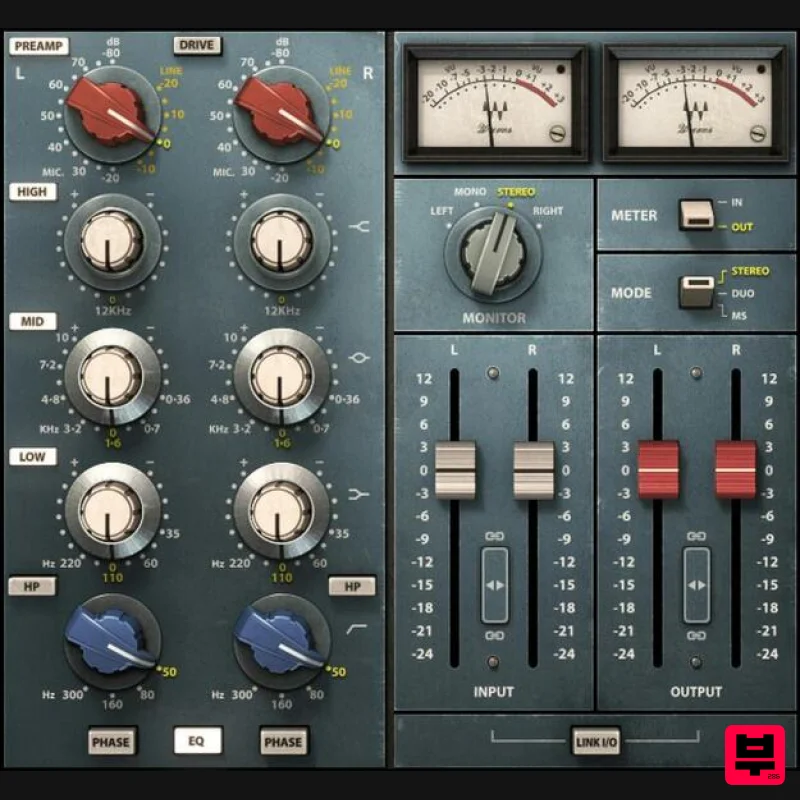
- Scheps 73 Colorful EQ with Mic Preamp Modeled from the Classic 1073 Console The only way a preamp and EQ can remain coveted for over half-a-century is by checking all the boxes: a sonic character that still stands alone
- strategic control and design choices that prioritize results over complexity
- and reverence—that persists to this day—from world-class engineers. The 1073’s EQ and preamp by themselves embody excellence
- but combining the two creates magic. The way the EQ processes the fat
- warm
- inviting preamp sound is the key to the 1073’s enduring success. With precision analog modeling of the original’s behavior—tweaked to perfection by Grammy-winning mixing engineer Andrew Scheps (Adele
- Metallica
- Jay Z)—Scheps 73 keeps the legend alive. Features Add the fat
- warm sounds made possible by transformer saturation Reproduces the four classic bands of EQ with exacting detail Equalize mid and sides individually with the included Mid-Side Matrix Models the “secret ingredient”— the Marinair audio transformer Mono
- Dual Mono
- or Stereo modes
- and 4 monitoring options Includes an exclusive midrange band from the original schematics Designed with Grammy-winning mix engineer Andrew Scheps Equalize left and right channels individually System Requirements Mac macOS Monterey 12
- Ventura 13
- Sonoma 14
- Sequoia 15 VST / AU / AAX PC Windows 10+ VST / AAX 1. Head to https: //www.waves.com/create-account 2. Enter your email and choose a password to create an account (if you already have a Waves account
- choose Log in
- enter your details and head to Step 5) > click 'Submit' 3. Open your email inbox > click the activation link in the email from Waves 4. Click 'Log in here' > Log in to your Waves account 5. Click 'Register New Products' 6. Enter the Serial Number found in your Plugin Boutique user account > click 'Submit' 7. Click download in your Plugin Boutique user account or head to https: //www.waves.com/downloads/central > download the Waves Central app for your operating system 8. Install Waves Central > Open Waves Central 9. Click 'Log in' > enter your log in details 10. Click the 'Install Products' tab 11. Tick the blue dot on all products you wish to install or click the top dot to install all products > click 'Install & Activate' 12. Click 'OK' 13. Open your DAW > open the Waves plugin Your Waves plugins are installed and ready to use
- enjoy!
Additional Information
About the Waves Scheps 73
Discover the distinctive sound and feel of the Waves Scheps 73, a standout choice among Compressor.
Why Choose the Waves Scheps 73?
- •Authentic Waves craftsmanship and design
- •Versatile sound suitable for multiple musical genres
- •Professional build quality and reliable performance
- •Part of Waves's respected Compressor lineup
Compare & Explore
Browse our complete selection of Waves instruments or explore other Compressor options. Use our comparison tools to find the perfect match for your musical style and budget.
Similar Products

DDMF LinComp
Compressor

DDMF Comprezzore
Compressor

MeldaProduction MEssentialsFXBundle
Compressor

Soundspear Supertube
Compressor

W. A. Production BIGGIFIER
Compressor

Korneff Audio Pawn Shop Comp
Compressor

PSP Audioware PSP Vintage Warmer 2
Compressor

Initial Audio IA-LA1
Compressor

