
Waves Manny Marroquin Tone Shaper
Professional music gear - detailed information and where to buy
Waves
Manny Marroquin Tone Shaper
Product Info
* Prices may vary. Check retailer for current pricing and availability.
Product Description
- Manny Marroquin Tone Shaper Multiband Compression Made Easy Multiband compression can do wonders
- but the sheer number of interacting parameters is daunting. Let 10x Grammy®-winning mix legend Manny Marroquin (Kendrick Lamar
- Kanye West
- Lizzo
- Rihanna) do the prep work—so you can quickly shape resonant kicks
- sizzling cymbals
- fuller bass
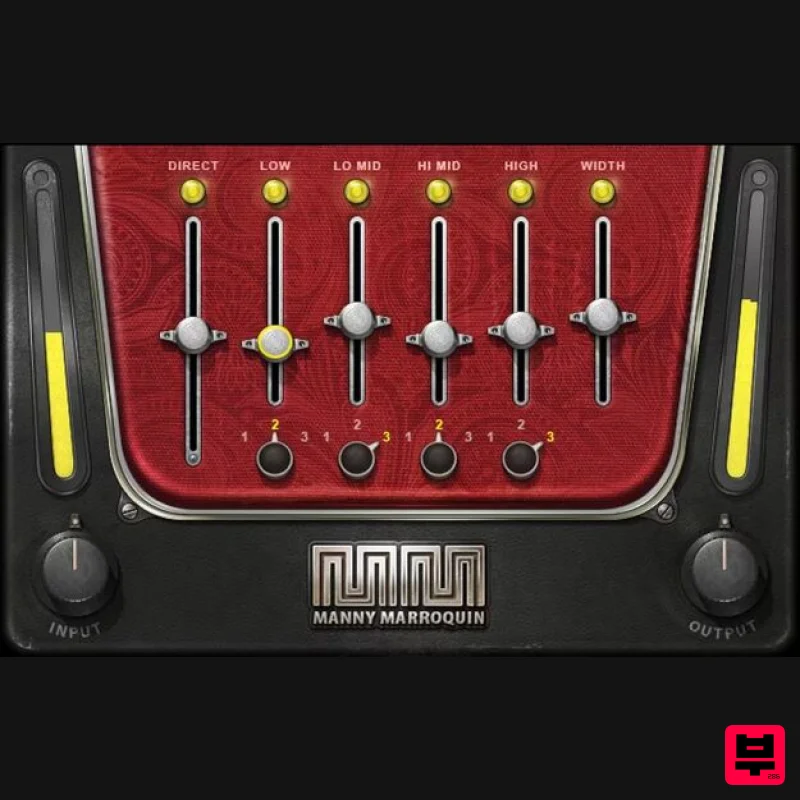
- and more. The Manny Marroquin Tone Shaper works as a parallel compressor
- which maintains a sound’s fundamental character alongside the added compression. The four bands layer enhancements to quickly bring out the best in your tracks. “Parallel compression plays a huge part in my mixing. It adds richness and brings out the full character of almost any sound. The Tone Shaper has my ‘secret ingredients’ for changing tonality
- to make sure every element sits in the mix in just the right way.” —Manny Marroquin Features Created with mix engineer Manny Marroquin (Kendrick Lamar
- Lizzo) Give fuller
- punchier tone to individual tracks
- buses
- or masters Help elements stand out in the mix
- without overcrowding the mix Fastest possible workflow for multiband compression Parallel compression split into 4 bands for quick tone control 3 frequency choices per band further extend the flexibility Width control enhances the stereo image Presets by Manny plus star mixers Tony Maserati and Michael Brauer System Requirements Mac macOS Monterey 12
- Ventura 13
- Sonoma 14
- Sequoia 15 VST / AU / AAX PC Windows 10+ VST / AAX 1. Head to https: //www.waves.com/create-account 2. Enter your email and choose a password to create an account (if you already have a Waves account
- choose Log in
- enter your details and head to Step 5) > click 'Submit' 3. Open your email inbox > click the activation link in the email from Waves 4. Click 'Log in here' > Log in to your Waves account 5. Click 'Register New Products' 6. Enter the Serial Number found in your Plugin Boutique user account > click 'Submit' 7. Click download in your Plugin Boutique user account or head to https: //www.waves.com/downloads/central > download the Waves Central app for your operating system 8. Install Waves Central > Open Waves Central 9. Click 'Log in' > enter your log in details 10. Click the 'Install Products' tab 11. Tick the blue dot on all products you wish to install or click the top dot to install all products > click 'Install & Activate' 12. Click 'OK' 13. Open your DAW > open the Waves plugin Your Waves plugins are installed and ready to use
- enjoy!
Additional Information
About the Waves Manny Marroquin Tone Shaper
The Waves Manny Marroquin Tone Shaper combines traditional design with modern performance for Compressor enthusiasts.
Why Choose the Waves Manny Marroquin Tone Shaper?
- •Authentic Waves craftsmanship and design
- •Versatile sound suitable for multiple musical genres
- •Professional build quality and reliable performance
- •Part of Waves's respected Compressor lineup
Compare & Explore
Browse our complete selection of Waves instruments or explore other Compressor options. Use our comparison tools to find the perfect match for your musical style and budget.
Similar Products

MeldaProduction MEssentialsFXBundle
Compressor

Initial Audio IA-LA1
Compressor

DDMF Comprezzore
Compressor

PSP Audioware PSP Vintage Warmer 2
Compressor

Soundspear Supertube
Compressor

DDMF LinComp
Compressor

Korneff Audio Pawn Shop Comp
Compressor

W. A. Production BIGGIFIER
Compressor

