
Waves Element 2.0 Virtual Analog Synth
Professional music gear - detailed information and where to buy
Product Description
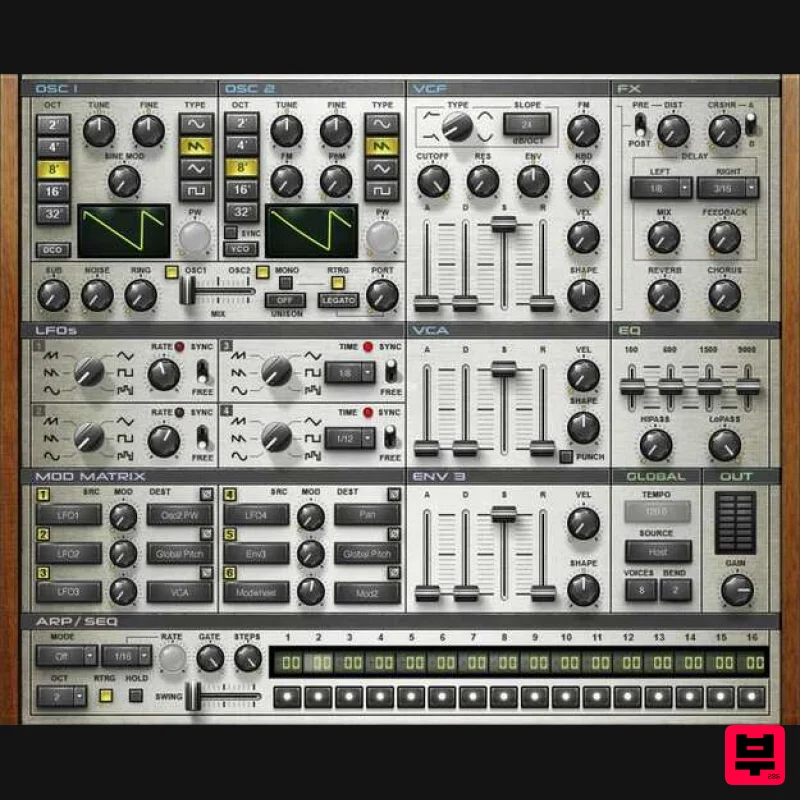
- Element 2.0 Virtual Analog Synth The Fat
- Warm Sounds of Classic Analog Synths Analog synthesizers are all about a warm
- sweet
- lustrous sound quality. They’re also about the experience: hands-on control
- with a straightforward interface that invites quick tweaking. With integrated effects
- a 16-step sequencer
- MIDI Learn for all controls
- multipoint touch response
- and a massive preset library
- Element 2.0 captures the feel
- not only the sound
- of classic analog synthesizers. Features Classic sound quality of 70s mono synths and 80s polysynths Use as a plugin for the studio
- or stand-alone for the stage Convenient matrix modulation to control synth parameters Add motion with 16-step sequencing and arpeggiation Suite of effects complements the synthesis sound engine Instant gratification from hundreds of presets System Requirements Mac macOS Monterey 12
- Ventura 13
- Sonoma 14
- Sequoia 15 VST / AU / AAX PC Windows 10+ VST / AAX 1. Head to https: //www.waves.com/create-account 2. Enter your email and choose a password to create an account (if you already have a Waves account
- choose Log in
- enter your details and head to Step 5) > click 'Submit' 3. Open your email inbox > click the activation link in the email from Waves 4. Click 'Log in here' > Log in to your Waves account 5. Click 'Register New Products' 6. Enter the Serial Number found in your Plugin Boutique user account > click 'Submit' 7. Click download in your Plugin Boutique user account or head to https: //www.waves.com/downloads/central > download the Waves Central app for your operating system 8. Install Waves Central > Open Waves Central 9. Click 'Log in' > enter your log in details 10. Click the 'Install Products' tab 11. Tick the blue dot on all products you wish to install or click the top dot to install all products > click 'Install & Activate' 12. Click 'OK' 13. Open your DAW > open the Waves plugin Your Waves plugins are installed and ready to use
- enjoy!
Additional Information
About the Waves Element 2.0 Virtual Analog Synth
The Waves Element 2.0 Virtual Analog Synth represents excellent craftsmanship in the Synth category.
Why Choose the Waves Element 2.0 Virtual Analog Synth?
- •Authentic Waves craftsmanship and design
- •Versatile sound suitable for multiple musical genres
- •Professional build quality and reliable performance
- •Part of Waves's respected Synth lineup
Compare & Explore
Browse our complete selection of Waves instruments or explore other Synth options. Use our comparison tools to find the perfect match for your musical style and budget.
Similar Products

ThaLoops Templetone
Synth
$30
The Ultimate Hip-Hop Production Plugin – Featuring a Vast Collection of Hip-Hop Sounds. Choose between wild drums,...

discoDSP Discovery
Synth
$30
Discovery is a virtual analog Nord Lead 2 inspired synthesizer featuring multi-layering, a morphing engine, high...

Reflekt Audio Xonex
Synth
$30
Xonex is a futuristic plugin that we have used time and time again to make a variety of beats. Xonex has offered me a...

discoDSP OPL
Synth
$30
The OPL is a digital sound synthesis chip developed by Yamaha in the mid 1980s. Among other products, it was used in...

Thenatan Audio Poizen VST
Synth
$30
Thenatan and Global Audio Tools have teamed up again to bring music makers across the globe a jam packed powerful tool...

AngelicVibes ELITE PIANIST
Synth
$30
Your next go-to virtual instrument. Real piano recordings with unique sound and effects 50 high-quality presets for...

discoDSP OB-Xd
Synth
$30
OB-Xd is based on the Oberheim OB-X. It attempts to recreate its sound and behavior, but as the original was very...

discoDSP Discovery Pro
Synth
$30
discoDSP’s Discovery was one of the company’s first and finest efforts. Heavily inspired by Clavia’s Nord Lead...
Frequently Asked Questions
The Waves Element 2.0 Virtual Analog Synth stands out for its exceptional Waves craftsmanship and innovative design.
Yes! With its affordable price point and quality construction, it's perfect for learning synth.
Browse the similar products section to see how it stacks up against other synth.

