
Waves COSMOS Sample Finder
Professional music gear - detailed information and where to buy
Product Description
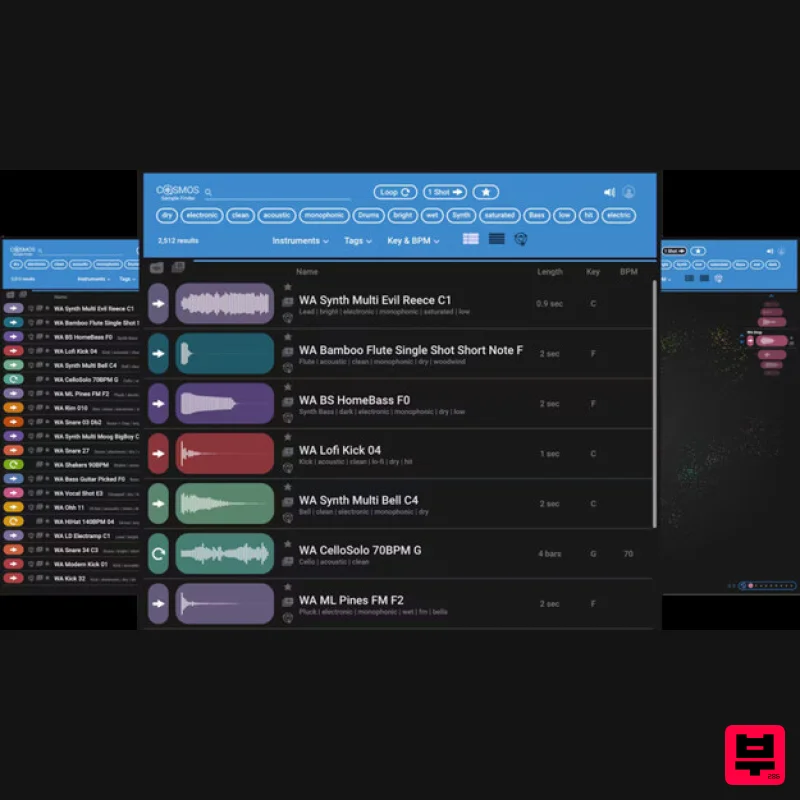
- COSMOS Sample Finder Always Find the Right Samples for Your Tracks Quick—what sound is the sample with filename asdf_#12C.wav? You may not know
- but COSMOS does. COSMOS uses an AI neural networks engine to analyze all the samples on your hard drive
- and then categorizes and auto-tags the instrument
- timbre
- style
- and sonic characteristics (loop or one-shot
- dry or wet
- and much more) in its database. Need to find a saturated kick? Just type “saturated” and “kick” in COSMOS
- and all your saturated kicks will show up
- no matter what the files are actually named. Need to find a bright reverby drum loop in 120 BPM? Or a saturated synth sample in F#-minor with a cinematic feel? Just choose the appropriate tags
- and COSMOS will deliver the samples you’re after
- instantly. Features Uses AI to sort and auto-tag all the samples on your hard drive Over 2500 royalty-free samples included Sorts by instrument
- and more sonic characteristics 3 views: waveform
- list
- and COSMOS “cluster” view Saves you time by finding the samples you want Re-discover samples you forgot you had Assign oft-used samples to a favorites list
- or create collections Compatible with all WAV
- OGG and FLAC files Use as a standalone app
- or open from the Waves CR8 sampler Powered by Waves Neural Networks technology System Requirements Mac macOS Monterey 12
- Ventura 13
- Sonoma 14
- Sequoia 15 VST / AU / AAX PC Windows 10+ VST / AAX 1. Head to https: //www.waves.com/create-account 2. Enter your email and choose a password to create an account (if you already have a Waves account
- choose Log in
- enter your details and head to Step 5) > click 'Submit' 3. Open your email inbox > click the activation link in the email from Waves 4. Click 'Log in here' > Log in to your Waves account 5. Click 'Register New Products' 6. Enter the Serial Number found in your Plugin Boutique user account > click 'Submit' 7. Click download in your Plugin Boutique user account or head to https: //www.waves.com/downloads/central > download the Waves Central app for your operating system 8. Install Waves Central > Open Waves Central 9. Click 'Log in' > enter your log in details 10. Click the 'Install Products' tab 11. Tick the blue dot on all products you wish to install or click the top dot to install all products > click 'Install & Activate' 12. Click 'OK' 13. Open your DAW > open the Waves plugin Your Waves plugins are installed and ready to use
- enjoy!
Additional Information
About the Waves COSMOS Sample Finder
Experience the quality and tone that makes the Waves COSMOS Sample Finder a popular choice for musicians.
Why Choose the Waves COSMOS Sample Finder?
- •Authentic Waves craftsmanship and design
- •Versatile sound suitable for multiple musical genres
- •Professional build quality and reliable performance
- •Part of Waves's respected Utility lineup
Compare & Explore
Browse our complete selection of Waves instruments or explore other Utility options. Use our comparison tools to find the perfect match for your musical style and budget.
Similar Products

Audible Genius Building Blocks 1
Utility
$30
Music Theory & Composition Training Software for DAW-Based Music Makers Drum Patterns, Basslines, Chord Progressions,...

Soundspear Luxor
Utility
$30
Luxor is the key if you want an instrument to stand out and spread in the mix. It will scoop your high frequencies to...

Blue Cat Audio Blue Cat's Connector
Utility
$30
The Virtual Cable For Your Virtual Studio Blue Cat’s Connector is an audio & MIDI streaming plug-in that can be used...

Audible Genius Building Blocks 2
Utility
$30
Music Theory & Composition Training Software for DAW-Based Music Makers Drum Patterns, Basslines, Chord Progressions,...

Tonalic Tonalic Arranger - 30 Day Subscription
Utility
$30
Real Musicians. Real Feel. Adaptive Performance Instrument for Your DAW Bring authentic, human musicianship into your...

Acoustica Spin It Again
Utility
$30
Spin It Again is the easiest way to convert your LPs and cassettes to CD and MP3. Remember all those ‘oldies but...

Inphonik RX950
Utility
$30
Legendary Grit and Crunch Meet the RX950 Classic AD/DA Converter, Inphonik’s first effect plug-in, designed to...

DDMF TheStrip
Utility
$30
What is it? The Strip is the essential channel strip: the finest EQ, gate and compressor bundled in one beautifully...
Frequently Asked Questions
The Waves COSMOS Sample Finder stands out for its exceptional Waves craftsmanship and innovative design.
Yes! With its affordable price point and quality construction, it's perfect for learning utility.
Browse the similar products section to see how it stacks up against other utility.

