
Waves CLA MixDown
Professional music gear - detailed information and where to buy
Waves
CLA MixDown
Product Info
* Prices may vary. Check retailer for current pricing and availability.
Product Description
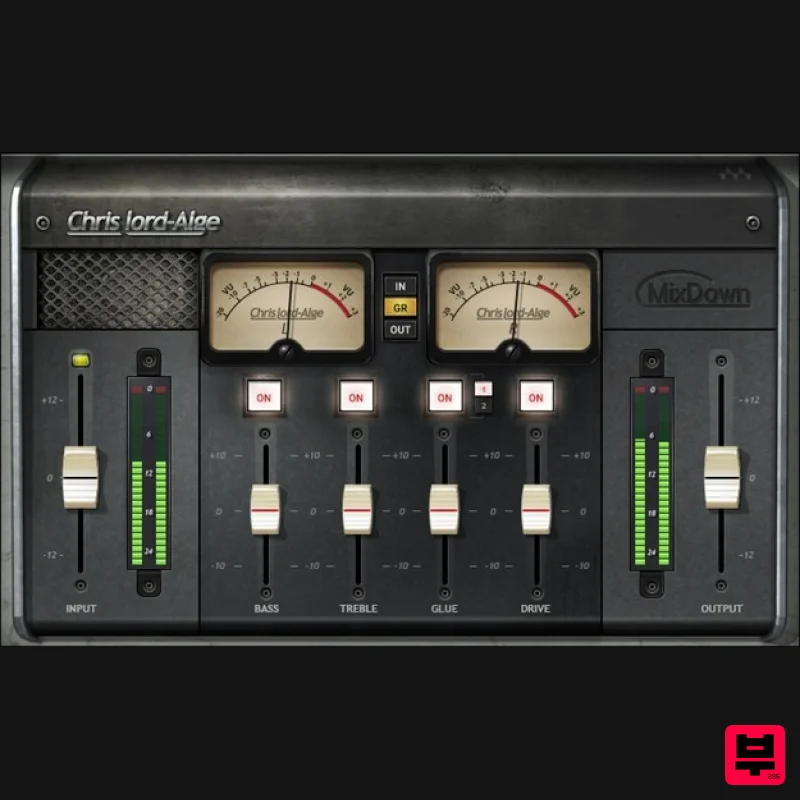
- CLA MixDown Drive Your Mix Bus to a Better Destination The mix bus is the last stop before mastering
- so engineers often add bass shelving EQ
- treble for sparkle
- a “glue” compressor
- and console emulation. Or at least they did before CLA MixDown—which combines
- optimizes
- and expands these processors to deliver the ultimate mix bus plugin. Grammy winner Chris Lord-Alge’s legendary mixes have graced the music of Foo Fighters
- Bruce Springsteen
- the Rolling Stones
- Green Day
- and so many more. He knows what a mix bus needs—here it is. “I’ve taken my two favorite mix bus chains and put them under the hood of this supercharged plugin. Two flavors of my mix bus compression
- plus console overdrive and a finishing EQ with perfect bass and treble curves. You can use MixDown on your master bus—or the CLA way
- on a master aux. You can add it after you finish mixing for that final touch—but I recommend you insert it before you start mixing
- then mix through it to help you nail your mix fast.”—Chris Lord-Alge Features Two flavors of “glue” compression deliver dazzling dynamics Four modules provide crucial mix bus processors Emulate an overdriven SSL console for color—or push for grit Creates the best possible mix for mastering Exceptionally effective
- but with a simple interface Mix through MixDown as the mix develops
- or add as the final step System Requirements Mac macOS Monterey 12
- Ventura 13
- Sonoma 14
- Sequoia 15 VST / AU / AAX PC Windows 10+ VST / AAX 1. Head to https: //www.waves.com/create-account 2. Enter your email and choose a password to create an account (if you already have a Waves account
- choose Log in
- enter your details and head to Step 5) > click 'Submit' 3. Open your email inbox > click the activation link in the email from Waves 4. Click 'Log in here' > Log in to your Waves account 5. Click 'Register New Products' 6. Enter the Serial Number found in your Plugin Boutique user account > click 'Submit' 7. Click download in your Plugin Boutique user account or head to https: //www.waves.com/downloads/central > download the Waves Central app for your operating system 8. Install Waves Central > Open Waves Central 9. Click 'Log in' > enter your log in details 10. Click the 'Install Products' tab 11. Tick the blue dot on all products you wish to install or click the top dot to install all products > click 'Install & Activate' 12. Click 'OK' 13. Open your DAW > open the Waves plugin Your Waves plugins are installed and ready to use
- enjoy!
Additional Information
About the Waves CLA MixDown
Discover the distinctive sound and feel of the Waves CLA MixDown, a standout choice among Compressor.
Why Choose the Waves CLA MixDown?
- •Authentic Waves craftsmanship and design
- •Versatile sound suitable for multiple musical genres
- •Professional build quality and reliable performance
- •Part of Waves's respected Compressor lineup
Compare & Explore
Browse our complete selection of Waves instruments or explore other Compressor options. Use our comparison tools to find the perfect match for your musical style and budget.
Similar Products

MeldaProduction MEssentialsFXBundle
Compressor

Korneff Audio Pawn Shop Comp
Compressor

Soundspear Supertube
Compressor

PSP Audioware PSP Vintage Warmer 2
Compressor

DDMF Comprezzore
Compressor

W. A. Production BIGGIFIER
Compressor

Initial Audio IA-LA1
Compressor

DDMF LinComp
Compressor

