
Waldorf PPG Wave 3.V Version 2
Professional music gear - detailed information and where to buy
Product Description
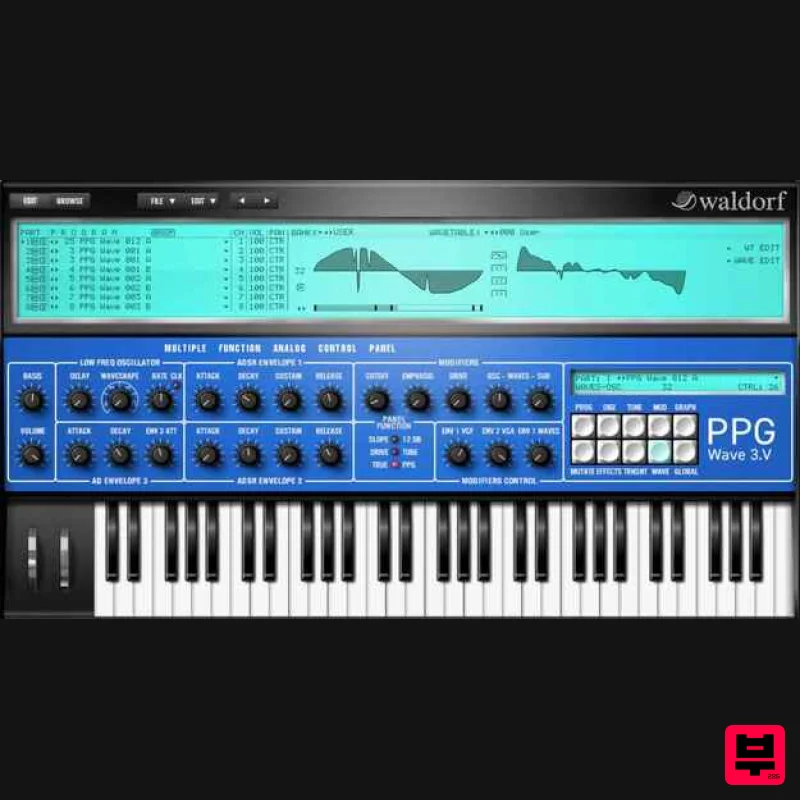
Please note: This is an update product for owners of PPG Wave 3.V Version 1. With the new Update 2.0 of the PPG Wave 3.V plugin, Waldorf builds a bridge between the past and present of wavetable synthesis. The legendary Waldorf Microwave was originally inspired by the PPG Wave, with personal input from Wolfgang Palm, and Waldorf took the concept to the next level. With the new update, Waldorf now brings some of these Microwave innovations back to the PPG – as a tribute to a legacy without which Waldorf would not exist today. What’s new in 2.0 Resizeable user interface – adapt the UI to different screen sizes User wavetables with an integrated Wavetable Editor “Mutator” patch randomizer (inspired by the Microwave plugin) Brand-new factory wavetables Features Up to 256 voices per instance (depending on available CPU power) 8 part Multimode 8 Stereo Outputs Host automation of most parameters MIDI Controller automation of most parameters More than 100 new Wavetables created by Wolfgang Palm Original Waveterm B Factory Sample Library Original PPG Wave Factory Sounds Microsoft Windows – 7/10/11 • Intel- or AMD- based PC MacOS – 10.13.x or higher • Intel- or M1-based Mac Supported formats: VST2 / VST3 / AU / AAX Registration 1. Go to https://waldorfmusic.com/my-account/ or click 'Download' within your Plugin Boutique User Account. 2. Enter your email address and click 'Register'. > Log in if you already have an account. 3. Click 'Redeem Coupon'. 4. Enter the serial number found in your Plugin Boutique User Account > Click 'Redeem' > Navigate to the 'License keys' tab. 5. Click on the relevant operating system to begin your download > Make note of your "key". 6. Click 'Download all files'. Installation Mac 1. Double click the .pkg file to begin installation. 2. Click 'Continue'. 3. Click 'Continue'. 4. Click 'Continue'. 5. Click 'Agree'. 6. Click 'Continue'. 7. Click 'Install'. 8. Click 'Restart' to restart your Mac and finish the installation. 9. Open your DAW and open Streichfett. 10. Enter your email as well as the Key found in your Waldorf account in the Registration steps > Click 'Activate License'. Your plugin is now activated and ready to be used in your DAW! PC 1. Double click the .exe file to begin installation. 2. Click 'Next'. 3. Click 'Continue'. 4. Click 'I Agree'. 5. Click 'Next >'. 6. Click 'Next >'. 7. Click 'Finish'. 8. Open your DAW and open Streichfett. 9. Enter your email as well as the Key found in your Waldorf account in the Registration steps > Click 'Activate License'. Your plugin is now activated and ready to be used in your DAW!
Additional Information
About the Waldorf PPG Wave 3.V Version 2 - Update
Discover the distinctive sound and feel of the Waldorf PPG Wave 3.V Version 2 - Update, a standout choice among Synth.
Why Choose the Waldorf PPG Wave 3.V Version 2 - Update?
- •Authentic Waldorf craftsmanship and design
- •Versatile sound suitable for multiple musical genres
- •Professional build quality and reliable performance
- •Part of Waldorf's respected Synth lineup
Compare & Explore
Browse our complete selection of Waldorf instruments or explore other Synth options. Use our comparison tools to find the perfect match for your musical style and budget.
Similar Products

discoDSP OB-Xd
Synth

Thenatan Audio Poizen VST
Synth

Reflekt Audio Xonex
Synth

discoDSP OPL
Synth

discoDSP Discovery Pro
Synth

AngelicVibes ELITE PIANIST
Synth

discoDSP Discovery
Synth

ThaLoops Templetone
Synth

