
W. A. Production Puncher 2
Professional music gear - detailed information and where to buy
W. A. Production
Puncher 2
Product Info
* Prices may vary. Check retailer for current pricing and availability.
Product Description
- Intense Power. Perfect Punch. Puncher 2 is a Multi-FX plug-in that will add instant power and punch to your tracks. In terms of compression
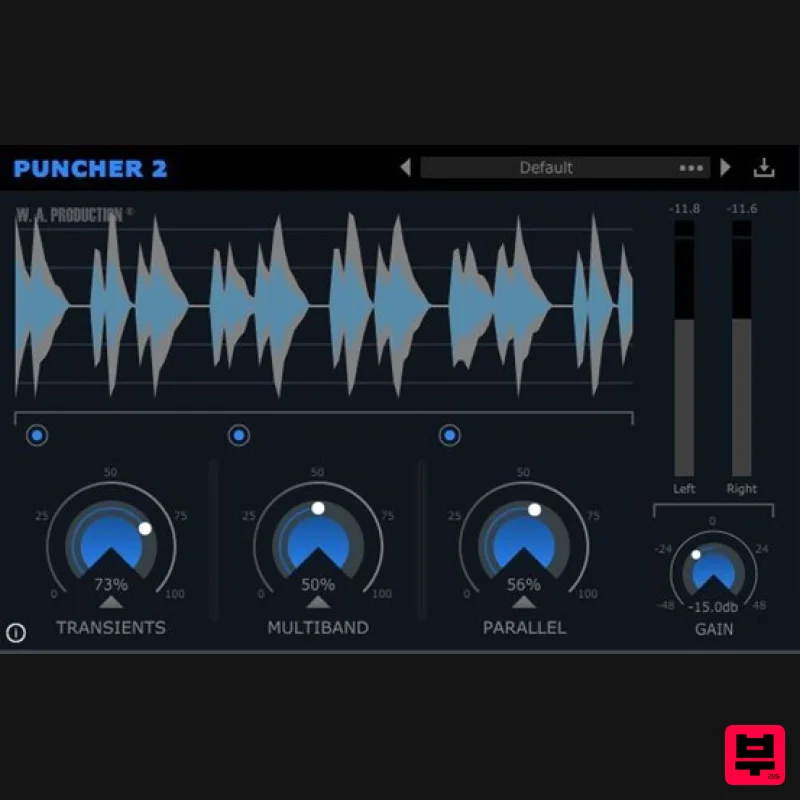
- this is the all in one tool you’ve been dreaming of. Packed into its compact design you will find 3 different effects. A Transient Shaper
- Multiband Compressor and Parallel Compressor. It allows you to combine the power of these 3 amazing tools to create a brand new
- unique and powerful sound. Puncher 2 not only allows you to to control the amount of the applied effect
- but it also allows you to control the effect itself. Offering advanced options for each effect you can fine-tune every aspect as much as you like. Inside Puncher 2 you will also find 48 configured presets made for various genres and instruments. Puncher 2 is designed to give you absolute tonal control of transient energy so that you can customize and shape those sounds. Rather than have 3 separate units
- Puncher 2 has the 3 elements you need to give your mix that clear extra punch
- all in one compact plugin. Transient Shaper The 'Transients' section lets you shape the transients and sustain of your tracks. The main mix control lets you set the intensity of the effect
- while the advanced settings give you control over the stereo linking
- bandwidth and envelope length of the detection signal
- as well as the maximum boost overage or cut that you want to apply to your signal's transients or sustain. Multiband Compressor The 'Multiband' section divides your track into 4 bands with subtractive IIR filters
- creating a real-time linear phase Multiband split. Every band has its own compressor that applies logarithmic attack and release directly to the required gain reduction value
- instead of to the detection signal
- out the compression effect in an analogue fashion. Parallel Compressor The Parallel section lets you apply parallel compression to even out the dynamics in your track in a very natural way
- or create a powerful compression effect. You can also reduce the dynamic range without reduction to the peak level. The compressor has a continuous RMS time control and a knee width control that will let you fine-tune the compressor's sensitivity to react aggressive and digital
- or silky and analogue. By adding a parallel compressor to work with the Multiband band compressor this increases the effective compression ratio and makes the processing more obvious and effective. In addition to expanding transient peaks
- Puncher 2 allows you to shape the frequency response of the transient as well as the sustain signal. Innovations in technology bring new possibilities to customize the sound
- plus a new ease of use to achieve the same sought-after results once only achieved by bulky
- expensive and complex hardware. Designed with an easily understood and operational interface
- Puncher 2 is a compact Multi FX plugin capable of delivering pin drop clarity as well as the hardest most intense punch to your mix. Features Attack and release transient shaping Real-time linear phase Multiband compression Variable RMS parallel compression Built-in preset manager Before/after dynamics wave display out bypass controls Resizable user interface Presets Include 9 Instrument Presets (guitar
- brass
- string
- piano) 8 Drum Presets (deep house
- rock
- trap) 9 Bass Synth Presets 7 Synth Lead Presets 11 Synth Presets by Genre (ambient
- hip-hop
- future bass) 6 vocal presets System Requirements Windows 8 or later (32 / 64-bit) macOS 10.13 and later (64-bit only) Formats: AU (Mac Only) VST VST3 AAX Important notes: AAX format requires Pro Tools 11 or higher. When accessing this software via a Rent to Own plan or the Beatport Studio membership
- it's installed and run through the Beatport Access portal. An internet connection is required every 30 days to validate your license. Important note for Mac Apple Silicon users: Before purchasing
- please review the current compatibility status of this plugin on your system here. Reuben Cornell (The Samplecast) "Puncher is just that... a great all-in-one toolkit of upfront effects to make even the laziest instruments punch right through a mix." 22Bullets "I love how easy the GUI is laid out and you can really add meat to the sounds and make it snappier in just a sec." Registration and Activation Video <iframe frameborder="0" height="315" src="https: //www.youtube.com/embed/YJHtWvm8z0Y" width="560"></iframe> Please Note: CHORDS is used as an example. Registration 1. Click the Download button in your Plugin Boutique account or go to https://www.waproduction.com/users/login 2. Click 'Create New Account' (if you already have a W.A Production account
- enter your details
- log in and skip to step 5). 3. Enter your details > Choose your marketing preferences > Click 'Finish Registration'. 4. Your account has been registered > Click 'Register Plugin'. 5. On the license registration page
- enter the license key from your Plugin Boutique account (which will be referred to as 'serial number' on our site) > Click 'Add'. 6. Your product will now be displayed in your W.A Production account > Scroll down to My Orders and click 'View Order'. 7. Click 'Download Files'. 8. Click 'Download'. Mac Installation 1. Once the download is complete
- extract and open the ZIP folder you just downloaded > Open the Mac folder > Double-click the CHORDS .pkg installer file. 2. Click 'Continue'. 3. Read the Software License Agreement > Click 'Continue'. 4. Click 'Agree'. 5. Click 'Install'. 6. Click 'Close'. 7. Open CHORDS in your DAW. 8. Click the information icon in the bottom left-hand corner > Enter the serial number you were given in your W.A Production account > Click 'Authorize'. Your software is now ready to use in your DAW! Windows Installation 1. Once the download is complete
- extract and open the ZIP folder you just downloaded > Open the PC folder > Double-click the CHORDS PC installer file. 2. Click 'Next'. 3. Click 'Next'. 4. Select which plugin formats you would like to install > Click 'Next' > Click 'Install'. 5. Click 'Finish'. 6. Open CHORDS in your DAW. 7. Click the information icon in the bottom left-hand corner > Enter the serial number you were given in your W.A Production account > Click 'Authorize'. Your software is now activated and ready to use in your DAW!
Additional Information
About the W. A. Production Puncher 2
The W. A. Production Puncher 2 represents excellent craftsmanship in the Compressor category.
Why Choose the W. A. Production Puncher 2?
- •Authentic W. A. Production craftsmanship and design
- •Versatile sound suitable for multiple musical genres
- •Professional build quality and reliable performance
- •Part of W. A. Production's respected Compressor lineup
Compare & Explore
Browse our complete selection of W. A. Production instruments or explore other Compressor options. Use our comparison tools to find the perfect match for your musical style and budget.
Similar Products

MeldaProduction MEssentialsFXBundle
Compressor

Korneff Audio Pawn Shop Comp
Compressor

DDMF Comprezzore
Compressor

Initial Audio IA-LA1
Compressor

W. A. Production BIGGIFIER
Compressor

DDMF LinComp
Compressor

PSP Audioware PSP Vintage Warmer 2
Compressor

Soundspear Supertube
Compressor

