
W. A. Production ComBear
Professional music gear - detailed information and where to buy
W. A. Production
ComBear
Product Info
* Prices may vary. Check retailer for current pricing and availability.
Product Description
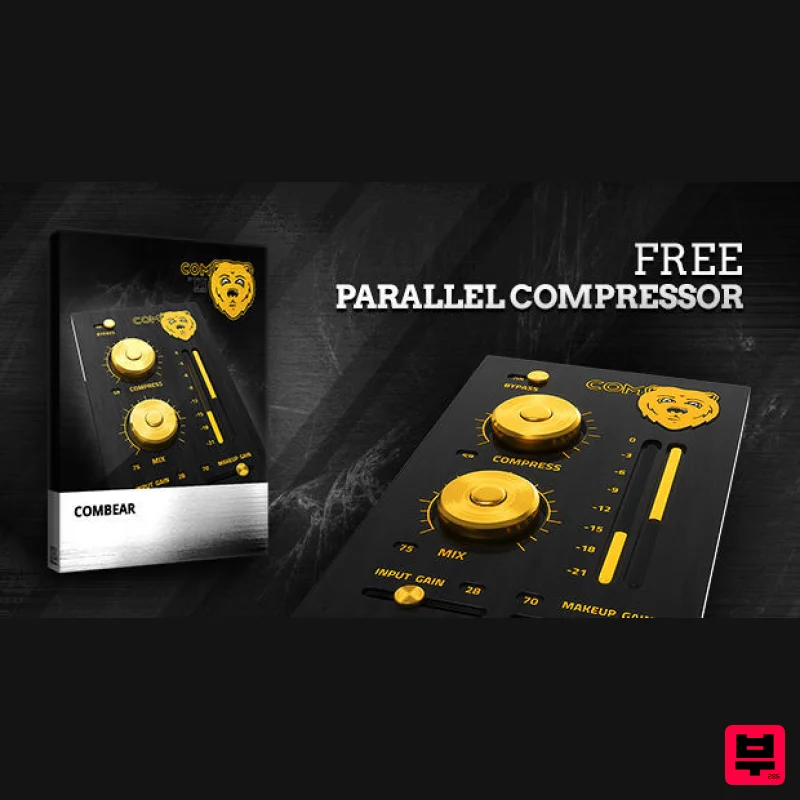
- ComBear is an EXTREMELY powerful and incredibly dynamic Parallel Compression effect plugin that brings an amazing sound and feel to Drums
- Synth
- Vocals and anything else you can thank of! This plugin is going to change the game and sound the EDM Industry. ComBear is packed full of incredible features like; Compress
- Input Gain
- Make-Up Gain and Bypass. By adjusting the Compress knob
- you increase the Parallel Compression that ComBear adds to the element from value 0 to 100. Bypass ComBear’s effects on an element by flipping the Bypass switch
- correct the Make-Up Gain that is altered based on how much compression you add to the element by adjusting the Make-Up Gain
- adjust how much gain comes in from the element by adjusting the Input Gain and finally adjust how much of ComBear you hear on the element with the Mix knob. The Idea behind this plugin was of course Parallel Compression. The main way ComBear can be used is add the plugin to a certain element then have the ability to compress that element pretty hard
- and then mix this harshly compressed element with a duplicate of the element that is not compressed. This tactic brings a bold
- delightful and intense sound to any and all elements of the production. ComBear is a must-have tool in the production world
- and is something any and all producers should look into investing in. What is Parallel Compression? In the simplest way
- Parallel Compression
- also called New York Compression
- is a very dynamic range compression technique that is used in sound recording and mixing. Basically
- Parallel Compression is a big form of upward compression and is achieved by mixing an unprocessed “dry”
- or lightly compressed signal with a heavily compressed version of the same signal. The Compress knob is what will add the Parallel Compression to the element from the value 0 to 100. Make-Up Gain Make-Up Gain as a whole is a make up for the gain reduction due to compression. Making sure to adjust the Make-Up Gain will bring the fullness of the compression to the sound. Do be careful not to over use the Make-Up Gain
- as you can cause the plugin and the element to clip. Make-Up Gain is an amazing and useful tool inside of ComBear that we know will bring the effected element more power. Input Gain Input Gain is a setting that usually allows users to control the gain coming from the original element. Adjusting the Input Gain in ComBear will increase or decrease the amount of gain that comes from the original element into ComBear. If you decrease the amount of gain
- then you may need to compensate this with the Make-Up Gain. Mix On most if not all plugins in the world
- the Mix knob is a very basic feature that allows the user to judge exactly how much of the effect they want to actually be heard. ComBear’s Mix knob does the same thing
- but you can also automate it to add some dynamics to the track
- like bringing the effected element into the track slowly to bring in intensity. ComBear is a plugin that will change the EDM scene forever. If you want to jump the to the top of the game
- you need to get your hands on this beast. Be like the professionals and make your tracks sound top tier! W. A. Production has strived to make some of the industries highest quality sample packs as well as some of the most amazing and hard-hitting plugins. We believe that ComBear is a game changer and can not WAIT for all of you to get your eager hands on this beast! System Requirements Mac macOS 10.7 and later (32/64 bit) Formats: Audio Units (AU) VST VST3 Important Note for Mac Apple Silicon users: Before purchasing
- please review the current compatibility status of this plugin on your system here. Windows Windows 7 and later (32 & 64-bit) Formats: VST VST3 Registration and Activation Video <iframe frameborder="0" height="315" src="https://www.youtube.com/embed/YJHtWvm8z0Y" width="560"></iframe> Please Note: CHORDS is used as an example. Registration 1. Click the Download button in your Plugin Boutique account or go to https://www.waproduction.com/users/login 2. Click 'Create New Account' (if you already have a W.A Production account
- enter your details
- log in and skip to step 5). 3. Enter your details > Choose your marketing preferences > Click 'Finish Registration'. 4. Your account has been registered > Click 'Register Plugin'. 5. On the license registration page
- enter the license key from your Plugin Boutique account (which will be referred to as 'serial number' on our site) > Click 'Add'. 6. Your product will now be displayed in your W.A Production account > Scroll down to My Orders and click 'View Order'. 7. Click 'Download Files'. 8. Click 'Download'. Mac Installation 1. Once the download is complete
- extract and open the ZIP folder you just downloaded > Open the Mac folder > Double-click the CHORDS .pkg installer file. 2. Click 'Continue'. 3. Read the Software License Agreement > Click 'Continue'. 4. Click 'Agree'. 5. Click 'Install'. 6. Click 'Close'. 7. Open CHORDS in your DAW. 8. Click the information icon in the bottom left-hand corner > Enter the serial number you were given in your W.A Production account > Click 'Authorize'. Your software is now ready to use in your DAW! Windows Installation 1. Once the download is complete
- extract and open the ZIP folder you just downloaded > Open the PC folder > Double-click the CHORDS PC installer file. 2. Click 'Next'. 3. Click 'Next'. 4. Select which plugin formats you would like to install > Click 'Next' > Click 'Install'. 5. Click 'Finish'. 6. Open CHORDS in your DAW. 7. Click the information icon in the bottom left-hand corner > Enter the serial number you were given in your W.A Production account > Click 'Authorize'. Your software is now activated and ready to use in your DAW!
Additional Information
About the W. A. Production ComBear
The W. A. Production ComBear represents excellent craftsmanship in the Compressor category.
Why Choose the W. A. Production ComBear?
- •Authentic W. A. Production craftsmanship and design
- •Versatile sound suitable for multiple musical genres
- •Professional build quality and reliable performance
- •Part of W. A. Production's respected Compressor lineup
Compare & Explore
Browse our complete selection of W. A. Production instruments or explore other Compressor options. Use our comparison tools to find the perfect match for your musical style and budget.
Similar Products

W. A. Production BIGGIFIER
Compressor

MeldaProduction MEssentialsFXBundle
Compressor

Soundspear Supertube
Compressor

PSP Audioware PSP Vintage Warmer 2
Compressor

DDMF Comprezzore
Compressor

Initial Audio IA-LA1
Compressor

DDMF LinComp
Compressor

Korneff Audio Pawn Shop Comp
Compressor

