
Venomode Lowtility 2
Professional music gear - detailed information and where to buy
Product Description
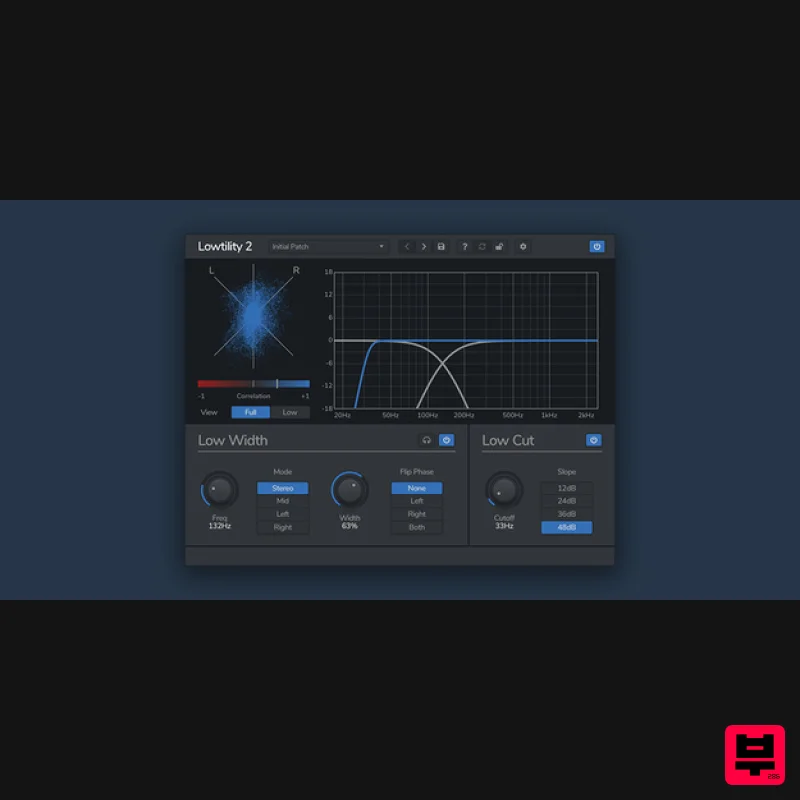
- Stereo Bass Utility Lowtility 2 is a low-end filter and mid/side utility plugin. It lets you cleanly cut the low frequencies from your mix
- and modify the stereo width of the low end. Lowtility is a stereo tool designed to control the low end of your mix. It features a variable-slope low pass filter
- along with a separate section for finely tuning the stereo width of the bass frequencies. With the stereo meters
- you can visualise how the left and right channels interact
- making sure you don't have any phase-cancellation issues. Features Width Adjustment Lowtility 2 lets you adjust the stereo signal of your low-end to clean up bass frequencies. Choose to reduce the width
- or make it mono keeping either the mid-channel or one of the left and right channels. Low Cut Cut the low frequencies using a choice of 4 different filters
- from a gentle 12dB roll-off
- to a steep 48dB slice. Stereo Meters Lowtility 2 features both a Goniometer and a Correlation meter
- visually displaying the phase and stereo information of your signal. The meters can be switched between the full band or just the low band. System Requirements Windows Windows 10 and later (64-bit only) VST / VST3 / AAX compatible DAW Mac macOS 10.13 and later (M1 Apple Silicon supported) (64-bit only) VST2
- VST3
- AU & AAX compatible DAW Ubuntu Ubuntu 18.04 and later (64-bit only) VST2 & VST3 Compatible DAW Note: Lowtility 2 should work in any DAW that can run VST
- VST3
- or AU plugins
- on any dual-core system with at least 1 GB of RAM. Important note: When accessing this software via a Rent to Own plan or the Beatport Studio membership
- it's installed and run through the Beatport Access portal. An internet connection is required every 30 days to validate your license. Note: Complexer 2 is used as the example. Mac Registration 1. Go to https://venomode.com/redeem 2. Enter your Full Name
- Email Address
- Voucher (found in the 'Serial' section within your Plugin Boutique User Account) and Password > Click 'Register'. Installation 1. Within the section titled 'Registered Products'
- select the Mac OS X installer to download the installer file. 2. Open the .pkg file to begin the installation > Click 'Continue'. 3. Click 'Continue'. 4. Click 'Agree'. 5. Click 'Continue'. 6. Click 'Continue'. 7. Click 'Install'. 8. Enter your computer Username and Password > Click 'Install Software'. 9. The installation is complete > Click 'Close'. Activation Type 1 1. Open your newly-installed plugin in your DAW > Click the Gear icon at the top of the plugin window. 2. Enter your Name
- Email Address and Serial Number found in your Venomode user account > Click 'Register'. 3. Click 'Ok' > Restart your DAW. Activation Type 2 1. Open your newly-installed plugin in your DAW > Click the Gear icon at the top of the plugin window. 2. Go to your Venomode User Account > Click 'Copy' to copy your Keyfile to the clipboard. 3. Go back to the plugin in your DAW > Click 'Paste Keyfile'. 4. Click 'Ok' > Restart your DAW. Your software is now activated and ready to use within your DAW. Windows Registration 1. Go to https: //venomode.com/redeem 2. Enter your Full Name
- Email Address
- Voucher (found in the 'Serial' section within your Plugin Boutique User Account) and Password > Click 'Register'. Installation 1. Within the section titled 'Registered Products'
- select the Windows installer to download the installer file. 2. Open the .exe file to begin the installation > Select 'I Accept the Agreement' and click 'Next'. 3. Click 'Next'. 4. Click 'Next'. 5. Click 'Next'. 6. Click 'Install'. 7. Click 'Finish'. Activation Type 1 1. Open your newly-installed plugin in your DAW > Click the Gear icon at the top of the plugin window. 2. Enter your Name
- Email Address and Serial Number found in your Venomode User Account > Click 'Register'. 3. Click 'Ok' > Restart your DAW. Activation Type 2 1. Open your newly-installed plugin in your DAW > Click the Gear icon at the top of the plugin window. 2. Go to your Venomode User Account > Click 'Copy' to copy your Keyfile to the clipboard. 3. Go back to the plugin in your DAW > Click 'Paste Keyfile'. 4. Click 'Ok' > Restart your DAW. Your software is now activated and ready to use within your DAW.
Additional Information
About the Venomode Lowtility 2
The Venomode Lowtility 2 represents excellent craftsmanship in the Utility category.
Why Choose the Venomode Lowtility 2?
- •Authentic Venomode craftsmanship and design
- •Versatile sound suitable for multiple musical genres
- •Professional build quality and reliable performance
- •Part of Venomode's respected Utility lineup
Compare & Explore
Browse our complete selection of Venomode instruments or explore other Utility options. Use our comparison tools to find the perfect match for your musical style and budget.
Similar Products

Audible Genius Building Blocks 2
Utility
$30
Music Theory & Composition Training Software for DAW-Based Music Makers Drum Patterns, Basslines, Chord Progressions,...

Blue Cat Audio Blue Cat's Connector
Utility
$30
The Virtual Cable For Your Virtual Studio Blue Cat’s Connector is an audio & MIDI streaming plug-in that can be used...

Soundspear Luxor
Utility
$30
Luxor is the key if you want an instrument to stand out and spread in the mix. It will scoop your high frequencies to...

Inphonik RX950
Utility
$30
Legendary Grit and Crunch Meet the RX950 Classic AD/DA Converter, Inphonik’s first effect plug-in, designed to...

DDMF TheStrip
Utility
$30
What is it? The Strip is the essential channel strip: the finest EQ, gate and compressor bundled in one beautifully...

Tonalic Tonalic Arranger - 30 Day Subscription
Utility
$30
Real Musicians. Real Feel. Adaptive Performance Instrument for Your DAW Bring authentic, human musicianship into your...

Audible Genius Building Blocks 1
Utility
$30
Music Theory & Composition Training Software for DAW-Based Music Makers Drum Patterns, Basslines, Chord Progressions,...

Acoustica Spin It Again
Utility
$30
Spin It Again is the easiest way to convert your LPs and cassettes to CD and MP3. Remember all those ‘oldies but...
Frequently Asked Questions
The Venomode Lowtility 2 stands out for its exceptional Venomode craftsmanship and innovative design.
Yes! With its affordable price point and quality construction, it's perfect for learning utility.
Browse the similar products section to see how it stacks up against other utility.

