
Vengeance Sound Multiband Compressor
Professional music gear - detailed information and where to buy
Vengeance Sound
Multiband Compressor
Product Info
* Prices may vary. Check retailer for current pricing and availability.
Product Description
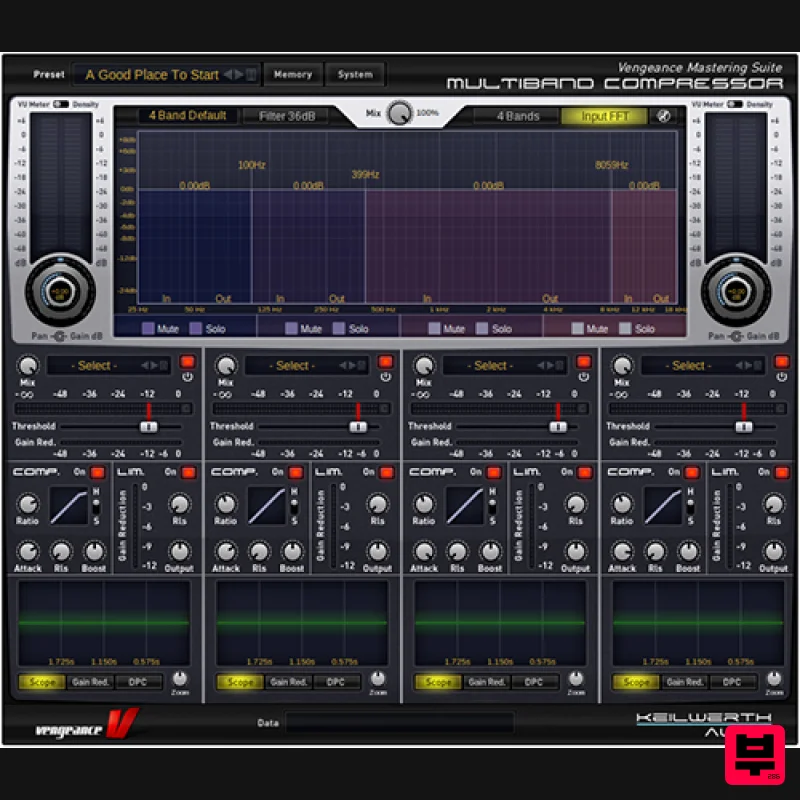
- This multiband compressor plugin is your perfect choice for a punchy
- loud but yet dynamic mix; you may also use it to create unique effects elevating your sound to a completely different level! Choose from 1 to 4 band modes
- experience high-quality filters from 6 to 96 dB without any phasing issues
- use up to 4 independent compressors and limiters
- get to know why the New York Compression is so famous and precious ... and so much more! Features VST / PC & Intel Mac VST / AU & RTAS/AAX - runs in all compatible hosts You can choose between 1 band
- 3 or 4 band modeHigh quality filter models
- from 6db to 96db - without any phasing issues! Up to 4 independent compressors (one per selected band Hard-/softknee mode
- optional autogain
- optional autorelease for every compressor Graphical Ratio/Threshold curve display Up to 4 limiters (one for each band) 1 mastering limiter (sum)
- also with autorelease New York Compression: MIX knob
- to bring back some original dynamic! Live waveform scopes for every channel Realtime FFT analyzer (in-/output overlay to compare dry and wet signals) Unique new feature: the "DPC" (dynamic pattern compressor) Anti-distortion filters for ultra-short release times Many cool presets are included - ranging from complete masterings to special fx All parameters are automatable (host) System Requirements Mac macOS 10.9 and later (Intel / M1 Apple Silicon supported) (64-bit only) Intel 1.5 GHz or Apple Silicon 2 GB RAM VST2
- VST3
- AU and AAX compliant host required (64-bit only) Windows Windows Vista or higher (64-bit only) OpenGL 3.2 capable GPU 2 GB RAM VST2
- VST3 and AAX compliant host required (64-bit only) Important note: This product licence needs to be refreshed every 90 days and can be done within the Vengeance Sound V-Manager
- or by using an offline key file that can be downloaded from your Vengeance Sound User Account. Awards Future Music 'This thing has loads more creative potential than your typical multiband compressor' Computer Music 'MBC goes beyond being merely a good deal to become a total no brainer!' Beat Magazine 'Once more Vengeance-Sound proves a sense for highly useful tools for dance music producers' Please Note: VPS Avenger is used as an example. Registration 1. Click DOWNLOAD in your Plugin Boutique account or go to https://register.vps-avenger.com/login > Click Register (or login to your account and skip to step 3). 2. Enter your details and click 'Register' to create an account. 3. You have now created a Vengeance Sounds account > Click '+ Add New Product' on the left side of the page. 4. Copy and paste the serial number from your Plugin Boutique account > Click 'Look up'. 5. Your license has now been added to your Vengeance Sounds account > Click 'OK'. Mac Installation 1. Go back to https://register.vps-avenger.com/details > Download the V-Manager installer. 2. Open the V-Manager installer once it has downloaded > Enter your email and password > Click 'Login'. 3. Click 'Download Factory Content' (this may take a while to download as it’s a large file). 4. Whilst the Factory Content is downloading
- click ‘Download Keyfile’ > VPS Avenger is now activated. 5. Once the Factory Content has been downloaded
- click ‘Download Installer’ at the top of the window. 6. Click ‘Yes’ to run the installer now > Click ‘Continue’. 7. Click ‘Continue’. 8. Read the Software License Agreement > Click ‘Continue’. 9. Click ‘Agree’. 10. Choose which formats you would like to install (if you're not sure
- check out our Help Centre guide about plugin formats) > Click ‘Continue’. 11. Click ‘Install’. 12. Click 'Close'. Your software is now activated and ready to use in your DAW! Windows Installation 1. Go back to https: //register.vps-avenger.com/details > Download the V-Manager installer. 2. Once the V-Manager installer has downloaded
- run the V-Manager.exe file > Enter your email and password > Click 'Login'. 3. Click 'Download Factory Content' and any other downloads you may have in your account (this may take a while as the factory content is a large file). 4. Whilst the Factory Content is downloading
- click 'Download Keyfile' to activate the software on your system > Click 'OK'. 5. Click 'Download Installer' to download the latest VPS Avenger software. 6. Once the download has completed
- run the .exe file > Read the licensing agreement > Click 'Next >'. 7. Choose the installation location (we recommend leaving this as the default unless you have a customer folder) > Click 'Next >'. 8. Choose which plugin formats you would like to install (AAX for Pro Tools
- VST for other DAWs) > Click 'Next >'. 9. Click 'Install'. 10. Click 'Next >'. 11. Click 'Finish' to restart your computer and complete the installation. Your software is now activated and ready to use in your DAW!
Additional Information
About the Vengeance Sound Multiband Compressor
The Vengeance Sound Multiband Compressor combines traditional design with modern performance for Compressor enthusiasts.
Why Choose the Vengeance Sound Multiband Compressor ?
- •Authentic Vengeance Sound craftsmanship and design
- •Versatile sound suitable for multiple musical genres
- •Professional build quality and reliable performance
- •Part of Vengeance Sound's respected Compressor lineup
Compare & Explore
Browse our complete selection of Vengeance Sound instruments or explore other Compressor options. Use our comparison tools to find the perfect match for your musical style and budget.
Similar Products

Soundspear Supertube
Compressor

W. A. Production BIGGIFIER
Compressor

Initial Audio IA-LA1
Compressor

Korneff Audio Pawn Shop Comp
Compressor

DDMF Comprezzore
Compressor

DDMF LinComp
Compressor

PSP Audioware PSP Vintage Warmer 2
Compressor

MeldaProduction MEssentialsFXBundle
Compressor

