
u-he Diva
Professional music gear - detailed information and where to buy
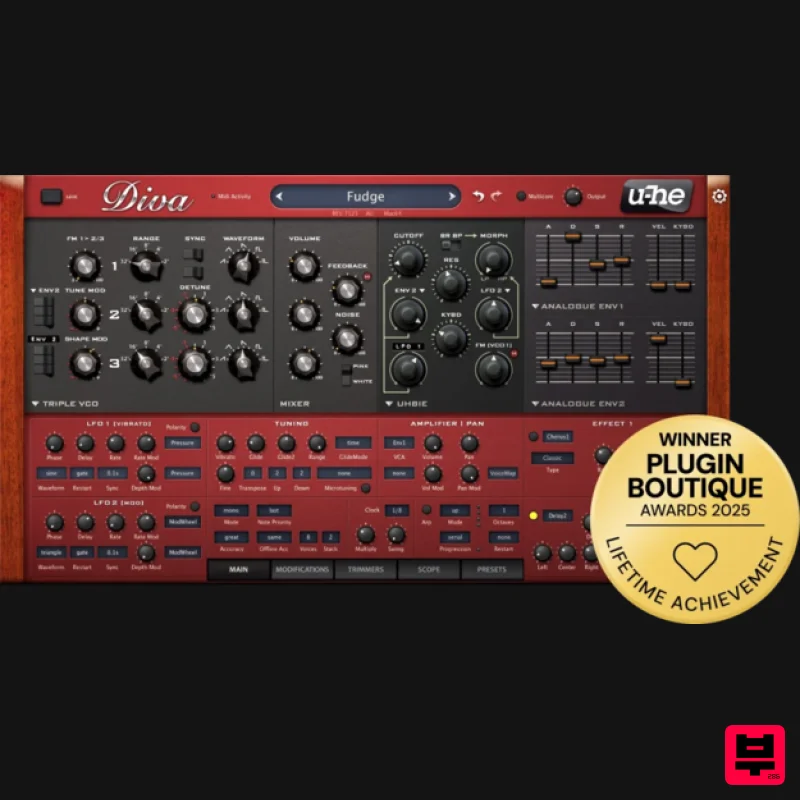
Product Description
- The Spirit Of Analogue DIVA - Dinosaur Impersonating Virtual Analogue Synthesizer The oscillators
- filters and envelopes closely model components found in some of the great monophonic and polyphonic synthesizers of yesteryear. Modules can be mixed and matched so you can build hybrids
- but what sets DIVA apart is the sheer authenticity of the analogue sound. This comes at the cost of quite a high CPU hit
- but we think it was worth it. Diva is the first native software synth that applies methods from industrial circuit simulators (e.g. PSpice) in real time. The behaviour of zero-delay-feedback filters when pushed to the limit clearly demonstrates the advantages of this groundbreaking approach. Check out more than 1200 presets. If your computer can handle it
- try them in "Divine" mode. Filters This is where a LOT of Diva's magic happens - Diva's zero-delay-feedback filters set a very high standard of authenticity. Each filter type closely models a classic analogue hardware filter (or two): You can already choose between Ladder
- Cascade
- Multi-Mode
- Bite... and more are planned! Envelopes Two envelopes
- one for the output amp and the other general-purpose. Again
- there is a choice of several different models based on classic hardware synthesizers. The characteristics of amp and filter envelopes within the same synthesizer often differ. This important detail has also been carefully modelled. Mix & Match All modules in the upper rack can be replaced - send any of the oscillator models through any filter model to any amp/envelope model. The rack also offers highpass filter models (pre or post main filter) or feedback from output to input. Effects 3 x analogue chorus
- 2 x analogue phaser
- plate reverb
- stereo analogue delay
- rotary speaker emulations... The two effects are arranged in series - you can even use two plate reverbs
- one after the other. Modifiers Modulation processors: Rectify
- quantize
- multiply
- invert
- add modulation sources before using them. There are also several modulation options here that aren't available in all the main panels (e.g. filter resonance
- feedback). Trimmers Diva shows her most esoteric side here as she saucily flashes those voice activity indicators! As well as detuning individual voices
- a voice-specific offset is applied to cutoff
- envelope times
- pulse width and glide. Scope Every synth needs an oscilloscope! Diva has a no-nonsense scope that only requires two knobs - frequency and scale. Patches Diva comes loaded with over 1
- 200 presets sorted into various categories. Select a folder from the bottom left panel
- then a preset from the main area. Features Authentic
- unrivalled analogue sound Up to 40% less CPU-hit than version 1.0 Multithreading support for modern CPUs - more polyphony
- less overload Even bigger library of gorgeously organic presets Resizable editor window
- alternative skins available shortly The essence of 7 or 8 vintage synths for about 1% of the cost ...and so much more! Awards Mac Mac OS X 10.9 or newer (Intel and M1 Mac Supported) (64-bit only) AU2
- VST2
- VST3 Windows Windows 7 or newer (32 / 64-bit) VST2
- VST3 Minimum Requirements Host software / DAW 1GB RAM
- more recommended 50MB free disk space 1000 × 600 or larger display Modern CPU required Intel Nehalem or newer
- AMD Bulldozer or newer (for Windows / Linux) Intel Nehalem or newer
- Apple M1 (for Mac) Linux - glibc version 2.28 or newer Plugin Formats: Diva is not a standalone product
- it requires host software. Diva is compatible with nearly all DAWs. Diva is Native Instruments NKS-ready and compatible with Maschine and Komplete Kontrol hardware. u-he Installation/Activation Instructions 1. Visit redeem.u-he.com and enter your registration code (located within your account). 2. On the next page
- fill in the required fields. An email with your serial number and download link will be sent to the supplied email address. 3. Once you have downloaded your installer from within your account
- launch the Setup then click NEXT. 4. Read the licence agreement and if happy
- click to accept the agreement then click NEXT. 5. Select which components of your plugin you wish to install and click NEXT. 6. Choose your installation paths for both 32 and 64-bit versions of the plugin and click NEXT. 7. Evaluate your setup options and if happy
- click INSTALL. 8. Once the installation has concluded
- click FINISH. 9. Open your plugin within your DAW. Right-click on the plug-in's data display (usually at the top). 10. Select "Enter serial number..." from the dropdown men and enter your registered u-he username and Serial Number (when entering your name and Serial Number it's advisable to copy/paste the license information directly from the eMail into the plugin instead of typing each letter and number by hand). - Your plugin is now fully activated!
Additional Information
About the u-he Diva
Discover the distinctive sound and feel of the u-he Diva, a standout choice among Synth.
Why Choose the u-he Diva?
- •Authentic u-he craftsmanship and design
- •Versatile sound suitable for multiple musical genres
- •Professional build quality and reliable performance
- •Part of u-he's respected Synth lineup
Compare & Explore
Browse our complete selection of u-he instruments or explore other Synth options. Use our comparison tools to find the perfect match for your musical style and budget.
Similar Products

AngelicVibes ELITE PIANIST
Synth
$30
Your next go-to virtual instrument. Real piano recordings with unique sound and effects 50 high-quality presets for...

discoDSP Discovery Pro
Synth
$30
discoDSP’s Discovery was one of the company’s first and finest efforts. Heavily inspired by Clavia’s Nord Lead...

Thenatan Audio Poizen VST
Synth
$30
Thenatan and Global Audio Tools have teamed up again to bring music makers across the globe a jam packed powerful tool...

Reflekt Audio Xonex
Synth
$30
Xonex is a futuristic plugin that we have used time and time again to make a variety of beats. Xonex has offered me a...

discoDSP OB-Xd
Synth
$30
OB-Xd is based on the Oberheim OB-X. It attempts to recreate its sound and behavior, but as the original was very...

ThaLoops Templetone
Synth
$30
The Ultimate Hip-Hop Production Plugin – Featuring a Vast Collection of Hip-Hop Sounds. Choose between wild drums,...

discoDSP OPL
Synth
$30
The OPL is a digital sound synthesis chip developed by Yamaha in the mid 1980s. Among other products, it was used in...

discoDSP Discovery
Synth
$30
Discovery is a virtual analog Nord Lead 2 inspired synthesizer featuring multi-layering, a morphing engine, high...
Frequently Asked Questions
The u-he Diva stands out for its exceptional u-he craftsmanship and innovative design.
Yes! With its affordable price point and quality construction, it's perfect for learning synth.
Browse the similar products section to see how it stacks up against other synth.

