
u-he ACE
Professional music gear - detailed information and where to buy
Product Description
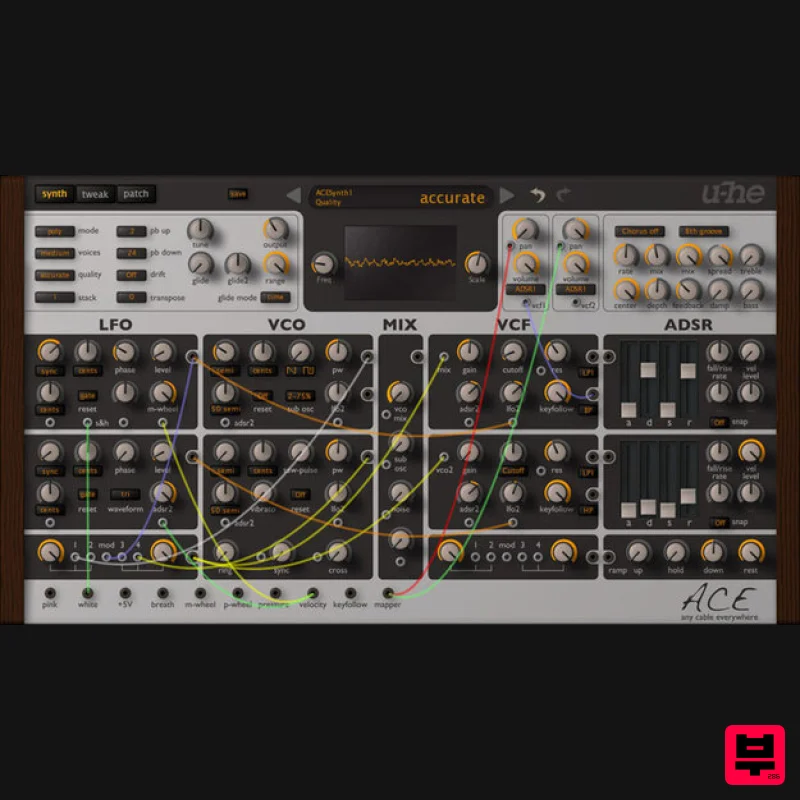
- Any Cable Everywhere ACE belongs to a new generation of synthesizers developed with the latest
- fastest computers in mind. ACE offers classic modular synthesis and more at a fraction of the cost of dedicated hardware. But like its hardware forebears
- you can patch any output into any input: the number of different ways to connect modules together is practically infinite. Needless to say
- you will never run out of cables! The careful selection of modules and clear layout make ACE the ideal instrument for newcomers delving into the fascinating world of modular synthesis. But ACE also delivers the goods: like any medium-sized professional hardware system
- ACE has enough synthesis power to keep you discovering new tricks for many years to come! List of Modules 2 x LFO (0Hz - 20kHz) 2 x ADSSR envelopes 2 x VCO (0Hz - 20kHz
- VCO1-linked sub) 2 x VCF (LP1/LP2/LP3/LP4 and HP/BP/BR each) 2 x VCA with pan 2 x multiples (with modulation input) 1 x mixer (for standard sources + aux) 1 x ramp generator (loopable) 1 x mapping generator (up to 128 values) 1 x noise (white
- pink) 3 x global effects (chorus
- delay
- 2 x tone) Key Features At first glance ACE may seem overly simplistic
- but remember that virtually anything can be plugged into anything else. For instance
- try plugging an LFO into a Filter
- then use that filter as an FM source for an oscillator. Crazy routing is possible
- endless fun is guaranteed! Semi-modular architecture
- with default routing like ARP 2600 25 signal sources
- 30+ signal targets Up to 8 times unison with +/-2 octave detune range each Exceptional filters
- can self-oscillate LFOs can be used as VCOs and vice versa Sync
- cross modulation Use multiples for inversion
- amp / ring modulation etc. Custom LFO waveform "tap map" Microtuning (Scala .tun standard) 100% free of Supersaws! System Requirements Mac Mac OS X 10.9 or newer (Intel and M1 Mac Supported) (64-bit only) AU2
- VST2
- VST3 Windows Windows 7 or newer (32 / 64-bit) VST2
- VST3 Minimum Requirements Host software / DAW 1GB RAM
- more recommended 50MB free disk space 1000 × 600 or larger display Modern CPU required Intel Nehalem or newer
- AMD Bulldozer or newer (for Windows / Linux) Intel Nehalem or newer
- Apple M1 (for Mac) Linux - glibc version 2.28 or newer Plugin Formats: ACE is not a standalone product
- it requires host software. ACE is compatible with nearly all DAWs. Awards Erik Svahn "This is an awesome synth with amazing modular capabilities. Super impressed!" u-he ACE review at Music Radar A superior semi-modular synth at a bargain price. We see so many soft synths that it's sometimes hard for us to get excited by them. But u-he's new ACE - or Any Cable Everywhere - has managed to get a serious rise out of us. Not only is it born of excellent stock (u-he's Zebra 2 synth and Uhbi... Read More u-he ACE review at Resident Advisor Urs Heckmann's U-he is best known for the award-winning Zebra modular soft synth
- and more recently the excellent Uhbik effects plug-ins. His latest venture
- ACE (Any Cable Everywhere)
- is once again on a modular tip. But this time it's simpler (semi-modular)
- cheaper and if he's done his maths r... Read More u-he Installation/Activation Instructions 1. Visit redeem.u-he.com and enter your registration code (located within your account). 2. On the next page
- fill in the required fields. An email with your serial number and download link will be sent to the supplied email address. 3. Once you have downloaded your installer from within your account
- launch the Setup then click NEXT. 4. Read the licence agreement and if happy
- click to accept the agreement then click NEXT. 5. Select which components of your plugin you wish to install and click NEXT. 6. Choose your installation paths for both 32 and 64-bit versions of the plugin and click NEXT. 7. Evaluate your setup options and if happy
- click INSTALL. 8. Once the installation has concluded
- click FINISH. 9. Open your plugin within your DAW. Right-click on the plug-in's data display (usually at the top). 10. Select "Enter serial number..." from the dropdown men and enter your registered u-he username and Serial Number (when entering your name and Serial Number it's advisable to copy/paste the license information directly from the eMail into the plugin instead of typing each letter and number by hand). - Your plugin is now fully activated!
Additional Information
About the u-he ACE
The u-he ACE represents excellent craftsmanship in the Synth category.
Why Choose the u-he ACE?
- •Authentic u-he craftsmanship and design
- •Versatile sound suitable for multiple musical genres
- •Professional build quality and reliable performance
- •Part of u-he's respected Synth lineup
Compare & Explore
Browse our complete selection of u-he instruments or explore other Synth options. Use our comparison tools to find the perfect match for your musical style and budget.
Similar Products

AngelicVibes ELITE PIANIST
Synth
$30
Your next go-to virtual instrument. Real piano recordings with unique sound and effects 50 high-quality presets for...

discoDSP OB-Xd
Synth
$30
OB-Xd is based on the Oberheim OB-X. It attempts to recreate its sound and behavior, but as the original was very...

Reflekt Audio Xonex
Synth
$30
Xonex is a futuristic plugin that we have used time and time again to make a variety of beats. Xonex has offered me a...

Thenatan Audio Poizen VST
Synth
$30
Thenatan and Global Audio Tools have teamed up again to bring music makers across the globe a jam packed powerful tool...

discoDSP OPL
Synth
$30
The OPL is a digital sound synthesis chip developed by Yamaha in the mid 1980s. Among other products, it was used in...

discoDSP Discovery Pro
Synth
$30
discoDSP’s Discovery was one of the company’s first and finest efforts. Heavily inspired by Clavia’s Nord Lead...

discoDSP Discovery
Synth
$30
Discovery is a virtual analog Nord Lead 2 inspired synthesizer featuring multi-layering, a morphing engine, high...

ThaLoops Templetone
Synth
$30
The Ultimate Hip-Hop Production Plugin – Featuring a Vast Collection of Hip-Hop Sounds. Choose between wild drums,...
Frequently Asked Questions
The u-he ACE stands out for its exceptional u-he craftsmanship and innovative design.
Yes! With its affordable price point and quality construction, it's perfect for learning synth.
Browse the similar products section to see how it stacks up against other synth.

