
Tracktion RetroMod LoFreq Classic
Professional music gear - detailed information and where to buy
Tracktion
RetroMod LoFreq Classic
Product Info
* Prices may vary. Check retailer for current pricing and availability.
Product Description
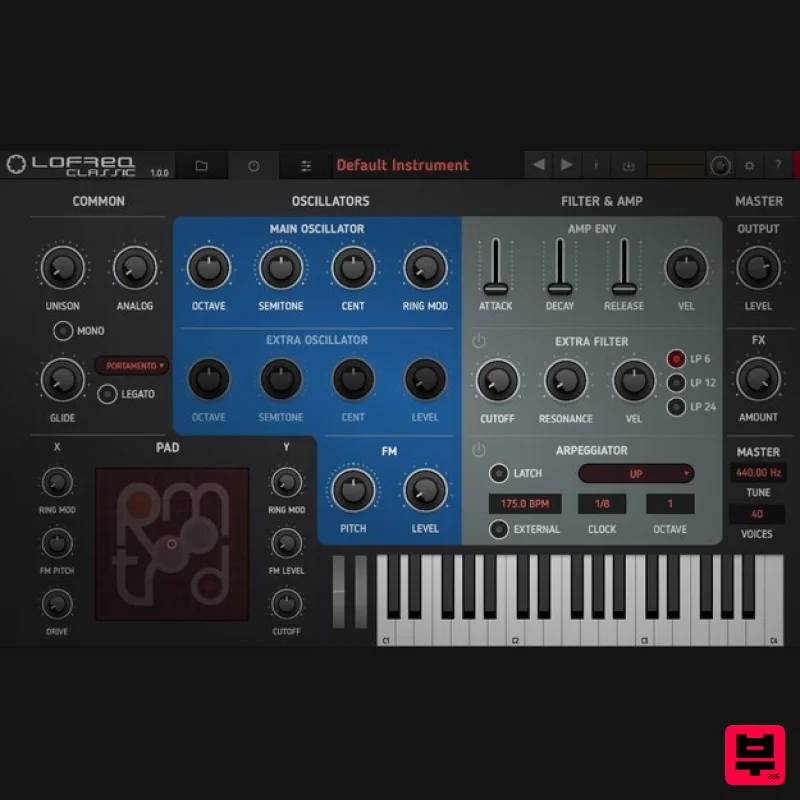
- LoFreq Classic includes samples from 11 iconic synthesizers produced from 1974 to 1995. All the usual suspects are here
- from the Oberheim SEM to the Korg MS-20 and Roland TB-303. Not only do the RetroMod LoFreq plug-ins render the feel of the original instruments thanks to meticulous sampling
- but they also add a contemporary twist deriving from the secondary multimode resonant filter
- while the second oscillator helps beef up the sound and the XY Pad is designed to add your choice of subtle or aggressive colour to the original sound. Go big with 16 voices of unison and rapidly generate patterns with the integrated arpeggiator – creating pulsing basses
- searing leads and thick pads just got freaky! Classic Instruments The following classic instruments were sampled with Avalon U5
- A-Design Reddi
- Phoenix Audio NiceDI
- Universal Audio 2192
- RME ADI-2 and VoVox Cables. Oberheim SEM Yamaha CS-30 Arp Odyssey Korg MS-20 Roland SH-2 Realistic MG-1 Roland TB-303 Roland SH-101 Novation Bass Station R. Doepfer MS-404 Roland CMU-810 Features 3.4 GB Total File Size 358 Presets 13
- 500 Samples System Requirements Mac macOS 10.9 or Later (32 & 64-bit) Intel Core 2 Duo 2GHz Processor 2GB RAM (8GB Recommended) AU
- VST PC Windows 7
- 10 (32 & 64-bit) Intel Core 2 Duo 2GHz Processor 2GB RAM (8GB Recommended) AAX
- VST Note: BioTek2 is used as an example. Windows 1. Visit https://marketplace.tracktion.com/activate > Enter your Activation Code found in your My Account > Enter your contact information and either register or log in to Tracktion > Click "Submit". 2. Click "My Downloads". 3. Download the Tracktion Download Manager by selecting your operating system and clicking "Download". 4. Double-click the downloaded .exe installer > Select "I accept the agreement" and click "Next >". 5. Decide whether or not you would like a desktop shortcut > Click "Next >". 6. Select your destination > Click "Next >". 7. Click "Install". 8. Click "Finish". 9. Open the Tracktion Download Manager > Click "Install" on both BioTek 2 and BioTek 2 content. 10. Once your files have been downloaded and installed
- you can close the download manager. > Then open your DAW. Your software is now installed and ready for use! Mac 1. Visit https: //marketplace.tracktion.com/activate > Enter your Activation Code found in your My Account > Enter your contact information and either register or log in to Tracktion > Click "Submit". 2. Click "My Downloads". 3. Download the Tracktion Download Manager by selecting your operating system and clicking "Download". 4. Open the.dmg file > Click "Continue". 5. Read the Software License Agreement > Click "Continue". 6. Click "Agree". 7. Click "Install". 8. Click "Close". 9. Open the Tracktion Download Manager > Click "Install" on both BioTek 2 and BioTek 2 content. 10. Once your files have been downloaded and installed
- you can close the download manager. > Then open your DAW. Your software is now installed and ready for use!
Additional Information
About the Tracktion RetroMod LoFreq Classic
Discover the distinctive sound and feel of the Tracktion RetroMod LoFreq Classic, a standout choice among Virtual Instruments.
Why Choose the Tracktion RetroMod LoFreq Classic?
- •Authentic Tracktion craftsmanship and design
- •Versatile sound suitable for multiple musical genres
- •Professional build quality and reliable performance
- •Part of Tracktion's respected Virtual Instruments lineup
Compare & Explore
Browse our complete selection of Tracktion instruments or explore other Virtual Instruments options. Use our comparison tools to find the perfect match for your musical style and budget.
Similar Products

Audiomodern Opacity 2: Soundbox Instrument
Virtual Instruments

ZAK Sound Asteroid
Virtual Instruments

UJAM BEAUTYFLUTE Pro
Virtual Instruments

ZAK Sound Lyra
Virtual Instruments

Safari Audio Cubby
Virtual Instruments

MNTRA Instruments Nagual
Virtual Instruments

Boom SWAMPS - 3D Surround
Virtual Instruments

MeldaProduction Electric Keys - Tines
Virtual Instruments

