
Tracktion RetroMod Digital 1
Professional music gear - detailed information and where to buy
Tracktion
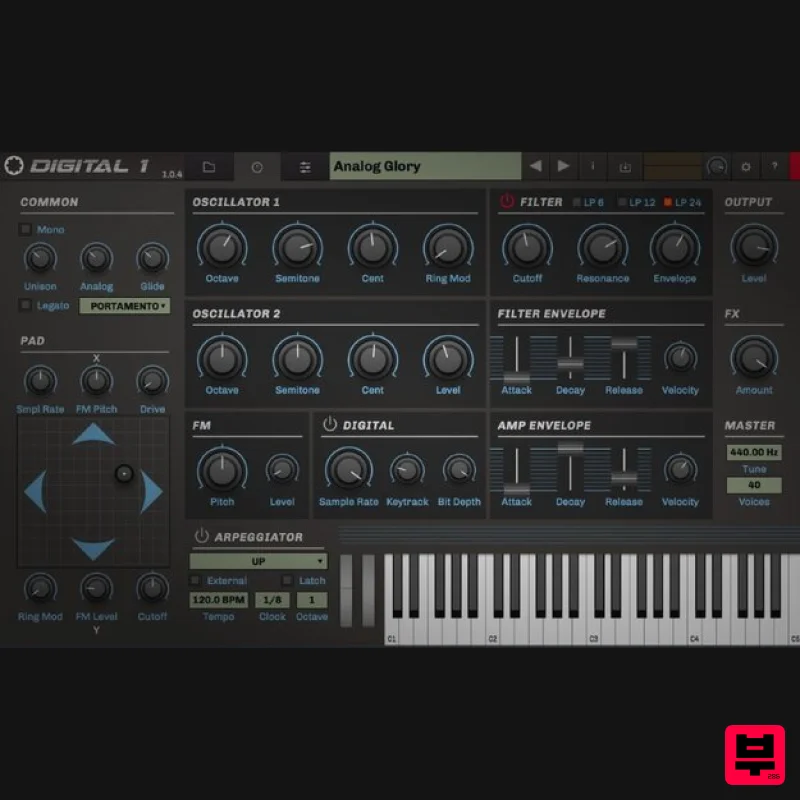
RetroMod Digital 1
Product Info
* Prices may vary. Check retailer for current pricing and availability.
Product Description
- The 80s were a magical time for musicians
- with the analog palette sharing the scene with an exciting new world of digital synthesis. The period between 1981 and 1987 were breakthrough years for the great hybrid machines: the PPG Wave series
- the Korg DW series and the Prophet VS
- just to mention a few. RetroMod Digital 1 brings you the best of that 80s sound: Tracktion captured thousands of waveforms generated from the original instruments to bring you a huge choice of evolving pads
- shining electric pianos
- metallic picked instruments
- harsh basses and loads more. Digital 1 is the ultimate virtual instrument that lets you re-experience the hybrid 80s sound. Digital Instruments The following digital instruments were sampled with Phoenix Audio Nice DI
- Apogee Rosetta 200 and VoVox Cables. Sequential Circuits Prophet VS Korg DW8000 Kawai K3 Kawai K5 Yamaha TX81Z Features 5.9 GB Total File Size 367 Presets 10
- 000 Samples System Requirements Mac macOS 10.9 or Later (32 & 64-bit) Intel Core 2 Duo 2GHz Processor 2GB RAM (8GB Recommended) AU
- VST PC Windows 7
- 10 (32 & 64-bit) Intel Core 2 Duo 2GHz Processor 2GB RAM (8GB Recommended) AAX
- VST Note: BioTek2 is used as an example. Windows 1. Visit https://marketplace.tracktion.com/activate > Enter your Activation Code found in your My Account > Enter your contact information and either register or log in to Tracktion > Click "Submit". 2. Click "My Downloads". 3. Download the Tracktion Download Manager by selecting your operating system and clicking "Download". 4. Double-click the downloaded .exe installer > Select "I accept the agreement" and click "Next >". 5. Decide whether or not you would like a desktop shortcut > Click "Next >". 6. Select your destination > Click "Next >". 7. Click "Install". 8. Click "Finish". 9. Open the Tracktion Download Manager > Click "Install" on both BioTek 2 and BioTek 2 content. 10. Once your files have been downloaded and installed
- you can close the download manager. > Then open your DAW. Your software is now installed and ready for use! Mac 1. Visit https: //marketplace.tracktion.com/activate > Enter your Activation Code found in your My Account > Enter your contact information and either register or log in to Tracktion > Click "Submit". 2. Click "My Downloads". 3. Download the Tracktion Download Manager by selecting your operating system and clicking "Download". 4. Open the.dmg file > Click "Continue". 5. Read the Software License Agreement > Click "Continue". 6. Click "Agree". 7. Click "Install". 8. Click "Close". 9. Open the Tracktion Download Manager > Click "Install" on both BioTek 2 and BioTek 2 content. 10. Once your files have been downloaded and installed
- you can close the download manager. > Then open your DAW. Your software is now installed and ready for use!
Additional Information
About the Tracktion RetroMod Digital 1
The Tracktion RetroMod Digital 1 represents excellent craftsmanship in the Virtual Instruments category.
Why Choose the Tracktion RetroMod Digital 1?
- •Authentic Tracktion craftsmanship and design
- •Versatile sound suitable for multiple musical genres
- •Professional build quality and reliable performance
- •Part of Tracktion's respected Virtual Instruments lineup
Compare & Explore
Browse our complete selection of Tracktion instruments or explore other Virtual Instruments options. Use our comparison tools to find the perfect match for your musical style and budget.
Similar Products

MeldaProduction Electric Keys - Tines
Virtual Instruments

MNTRA Instruments Nagual
Virtual Instruments

ZAK Sound Asteroid
Virtual Instruments

Audiomodern Opacity 2: Soundbox Instrument
Virtual Instruments

Safari Audio Cubby
Virtual Instruments

Boom SWAMPS - 3D Surround
Virtual Instruments

UJAM BEAUTYFLUTE Pro
Virtual Instruments

ZAK Sound Lyra
Virtual Instruments

