
Tracktion Outersect Modeler
Professional music gear - detailed information and where to buy
Product Description
- Physical Modeling Reimagined What happens when a classically trained musician and Pro Tools coder has a life changing experience at Burning Man? Rob Rayle's passion project
- the Outersect Modeler
- is a pure modeling synth designed to generate all the expression and nuance of acoustic and electro-acoustic instruments – perfect for Rob to jam with on his keytar or for anyone seeking an instrument that feels truly alive Rob’s infectious style includes genre-bending psychedelic electronic music that synergizes psychill
- techno-bluegrass
- and 70s progressive rock styles – designed to inspire ecstasy on the dance floor and auditory bliss. Travel through the wormhole into the trippy world of…… Outersect. Physical Modeling Reimagined The Outersect Modeler transcends the confines of traditional synthesizers
- putting an unparalleled level of realism and expressiveness at your fingertips. From the delicate nuances of a violin's bow to the screaming tones of electric guitar feedback
- every sonic detail is meticulously crafted
- allowing musicians and producers to sculpt a diverse range of lifelike sounds. Whether crafting ethereal atmospheres
- futuristic textures
- or emulating rare and exotic instruments
- let the Modeler take you on a trippy ride down the synthesis rabbit hole. The heart of the Modeler is a general purpose model for linear physical instruments which simulates many instruments accurately and can synthesize new instrument types that don’t exist in the real world. The modeler makes it possible to combine features of different instruments into a single sound. You can create trumpets that feed back like electric guitars
- saxophones muted with violin bows and other unlikely or impossible combinations. Ultimate Expression The Modeler creates sounds with all the expression and nuance of acoustic and electro-acoustic instruments. It offers the player so many different ways to play the same note that it would be impossible to sample them all. It feels organic and alive
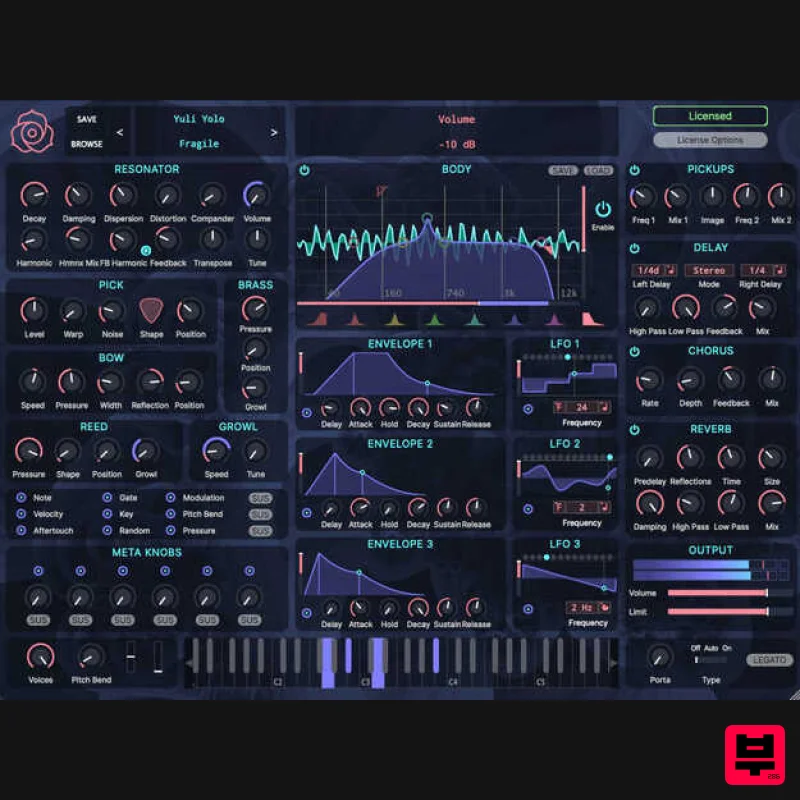
- creating beautiful sonic surprises and happy accidents. It provides a unique experience for the player. Play it yourself and find out! Fully MPE compatible! User Interface The Modeler’s user interface is remarkably simple given its power. All modeling parameters are easily understood properties and playing techniques of real-world instruments
- not mathematical abstractions. The synthesis interface fits on a single page
- and allows the user to modulate any knob from any source with 2 mouse clicks. System Requirements Windows Windows 10 & higher AAX
- VST3
- Standalone (in \Program Files\Modeler\) Mac MacOS 10.13 & higher AAX
- VST3
- Standalone (in /Applications/) Note: BioTek2 is used as an example. Windows 1. Visit https://marketplace.tracktion.com/activate > Enter your Activation Code found in your My Account > Enter your contact information and either register or log in to Tracktion > Click "Submit". 2. Click "My Downloads". 3. Download the Tracktion Download Manager by selecting your operating system and clicking "Download". 4. Double-click the downloaded .exe installer > Select "I accept the agreement" and click "Next >". 5. Decide whether or not you would like a desktop shortcut > Click "Next >". 6. Select your destination > Click "Next >". 7. Click "Install". 8. Click "Finish". 9. Open the Tracktion Download Manager > Click "Install" on both BioTek 2 and BioTek 2 content. 10. Once your files have been downloaded and installed
- you can close the download manager. > Then open your DAW. Your software is now installed and ready for use! Mac 1. Visit https: //marketplace.tracktion.com/activate > Enter your Activation Code found in your My Account > Enter your contact information and either register or log in to Tracktion > Click "Submit". 2. Click "My Downloads". 3. Download the Tracktion Download Manager by selecting your operating system and clicking "Download". 4. Open the.dmg file > Click "Continue". 5. Read the Software License Agreement > Click "Continue". 6. Click "Agree". 7. Click "Install". 8. Click "Close". 9. Open the Tracktion Download Manager > Click "Install" on both BioTek 2 and BioTek 2 content. 10. Once your files have been downloaded and installed
- you can close the download manager. > Then open your DAW. Your software is now installed and ready for use!
Additional Information
About the Tracktion Outersect Modeler
The Tracktion Outersect Modeler combines traditional design with modern performance for Synth enthusiasts.
Why Choose the Tracktion Outersect Modeler?
- •Authentic Tracktion craftsmanship and design
- •Versatile sound suitable for multiple musical genres
- •Professional build quality and reliable performance
- •Part of Tracktion's respected Synth lineup
Compare & Explore
Browse our complete selection of Tracktion instruments or explore other Synth options. Use our comparison tools to find the perfect match for your musical style and budget.
Similar Products

discoDSP Discovery Pro
Synth
$30
discoDSP’s Discovery was one of the company’s first and finest efforts. Heavily inspired by Clavia’s Nord Lead...

discoDSP Discovery
Synth
$30
Discovery is a virtual analog Nord Lead 2 inspired synthesizer featuring multi-layering, a morphing engine, high...

Reflekt Audio Xonex
Synth
$30
Xonex is a futuristic plugin that we have used time and time again to make a variety of beats. Xonex has offered me a...

discoDSP OPL
Synth
$30
The OPL is a digital sound synthesis chip developed by Yamaha in the mid 1980s. Among other products, it was used in...

Thenatan Audio Poizen VST
Synth
$30
Thenatan and Global Audio Tools have teamed up again to bring music makers across the globe a jam packed powerful tool...

discoDSP OB-Xd
Synth
$30
OB-Xd is based on the Oberheim OB-X. It attempts to recreate its sound and behavior, but as the original was very...

AngelicVibes ELITE PIANIST
Synth
$30
Your next go-to virtual instrument. Real piano recordings with unique sound and effects 50 high-quality presets for...

ThaLoops Templetone
Synth
$30
The Ultimate Hip-Hop Production Plugin – Featuring a Vast Collection of Hip-Hop Sounds. Choose between wild drums,...
Frequently Asked Questions
The Tracktion Outersect Modeler stands out for its exceptional Tracktion craftsmanship and innovative design.
Yes! With its affordable price point and quality construction, it's perfect for learning synth.
Browse the similar products section to see how it stacks up against other synth.

