
Sugar Bytes Guitarist
Professional music gear - detailed information and where to buy
Sugar Bytes
Guitarist
Product Info
* Prices may vary. Check retailer for current pricing and availability.
Product Description
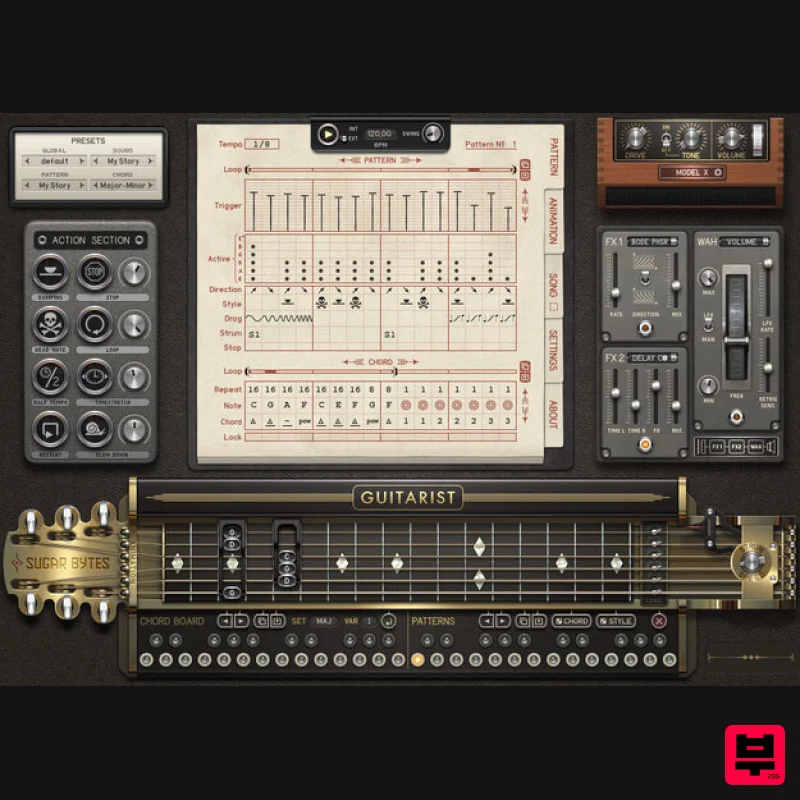
- Unrivalled Functionality Guitarist is a virtual guitar that's designed to emulate rhythm parts played on an electric guitar. The actual guitar player has been transformed into a step sequencer system with a huge level of customisation when it comes to chords or fingering patterns and a detailed control over authentic nuance and expression. The Sequencers Detailed Control and Vast Arrangement Options The Patterns page in the centre is actually very easy to use. On 16 steps you can determine if a chord is triggered
- which strings are played and if the strum goes up- or downward. Each string can be played individually at any time
- guaranteeing gigantic arpeggios
- nuanced metal riffs are also easily done. The damp- and deadnotes make it funky and lively. The lower lanes are where you can define the chord sequences. Select a root note
- choose one of 12 different chord types
- each available in three fingering variations and use the "step-repeat" for longer patterns. You can also create up to 24 user chords (incl. impossible chords) by clicking on the fretboard. The Human Touch Busy Fingers The "Animations" page lets you program extra movements for each of the mechanical "fingers" on the fretboard. A finger can be moved up or down by one
- two or three semitones per step
- to enrich chords with harmonic elements. The "Action Section" offers the means for immediate intervention. Loop parts with a press of a button
- include dead- or damp notes
- half tempo works as well. The Guitars Four Electric Models with More to Come Three different guitars are built in: Fender's Stratocaster and Telecaster are included
- along with a Duesenberg Starplayer Special. The Starplayer exists in a "Bright" and "Normal" version. Each of these beautiful six-strings was recorded with 2
- 000 samples. Extensive sets of fretted notes and open strings have been sampled
- each one repeated several times. The "round robin" function can alternate the playback of different samples. In Random mode
- a sample is selected at random from the available pool for the note triggered. Amps and Effects Form Your Sound Two effect-units with 10 effects altogether provide the colors you are looking for. FX1 specializes in modulation effects
- including a very nice Chorus
- a throaty Phaser
- and "Phase Wah" and "Auto Wah" effects. FX2 does classic delays and reverbs
- and a reverse‑buffer delay effect. Two wonderful sounding amp models are available as well as a direct out mode for your favourite amp-emulator-software. And there’s the Wah-Wah pedal. This is more sophisticated than the average guitar stomp-box
- with an integral
- variable‑rate LFO to sweep the effect back and forth (this can be deactivated
- and a MIDI controller assigned for manual control). The LFO can be set to retrigger with input signals above a given threshold (another way of producing "auto‑wah" effects)
- and Max and Min controls allow you to set the upper and lower boundaries of the effects sweep. Clever and Detailed Mechanics The Feature List Keeps on Giving Here are some more features to improve workflow and provide an authentic setup: Global Strum Speed controllable by host automation Export MIDI sequences to your DAW - can be useful when used to double on another instrument Copy/Paste buttons all over the place for effective composing Detune strings by a semitone using the pegs Sounds & Presets Authentic and Expressive: Presets are sub-divided into four categories: Global
- Sound
- Pattern and Chord Sound presets store settings such as the guitar type and selected effects. Pattern presets store the strumming and picking patterns
- while Chord presets store chord changes Selecting a Global preset automatically loads the matching presets in the other three categories. However
- you can mix and match the different categories
- combining the chord progression from one preset with the picking from another
- and the effects settings from still another User presets of all four types can be created and saved Features Four electric Guitars with more to come soon More than 2
- 000 Samples for each Sixstring Control over Strum
- Chords & Song Structures Action Section for real-time Control Slides
- Vibratos or Portamentos Warm Amps and Direct-Out 10 Effects plus Wahwah Pedal & Talk mode Mute or De-tune individual Strings System Requirements Mac macOS 10.12 or higher (Apple Silicon M1 supported) (64-bit only) VST2
- VST3
- AAX & Standalone Application Windows Windows 7 or higher (64-bit only) VST2
- VST3
- AAX & Standalone Application Important note: This software is only available in 64-bit format for both Windows and macOS and will not function on 32-bit systems. Sugar Bytes Guitarist Review at Sound On Sound Electric guitar is one of the most difficult instruments to recreate in sample-based form. Sugar Bytes are the latest developers to brave the challenge. Sampled guitars can be tricky. Sometimes they work well. Sometimes
- even with the most painstakingly multisampled
- velocity-switched libraries
- ... Read More Notes: Looperator is used as the example Pop up windows must be allowed within your browser's 'Settings' for the download link to be triggered Mac 1. After purchasing your product
- visit Sugar Bytes to register your software. 2. Enter the email address that you wish to register the software to
- as well as copy and paste/manually enter the serial number provided within your User Account > click ‘Register’. 3. Your software has successfully been registered > download your Apple (Mac) installer. Note: An email containing your Sugar Bytes login details and temporary password (in the form of a code) will be sent to the inbox of the email that you used to register the software with > this may have landed in the junk/spam folder of your email. After logging into your account
- you can select the 'Change Password' option to personalise your secret password. 4. Double-click the .dmg installer file to begin the installation process > click ‘Continue’. 5. Read the Software License Agreement > click ‘Continue’ and then ‘Agree’. 6. Copy and paste/manually enter the 8-digit serial code that exists in your Sugar Bytes account. 7. Select the software format (s) that you wish to install
- depending upon the DAW (s) you are using > click ‘Continue’. 8. Review the installation and click ‘Install’. 9. The installation of the software has successfully completed > click ‘Close’. 10. Restart your DAW and locate/open your purchased Sugar Bytes software from the plug-in selection. Note: You may need to Refresh/Rescan your DAW's Plug-in List
- if the software fails to appear. The Software is now Activated and Ready for Use Within Your DAW! Windows 1. After purchasing your product
- visit Sugar Bytes to register your software. 2. Enter the email address that you wish to register the software to
- as well as copy and paste/manually enter the serial number provided within your User Account > click ‘Register’. 3. Your software has successfully been registered > download your Windows (PC) installer. Note: An email containing your Sugar Bytes login details and temporary password (in the form of a code) will be sent to the inbox of the email that you used to register the software with > this may have landed in the junk/spam folder of your email. After logging into your account
- you can select the 'Change Password' option to personalise your secret password. 4. Double-click the .zip folder to extract and reveal its contents. 5. Double-click the .exe installer file to begin the installation process > click ‘Next’. 6. Select 'I accept the agreement’ > click ‘Next’. 7. Copy and paste/manually enter the 8-digit serial code that exists in your Sugar Bytes account. 8. Select the format (s) that you wish to install > click ‘Next’. 9. Select the software directories in which to install the software formats (32 and/or 64-Bit) to > click ‘Next’. 10. Select a folder in which to install the software to > click ‘Next’. 11. Review the installation and click ‘Install’. 12. The installation of the software has successfully completed > click ‘Finish’. 13. Restart your DAW and locate/open your purchased Sugar Bytes software from the plug-in selection. Note: You may need to Refresh/Rescan your DAW's Plug-in List
- if the software fails to appear. The Software is now Activated and Ready for Use Within Your DAW!
Additional Information
About the Sugar Bytes Guitarist
The Sugar Bytes Guitarist represents excellent craftsmanship in the Synth category.
Why Choose the Sugar Bytes Guitarist?
- •Authentic Sugar Bytes craftsmanship and design
- •Versatile sound suitable for multiple musical genres
- •Professional build quality and reliable performance
- •Part of Sugar Bytes's respected Synth lineup
Compare & Explore
Browse our complete selection of Sugar Bytes instruments or explore other Synth options. Use our comparison tools to find the perfect match for your musical style and budget.
Similar Products

AngelicVibes ELITE PIANIST
Synth
$30
Your next go-to virtual instrument. Real piano recordings with unique sound and effects 50 high-quality presets for...

ThaLoops Templetone
Synth
$30
The Ultimate Hip-Hop Production Plugin – Featuring a Vast Collection of Hip-Hop Sounds. Choose between wild drums,...

discoDSP OPL
Synth
$30
The OPL is a digital sound synthesis chip developed by Yamaha in the mid 1980s. Among other products, it was used in...

Thenatan Audio Poizen VST
Synth
$30
Thenatan and Global Audio Tools have teamed up again to bring music makers across the globe a jam packed powerful tool...

Reflekt Audio Xonex
Synth
$30
Xonex is a futuristic plugin that we have used time and time again to make a variety of beats. Xonex has offered me a...

discoDSP Discovery
Synth
$30
Discovery is a virtual analog Nord Lead 2 inspired synthesizer featuring multi-layering, a morphing engine, high...

discoDSP Discovery Pro
Synth
$30
discoDSP’s Discovery was one of the company’s first and finest efforts. Heavily inspired by Clavia’s Nord Lead...

discoDSP OB-Xd
Synth
$30
OB-Xd is based on the Oberheim OB-X. It attempts to recreate its sound and behavior, but as the original was very...
Frequently Asked Questions
The Sugar Bytes Guitarist stands out for its exceptional Sugar Bytes craftsmanship and innovative design.
Yes! With its affordable price point and quality construction, it's perfect for learning synth.
Browse the similar products section to see how it stacks up against other synth.

