
Soundiron Luminabells
Professional music gear - detailed information and where to buy
Soundiron
Luminabells
Product Info
* Prices may vary. Check retailer for current pricing and availability.
Product Description
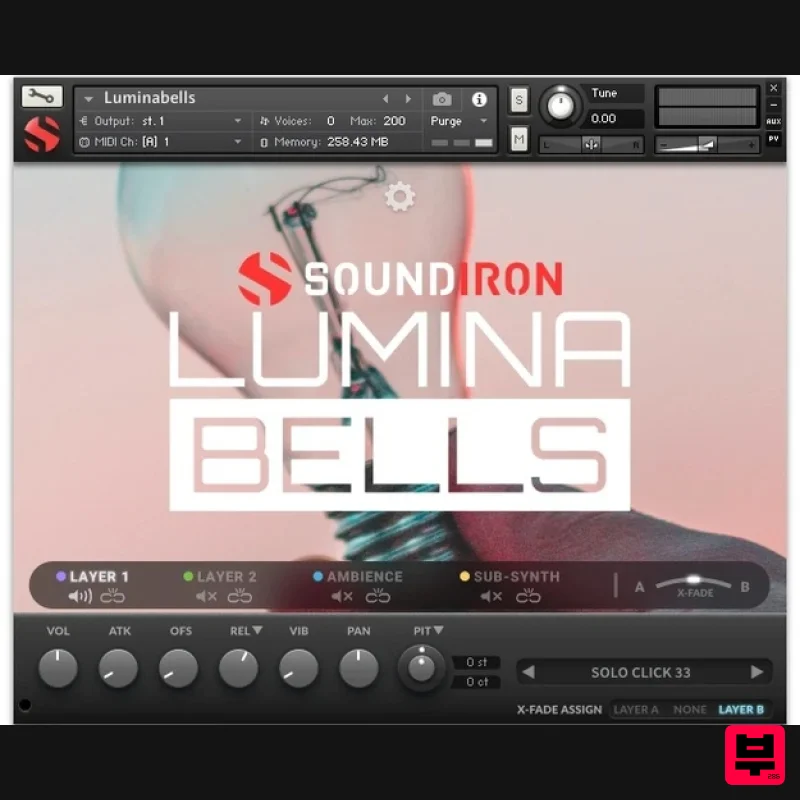
- The fragile and inherently musical bell-like aspect of the old incandescent bulb has always fascinated us and Soundiron knew that time was running out for this poor little device. That is why they must now bring you Luminabells – the mysterious and angelic essence of the simple ordinary light bulb
- captured as a tiny
- starry galaxy of humble and yet beautiful sounds. Soundiron recorded all manner of sizes and shapes of the old filament style incandescent bulb
- lovingly sculpted into a rich collection of tuned and un-tuned percussion
- sustaining melodic tones and otherworldly effects. Soundiron recorded a number of different sizes and shapes of bulbs
- using a variety of playing articulations to explore the sonic potential of each one. Soundiron tapped with fingers
- palms
- sticks
- mallets
- other bulbs and other implements
- focusing on each timbre and tone that they could bring out of each lightbulb. Soundiron paid special attention to vibrating the unique filament in each one as much as possible without breaking it or the glass bulb itself. The sound recorded for this library were all very quiet
- produced by often very and usually very fragile glass bulbs. In order to amplify many of these musical sounds up to usable levels
- some low-frequency rumble and high-frequency hiss has also been unavoidably boosted. Soundiron have left these impurities in place deliberately
- rather than filtering them out
- in order to both preserve the most delicate aspects of these sounds and to broaden the creative potential in these sounds. and allow those impurities to become added complexity and flavour. Contents The Kontakt interface includes a suite of automation-ready sound-shaping controls to give you total creative flexibility. You have control over swell
- attack
- release
- offset
- vibrato
- filter
- pitch (coarse & fine)
- articulation switching
- cross-fading and layering
- and so much more. Soundiron have also included 20 unique sound-designed custom FX presets to give you lots of creative options. This library comes with an adaptable LFO system
- with selectable LFO shape
- modulation target parameter
- speed
- intensity
- tempo-syncing and fade-in time. You can also apply your choice of 12 lowpass
- high-pass and FX filters
- with assignable modulation targets such as velocity
- modwheel
- expression
- after-touch
- key position and step-sequencer table control. Soundiron's customizable arpeggiator offers a velocity table and control over arp direction
- timing
- swing
- randomization and duration. Soundiron have included a key and scale lock system to constrain your notes to common scales and keys for easy melodic composition and live performance. The interface is rounded out by Soundiron's modular FX rack panel
- with 18 different DSP effect modules that you can assign in any of 10 available slots
- in any order that you wish. You’ll find classic phaser
- flanger
- delay
- distortion
- amp and cab simulators
- compressors
- rotator and so much more. The Reverb effect includes Soundiron's favourite convolution reverb impulse responses
- including 99 different rooms
- halls
- chambers and outdoor environments
- plus another 40 custom FX impulses to radically transform the sound and open up whole new worlds of musical possibility. Soundiron have added a great bank of FX rack chain factory presets to get you started! Features One master NKI instrument bank in open Kontakt format. Tuned & untuned tonal resonant dings
- rings
- pings
- pops
- clacks and other transient impacts from 40 lightbulbs of all shapes and sizes. 20 Ambience patches created from the source content. 24 bit / 48 kHz uncompressed PCM .wav samples. 20 Custom Sound-Designed FX and Ambient presets. 1
- 649 Stereo WAV files. 1.2 GB installed. Flexible and intuitive multi-layer user interface controls
- with LFO
- filter
- glide
- and arpeggiator. Full FX rack with convolution reverb with custom rooms
- halls
- chambers & FX environments. System Requirements The full retail version of Native Instruments Kontakt version 5.5 (or later) is required to use .nki instrument presets included in this library. The free Kontakt "Player" and "Add Library" import process do not support this standard open-format Kontakt library. Windows 7 or higher. Mac OSX 10.9 or higher. Dual-Core CPU
- 2 GB System Ram
- SATA or SSD hard drive recommended for this library. Important Notes: The FULL Version of Kontakt 5.5.0+ is required in order to use this instrument. You will be stuck in DEMO MODE if trying to use this instrument in the FREE Kontakt Player. Note: Sonespheres 1 - Distance is used as the example. Mac Installation 1. Download the installer from within your Plugin Boutique User Account > double-click the .zip file to extract the contents. 2. Double-click the .dmg file to begin the installation. 3. Enter your serial number
- found within your Plugin Boutique User Account > Click 'Verify'. 4. Click 'Okay'. 5. Read the Software Licensing Agreement > Click 'I Agree'. 6. Enter your name and email address > Click 'Confirm'. 7. Choose the download and install locations > Click 'Install'. 8. The installation is complete > Click 'Exit'. 9. Open Kontakt and click on the 'Files' tab. 10. Navigate to the location you chose to install your product in step 7 > Select the 'Instruments' folder. 11. Click and drag the .nki file into the main empty window in Kontakt. Your software is now ready to use in standalone or in your DAW! Windows Installation 1. Download the installer from within your Plugin Boutique User Account > Double-click the .exe file to begin the installation. 2. Enter your serial number
- found within your Plugin Boutique User Account > Click 'Verify'. 3. Click 'Okay'. 4. Read the Software Licensing Agreement > Click 'I Agree'. 5. Enter your name and email address > Click 'Confirm'. 6. Choose the download and install locations > Click 'Install'. 7. The installation is complete > Click 'Exit'. 8. Open Kontakt and click on the 'Files' tab. 9. Navigate to the location you chose to install your product in step 7 > Select the 'Instruments' folder. 10. Click and drag the .nki file into the main empty window in Kontakt. Your software is now ready to use in standalone or in your DAW!
Additional Information
About the Soundiron Luminabells
Discover the distinctive sound and feel of the Soundiron Luminabells, a standout choice among Kontakt Instrument.
Why Choose the Soundiron Luminabells?
- •Authentic Soundiron craftsmanship and design
- •Versatile sound suitable for multiple musical genres
- •Professional build quality and reliable performance
- •Part of Soundiron's respected Kontakt Instrument lineup
Compare & Explore
Browse our complete selection of Soundiron instruments or explore other Kontakt Instrument options. Use our comparison tools to find the perfect match for your musical style and budget.
Similar Products

Rigid Audio Retrocade
Kontakt Instrument

Audiofier Aerkord
Kontakt Instrument

Aria Sounds Hybrichord
Kontakt Instrument

Ecliptiq Audio Hexa Rhythm Designer
Kontakt Instrument

Audiofier Sequi2r EX
Kontakt Instrument

HD Instruments ZoneMatrix
Kontakt Instrument

The Beat House LE HITS THE ESSENTIALS
Kontakt Instrument

DoubleBang Software Plugged
Kontakt Instrument

