
Soundiron Grand El Campanil Piano
Professional music gear - detailed information and where to buy
Soundiron
Grand El Campanil Piano
Product Info
* Prices may vary. Check retailer for current pricing and availability.
Product Description
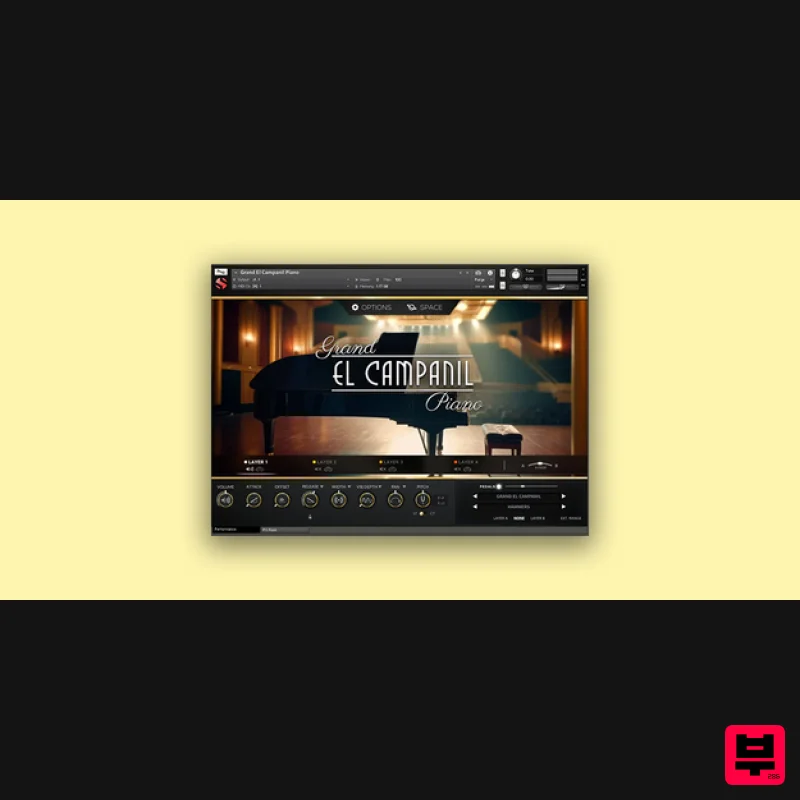
- Introducing The Grand El Campanil Piano — an extraordinarily rich and lush-sounding full-sized vintage Baldwin Grand Piano
- dating back to the 1930s. Soundiron recorded it at its home in the historic El Campanil Theatre
- a spacious and resplendent vaudevillian theater hall built in the late 1920s
- harkening back to the golden era of cinema and stage. With a sonorous low end
- dynamic responsiveness
- and nuanced character
- it is the ideal piano for classical songwriting and cinematic scoring. At the soft end of its dynamic range
- it has a warm
- hazy quality reminiscent of Soundiron's classic Emotional Piano. At its loudest
- it has a bombastic flair that punches through. The El Campanil theater has glorious acoustics
- with distinct reflective zones at the midstage
- front of house
- and back of house that each offer a very distinct sonic picture ideally suited for different mixes and musical arrangements. To capture everything this Baldwin had to offer
- Soundiron recorded it from a variety of distances and microphone configurations. The close “Hammer” position features a pair of large-diaphragm Neumann TLM 107 studio microphones to capture exquisite detail and robust presence. The overhead position
- positioned 8 feet away
- utilizes a pair of Neumann KM 183 SDC omni microphones that present a surprisingly intimate close room sound
- delivering a broad stereo field and just a hint of reverberation returning from the outer hall. The Hall position offers a well-rounded audience perspective
- recorded with a pair of Neumann TLM103 studio microphones placed about 60 feet from the piano in a wide AB stereo array
- at approximately the midpoint of the theater hall. Finally
- Soundiron included a stylized sound-designed mix called “Ghosts
- ” utilizing another far more distant pair of TLM103 mics at the very back of the house
- nearly 120 feet away. It’s perfect for long
- slow melancholic passages. The Kontakt interface includes a suite of automation-ready sound-shaping controls designed to give users total creative flexibility. Soundiron provides control over swell
- attack
- release
- offset
- vibrato
- filter
- pitch (coarse & fine)
- articulation switching
- cross-fading and layering
- among other features. This library also features an adaptable LFO system with selectable LFO shape
- modulation target parameter
- speed
- intensity
- tempo-syncing
- and fade-in time. Users can apply their choice of 12 low-pass
- high-pass
- and FX filters
- with assignable modulation targets such as velocity
- mod wheel
- expression
- aftertouch
- key position
- and step-sequencer table control. The customizable arpeggiator offers a velocity table and control over arp direction
- timing
- swing
- randomization
- and duration. Additionally
- a key and scale lock system constrains notes to common scales and keys
- simplifying melodic composition and live performance. The interface is rounded out by Soundiron's modular FX rack panel
- which offers 27 different DSP effect modules assignable to any of 8 available slots in any desired order. The effects include classic phaser
- flanger
- delay
- distortion
- amp and cab simulators
- compressors
- rotator
- and more. The Reverb effect comes with convolution reverb impulse responses
- featuring 99 different rooms
- halls
- chambers
- and outdoor environments
- plus another 40 custom FX impulses for radically transforming the sound and unlocking new creative possibilities. Soundiron has also included a great bank of FX rack chain factory presets to help users get started. Features Deeply sampled Baldwin grand piano
- captured with four microphone positions 20 ambient pads and evolving drones created from the source content 21 Powerful Kontakt .nki instrument presets 24 bit / 48 kHz uncompressed PCM wav samples 7513 stereo samples 20.1 GB Installed Flexible and intuitive multi-layer user interface controls
- with LFO
- filter
- glide
- and arpeggiator Full FX rack with convolution reverb with custom rooms
- halls
- chambers & FX environments System Requirements Windows 7 or higher required OSX 10.12 or higher required Dual Core CPU 3GB System RAM/SATA/SSD hard drive recommended The full retail version of Native Instruments Kontakt version 6.2.2+ is required to use .nki instrument presets included in this library. The free Kontakt "Player" and "Add Library" import process do not support this standard open-format Kontakt library. Important Notes: The FULL Version of Kontakt 6.2.2+ is required in order to use this instrument. You will be stuck in DEMO MODE if trying to use this instrument in the FREE Kontakt Player. Note: Sonespheres 1 - Distance is used as the example. Mac Installation 1. Download the installer from within your Plugin Boutique User Account > double-click the .zip file to extract the contents. 2. Double-click the .dmg file to begin the installation. 3. Enter your serial number
- found within your Plugin Boutique User Account > Click 'Verify'. 4. Click 'Okay'. 5. Read the Software Licensing Agreement > Click 'I Agree'. 6. Enter your name and email address > Click 'Confirm'. 7. Choose the download and install locations > Click 'Install'. 8. The installation is complete > Click 'Exit'. 9. Open Kontakt and click on the 'Files' tab. 10. Navigate to the location you chose to install your product in step 7 > Select the 'Instruments' folder. 11. Click and drag the .nki file into the main empty window in Kontakt. Your software is now ready to use in standalone or in your DAW! Windows Installation 1. Download the installer from within your Plugin Boutique User Account > Double-click the .exe file to begin the installation. 2. Enter your serial number
- found within your Plugin Boutique User Account > Click 'Verify'. 3. Click 'Okay'. 4. Read the Software Licensing Agreement > Click 'I Agree'. 5. Enter your name and email address > Click 'Confirm'. 6. Choose the download and install locations > Click 'Install'. 7. The installation is complete > Click 'Exit'. 8. Open Kontakt and click on the 'Files' tab. 9. Navigate to the location you chose to install your product in step 7 > Select the 'Instruments' folder. 10. Click and drag the .nki file into the main empty window in Kontakt. Your software is now ready to use in standalone or in your DAW!
Additional Information
About the Soundiron Grand El Campanil Piano
Discover the distinctive sound and feel of the Soundiron Grand El Campanil Piano, a standout choice among Kontakt Instrument.
Why Choose the Soundiron Grand El Campanil Piano?
- •Authentic Soundiron craftsmanship and design
- •Versatile sound suitable for multiple musical genres
- •Professional build quality and reliable performance
- •Part of Soundiron's respected Kontakt Instrument lineup
Compare & Explore
Browse our complete selection of Soundiron instruments or explore other Kontakt Instrument options. Use our comparison tools to find the perfect match for your musical style and budget.
Similar Products

The Beat House LE HITS THE ESSENTIALS
Kontakt Instrument

Rigid Audio Retrocade
Kontakt Instrument

Audiofier Aerkord
Kontakt Instrument

Aria Sounds Hybrichord
Kontakt Instrument

Ecliptiq Audio Hexa Rhythm Designer
Kontakt Instrument

DoubleBang Software Plugged
Kontakt Instrument

Audiofier Sequi2r EX
Kontakt Instrument

HD Instruments ZoneMatrix
Kontakt Instrument

