
Sound Yeti Revelation Scoring Grand
Professional music gear - detailed information and where to buy
Sound Yeti
Revelation Scoring Grand
Product Info
* Prices may vary. Check retailer for current pricing and availability.
Product Description
- Rule Breaking Alchemy of Synth and Acoustic The New Role for Musical Storytelling Revelation Scoring Grand uncovers truth telling musicality and unconventional storylines for composers
- musicians
- even sound designers at every level. Gain inspiration and write your next chapter with sublime underscores
- scintillating hybrid keys
- complex and sophisticated rhythmics and rich pianistic textures. All complimented with an ample medley of expressive solo grands. Shatter the stereotypes and traditional orthodoxy of blending the acoustic with the synthetic. Take melodic musings to concert hall completion with a single preset and sounds so expressive by themselves
- it’s the only instrument you need to create fully realized inspirational cues and compositions. Nonconformists Welcome Sometimes to be heard
- you need to break the rules
- do away with the conventions of today’s sonic expectations. With Revelation Scoring Grand your story becomes clear. Musical disclosures flow with the greatest of ease
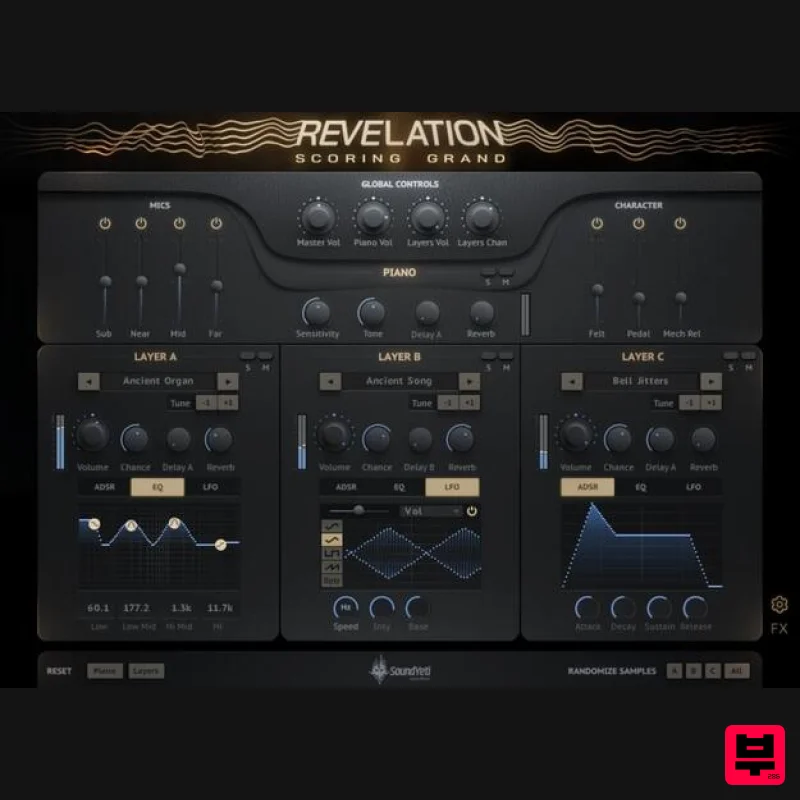
- like a truth serum for musical storytelling. Unmasking your musical intuitions with a new alchemy of synth and acoustic. A Grand Foundation Revelation’s foundation is built on a meticulously multi-sampled Steinway Grand Piano (Model O). Four microphone perspectives are beautifully captured; sub
- near
- mid and far
- for dialing in a masterful mix and revealing an extraordinary range of tones and timbers on which your ears can machinate. With much more tonal control than you’ll find even in an ultra sophisticated live session. Mic and tonal expressions are accentuated by the power to add subtle character and mechanical acoustics at will. Hyper-realize the nuance you desire with Pedal
- Felt and Mechanism Release for interjecting just the right touch of analog reality into your piano’s speaking voice. A Power Trio of Layers On top of Revelation’s grand foundation is a power trio of sampled instrument layers. Easily assign sounds to layers with the instrument’s browser of 50 uniquely sampled instruments
- categorized for easy recall. Summons any combination of the three layers and assemble an all-star supporting cast of timbres
- textures and tones. Mix for eloquent and subtle compliments to the grand or break some rules and design fully realized hybrid keys
- pads
- complex textures and rhythmics that become the main character in your musical story. Each stereo layer is accompanied by a combo of sound molding tools; ADSR
- Delay
- Reverb with 24 custom IR environments
- 4 Band EQ and Sound Yeti’s proprietary LFO design with tempo sync
- resonance
- wave shape selection
- fade in control and awesome LFO visualization. Thinking of taking the power trio on tour as the headliner? Simply mute the grand piano and you’ll find this trio is ready for top billing. Temptations for Tweaking The irresistible UI of Revelation beckons even those with only the slightest inclination to tweak twist and tune. Easily shape your sound to the perfect musical and lyrical expression. The upfront display provides almost instantaneous understanding of the composition of your sounds and is effortless for crafting your own signature mix. Features Rule breaking hybrid synth built on NI Kontakt 6 Mix four grand piano mic perspectives Character control for felt
- pedal
- and hammer mechanical samples/sounds Three layer channels (non grand piano sample groups) ADSR envelopes per layer channel Four band graphic EQ per layer channel Full-featured LFOs per layer channel
- with syncing & core waveforms Sound Yeti proprietary LFO visual display Sound Yeti custom reverb with 24 impulse response environments 58 delay effects presets Sound Yeti proprietary Preset Recall System for delay and reverb effects Probability/Chance controls for added performance dynamics Easy to use sample/sound browser with categories Drag and drop single samples into a layer Nothing else to buy – Licensed for NI Kontakt 6 Free Player What's Inside? 1 Master NKI template 100 Sound Yeti designed and curated presets/snapshots 2400 Steinway Grand Piano Model O samples 50 dynamic sample sources (non piano) 600 designed chromatic samples for textures/pads/layers 6.24 GB of compressed lossless ncw’s 24 custom impulse response reverb environments 58 delay effect presets with instant preset recall system Unlimited user snapshots System Requirements Powered by KONTAKT 6 ver 6.5.3 or later Includes KONTAKT 6 Player – Nothing else to buy Native Instruments NKS Ready with KOMPLETE KONTROL & MASCHINE Full integration with Komplete S-Series keyboards and hardware Use as a standalone virtual instrument plugin VST-AU-AAX plugin or with popular DAWs like Ableton
- Logic
- Pro Tools
- Cubase etc. Minimum System Requirements KONTAKT Player or KONTAKT 6 Full Version 6.5.3 or higher MacOS 10.12
- 10.13
- 10.14 or 10.15 (latest update)
- 4 GB RAM Windows 7
- Windows 8
- or Windows 10 (latest Service Pack)
- Intel Core i5 or equivalent CPU
- 2 GB RAM Recommended System Requirements KONTAKT Player Or KONTAKT 6 Full Version 6.5.3 or higher Mac OS X 10.12 and higher (latest update)
- 8 GB RAM Intel Core i5 or i7
- i9 Windows 7
- Windows 8
- or Windows 10 (latest Service Pack)
- Intel Core i5 or equivalent CPU
- 8 GB RAM *Please note Native Access is required for the activation of our Kontakt based instruments Note: This product is compatible with the FREE Kontakt Player. Important Note: Remember to only Extract PART 1 of the installer as this builds and correlates to Part 2. Installation Video <iframe frameborder="0" height="315" src="//www.youtube.com/embed/_3j24DEVlZo?showinfo=0&autohide=1&iv_load_policy=3&rel=0" width="560"></iframe> Important Notes: You must have a Native Instruments account and Native Access installed on your computer in order to activate this software. You can create an account and download the application at the Native Instruments website. You must have Kontakt Player 6.0 or higher installed on your computer in order to use this library. You can download the Kontakt Player from within the Native Access application. Method 1 is used as an example. Mac Installation 1. Download the product .zip file from within your Plugin Boutique User Account. 2. Unpack the contents from the .zip file. 3. After successfully unpacking the .zip file you will now see a single folder named ‘Method 1’ > Place this file in a location of your choosing. Note: You will need to reference the location of this folder later in the Activation process. Activation 1. Open Native Access and enter your Native Instruments-registered email address and password > Click 'LOG IN'. 2. Click 'Add a serial' in the top left corner of the application window. 3. Enter the serial number found in your Plugin Boutique User Account > Click 'Add Serial'. 5. Click 'View Products Not Installed'. 6. Navigate to Method 1 > Click 'ADD LIBRARY'. 7. Click 'BROWSE'. 8. Navigate to the content folder you installed in step 3 of the installation process > Click 'Open'. 9. Click 'INSTALL'. 10. Method 1 has now been successfully installed > Close Native Access. 11. Open Kontakt and go to the 'Libraries' tab. Your Library is now activated and ready to use in standalone or within your DAW. Windows Installation 1. Download the Method 1 .zip file from within your Plugin Boutique User Account. 2. Unpack the contents from the .zip file. 3. After successfully unpacking the .zip file you will now see a single folder named ‘Method 1’ > Place this file in a location of your choosing. Note: You will need to reference the location of this folder later in the Activation process. Activation 1. Open Native Access and enter your Native Instruments-registered email address and password > Click 'LOG IN'. 2. Click 'Add a serial' in the top left corner of the application window. 3. Enter the serial number found in your Plugin Boutique User Account > Click 'Add Serial'. 5. Click 'View Products Not Installed'. 6. Navigate to Method 1 > Click 'ADD LIBRARY'. 7. Click 'BROWSE'. 8. Navigate to the content folder you installed in step 3 of the installation process > Click 'Select Folder'. 9. Click 'INSTALL'. 10. Method 1 has now been successfully installed > Close Native Access. 11. Open Kontakt and go to the 'Libraries' tab. Your Library is now activated and ready to use in standalone or within your DAW.
Additional Information
About the Sound Yeti Revelation Scoring Grand
The Sound Yeti Revelation Scoring Grand represents excellent craftsmanship in the Kontakt Instrument category.
Why Choose the Sound Yeti Revelation Scoring Grand?
- •Authentic Sound Yeti craftsmanship and design
- •Versatile sound suitable for multiple musical genres
- •Professional build quality and reliable performance
- •Part of Sound Yeti's respected Kontakt Instrument lineup
Compare & Explore
Browse our complete selection of Sound Yeti instruments or explore other Kontakt Instrument options. Use our comparison tools to find the perfect match for your musical style and budget.
Similar Products

Rigid Audio Retrocade
Kontakt Instrument

Audiofier Sequi2r EX
Kontakt Instrument

DoubleBang Software Plugged
Kontakt Instrument

HD Instruments ZoneMatrix
Kontakt Instrument

Audiofier Aerkord
Kontakt Instrument

Aria Sounds Hybrichord
Kontakt Instrument

Ecliptiq Audio Hexa Rhythm Designer
Kontakt Instrument

The Beat House LE HITS THE ESSENTIALS
Kontakt Instrument

