
Sonuscore CHROMA – Grand Piano
Professional music gear - detailed information and where to buy
Sonuscore
CHROMA – Grand Piano
Product Info
* Prices may vary. Check retailer for current pricing and availability.
Product Description
- Vibrant • Profound • Eternal CHROMA personifies the ageless beauty of the piano. Painstakingly recorded from a world class Yamaha C3
- it fully captures the sonic exuberance of the ideal piano sound. It is not only the perfect recreation of the acoustic properties
- but it is also a full exploration of the instrument. From the rich depth of the single note
- to mallets
- pads
- and e-bow
- rich and inspiring soundscapes – CHROMA is more than a piano
- it is the experience of the piano itself CHROMA is the new SONUSCORE flagship piano. CHROMA offers 4 freely adjustable microphone positions. CHROMA has an unique core engine that both recreates the piano’s original sonority
- but also creates new and abstract soundscapes. CHROMA comes with an adjustable velocity curve to match the dynamics to every piano keyboard. A Piano For All Times CHROMA is not only a high-quality go-to piano for even your most demanding orchestra needs
- it is also an endless source for inspiration. With over 23 velocity layers and 8 round robins for mechanical sounds
- CHROMA reflects the real piano sound closer than ever before. The recordings include palm mutes
- brushes
- mallets
- e-bow
- and chains – a full sonic exploration of the Yamaha C3 grand piano. Choose Your Piano Though CHROMA was recorded from a top-class Yamaha C3
- Sonuscore developed it to shape the sound to any timbre you might need. With an adjustable velocity curve
- the dynamic response can be matched to any keyboard. The sound can further be adjusted by attack
- decay
- delay
- density
- octavation
- detune
- sample-start
- pan-randomizer and more. Realism At Your Fingers With fully adjustable mechanical sounds and 4 freely adjustable microphone positions (A/B
- ORTF and submic)
- CHROMA will become your choice piano for your high-quality orchestral needs. Intuitive And Natural From the interface through to the sound
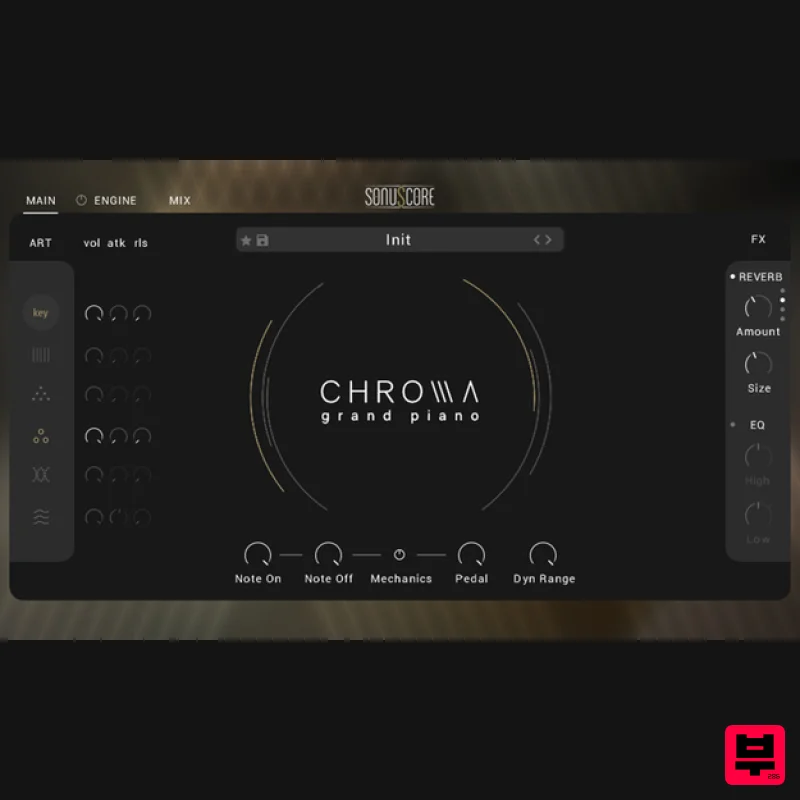
- CHROMA feels natural and easy to access. The Main Page Access the most important parameters like articulation mix
- FX and mechanics to shape the sound to your desire. The Engine Page Turn the engine on to extend CHROMA's capabilities and create and control extraordinary soundscapes. Preset Browser Filter and choose from over 90 creative and inspiring presets. Find the perfect style or create and save your own. The Mix Page Adjust and mix four different mic positions and set the velocity curve to match your preferred dynamic response. A Complete Sonic Exploration Multiple Articulations The piano was completely explored for the recording of this library. Not only were the notes played the traditional way
- but Sonuscore also used mallets
- brushes
- palm mutes
- e-bow
- and chains
- all adjustable and combinable in the virtual instrument itself. Add Mechanical Detail Live the pure grand piano experience and control mechanical sounds like Note On
- Note Off and Pedal for an even more realistic feel. The Engine - Create Abstract Soundscapes Utilizing the different recordings of the piano and its body along with an arsenal of creative effects
- CHROMA provides for a great deal of inspiring options. From new and abstract soundscapes
- to mimicking the sound of rain
- CHROMA is not just a piano
- but a powerful sound design tool. About The Yamaha C3 The Yamaha C3 grand piano is the highest quality studio piano offered by Yamaha. With a reputation for its responsive touch
- expressive tonal qualities
- and rich resonance
- it has made itself at home with top-tier professionals
- studios
- and concert halls alike. Features Revolutionary SONUSCORE flagship grand piano Perfect recreation of the acoustic properties of a Yamaha C3 piano Also an inspiring tool for creating new and abstract soundscapes Full mod wheel support of unique core engine
- inspired by TIME TEXTURES Multiple modifiable articulations like brushes
- mallets
- e-bows
- palm mutes
- and chains Over 23 velocity layers and 8 round robins 4 freely adjustable microphone positions Over 90 ready-to-go naturalistic & cinematic ensemble presets System Requirements Works with the FREE KONTAKT PLAYER KONTAKT Version 6.7.1 or higher macOS 10.14 or higher Windows 10 or higher 8GB RAM (more recommended) At least 11 GB of free hard disk space. SSD hard disk recommended. Be advised that some presets of CHROMA need a fast CPU to run and require an Intel i7 processor or higher. Please Note: This product is compatible with the FREE Kontakt Player 6.7.1 or later. Redemption 1. Go to the Sonuscore Product Registration website
- and either log in or create an account 2. Enter your license code found in your Plugin Boutique account. 3. Visit your Sonuscore Account Page by following the link 4. Either open the document to view the Native Access download instructions
- or visit the Native Access installer download website 5. Download the correct Native Access installer for your OS Mac 1. Download the .dmg installer file from the Native Access installer download website 2. Double-click the .dmg file to install Native Access. 3. Open Native Access > Create a new Native ID if you do not have one already. If you do
- skip ahead to step 5. 4. You will then receive an email with a confirmation link > Open the email and click 'CONFIRM EMAIL'. 5. Log in to Native Access with your Native ID. 6. Click 'Add a serial' 7. Enter your Serial Number found in your Plugin Boutique account > Click 'ADD SERIAL'. 8. Click the 'Not installed' tab > Locate Time Textures > Click 'INSTALL'. 9. Time Textures is now installed on your system. 10. Open Kontakt in your DAW > You should see Time Textures on the left sidebar > Click the drop-down bar and drag the .nki file into the middle of the window. Your software is now ready to use in your DAW! Windows 1. Download the .zip installer file from the Native Access installer download website 2. Double-click the extracted .exe file to begin the installation process > click ‘Run’. 3. Read the welcome message > click 'Next'. 4. Click 'Next' to begin the installation. 5. Native Access has now been installed > Click 'Finish'. 6. Open Native Access > Create a new Native ID if you do not have one already. If you do
- skip ahead to step 8. 7. You will then receive an email with a confirmation link > Open the email and click 'CONFIRM EMAIL'. 8. Log in to Native Access with your Native ID. 9. Click 'Add a serial'. 10. Enter your Serial Number found in your Plugin Boutique account > Click 'ADD SERIAL'. 11. Click the 'Not installed' tab > Locate Time Textures > Click 'INSTALL'. 12. Your new Kontakt Instrument is now installed on your system. 13. Open Kontakt in your DAW > You should see Time Textures on the left sidebar > Click the drop-down bar and drag the .nki file into the middle of the window. Your software is now ready to use in your DAW!
Additional Information
About the Sonuscore CHROMA – Grand Piano
The Sonuscore CHROMA – Grand Piano represents excellent craftsmanship in the Kontakt Instrument category.
Why Choose the Sonuscore CHROMA – Grand Piano?
- •Authentic Sonuscore craftsmanship and design
- •Versatile sound suitable for multiple musical genres
- •Professional build quality and reliable performance
- •Part of Sonuscore's respected Kontakt Instrument lineup
Compare & Explore
Browse our complete selection of Sonuscore instruments or explore other Kontakt Instrument options. Use our comparison tools to find the perfect match for your musical style and budget.
Similar Products

HD Instruments ZoneMatrix
Kontakt Instrument

Aria Sounds Hybrichord
Kontakt Instrument

Ecliptiq Audio Hexa Rhythm Designer
Kontakt Instrument

Rigid Audio Retrocade
Kontakt Instrument

The Beat House LE HITS THE ESSENTIALS
Kontakt Instrument

Audiofier Sequi2r EX
Kontakt Instrument

Audiofier Aerkord
Kontakt Instrument

DoubleBang Software Plugged
Kontakt Instrument

