
sonible pure:comp
Professional music gear - detailed information and where to buy
sonible
pure:comp
Product Info
* Prices may vary. Check retailer for current pricing and availability.
Product Description
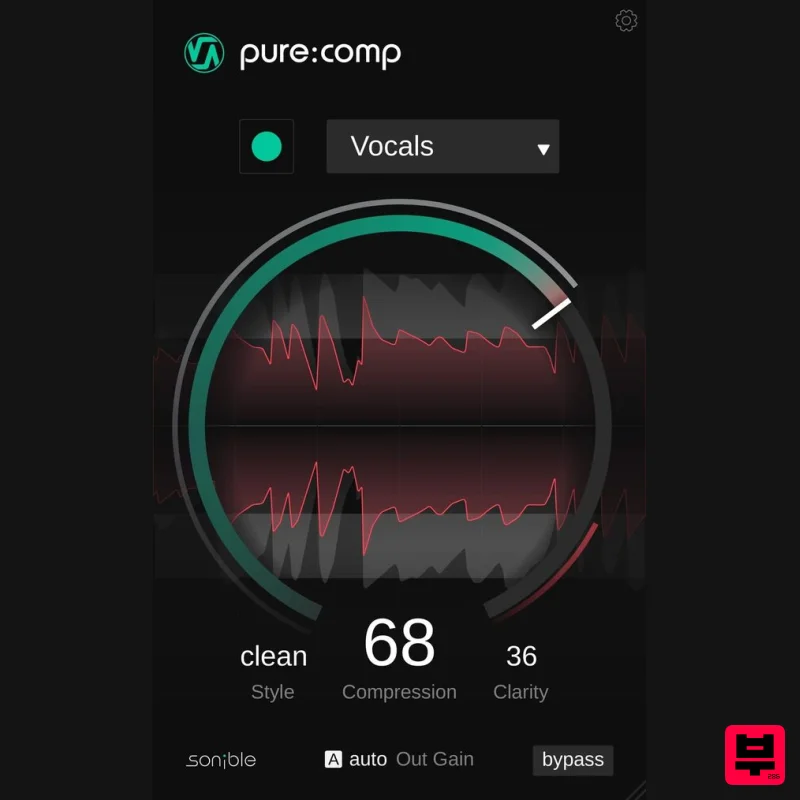
- The AI-Powered Compressor Plugin For Creators pure: comp is a straightforward compression plug-in that can instantly control a track’s dynamics – all at the touch of a single button. AI-Powered Algorithms At Your Service pure:comp simplifies the process of applying compression to any instrument or voice track. With its intelligent algorithms
- unique learning-feature and input specific profiles
- you can rely on pure: comp to deliver professional signal shaping without any artifacts or overcooking. With this tool in your arsenal
- expect to spend much more time focusing on the creative aspects instead of tweaking interdependent compression parameters. Create
- Compress
- Conquer! Use pure: comp to make 808s punchy
- get rid of muddiness in a kick or transform a drum track from weak to powerful in no time – shape the dynamics of your track without any hassle. The compressors’ visualization will let you know exactly how the plug-in is enhancing your input signal. You can modify the compression of the AI-powered processing by simply using the single compression parameter – this control combines all the general compression parameters such as threshold
- ratio
- attack and release. Nail Your Sound By Fine-Tuning pure: comp comes with two very effective sound-shaping options: Style and Clarity. Toggle through the clean
- mixed and dirty styles to decide what kind of compression character you want to dial in. Clarity has got you covered whenever you want to increase the transparency of your track. The Clarity control dials in spectral compression
- making sure that tonal imbalances are dynamically out. Features Automatic parametrization for high-quality results Intelligent processing and input-specific profiles Style control
- compression strength and clarity parameter System Requirements Mac macOS 10.9+ (M1 Apple Silicon supported) (64-bit only) RAM - at least 4 GB (recommended) CPU - at least Intel DualCore i5 (recommended) Plugin Formats - AU
- VST2
- VST3
- MultiRack Native Supported Sample Rates - 44.1 kHz to 192 kHz PC Windows 10+ (64-bit only) RAM - at least 4 GB (recommended) CPU - at least Intel DualCore i5 (recommended) Plugin Formats - VST2
- VST3
- MultiRack Native Supported Sample Rates - 44.1 kHz to 192 kHz Compatible DAWs: Logic Pro Ableton Live Pro Tools 11+ Reaper Cubase Nuendo FL Studio Studio One Please Note: frei:raum is used as an example. Mac Installation 1. Download the installer file from your Plugin Boutique account. 2. Double Click and open the installer file > Double-click the ‘frei:raum installer mac.mpkg’ file. 3. Begin the Installation Process > Click Continue. 4. Read through the Terms & Conditions of the Licence Agreement > Click Continue > Click Agree. 5. Select which software formats you wish to Install > Click Continue. 6. Confirm the Installation > Click Install. 7. The Installation of your software has completed > Click Close. 8. Open/restart your DAW and load your sonible software. Please note that you may need to refresh/rescan your DAW plugin list if you can't locate it. Standard Activation Instructions 1. Locate and open the sonible software in your DAW. 2. Copy & paste/manually enter the licence key/serial code that is available in your Plugin Boutique account > Click Register. 3. Your sonible software has now been successfully registered and authorised > Click Close. Your software is now activated and ready to use in your DAW! PC Installation 1. Download the installer file from your Plugin Boutique account. 2. Unzip the downloaded folder and Double click the file to open/run the installer. 3. Select which version or versions of the software that you wish to install (32/64-Bit) > Click Next. 5. Read the Terms & Conditions of the Licence Agreement > Select 'I Accept the Agreement' if you accept the terms > Click Next. 6. Your software is now ready to install on your computer > Click Install. 7. Your software is now installed > Click Finish. 8. Open/restart your DAW and open your sonible software. Please note that you may need to refresh/rescan your DAW plugin list if the software fails to appear. Standard Activation Instructions 1. Locate and open the sonible software in your DAW. 2. Copy & paste or manually enter the licence key/serial code that is available in your Plugin Boutique account > Click Register. 3. Your sonible software has now been successfully registered and authorised > Click Close. Your software is now activated and ready to use in your DAW!
Additional Information
About the sonible pure:comp
The sonible pure:comp represents excellent craftsmanship in the Compressor category.
Why Choose the sonible pure:comp?
- •Authentic sonible craftsmanship and design
- •Versatile sound suitable for multiple musical genres
- •Professional build quality and reliable performance
- •Part of sonible's respected Compressor lineup
Compare & Explore
Browse our complete selection of sonible instruments or explore other Compressor options. Use our comparison tools to find the perfect match for your musical style and budget.
Similar Products

Initial Audio IA-LA1
Compressor

DDMF Comprezzore
Compressor

DDMF LinComp
Compressor

Korneff Audio Pawn Shop Comp
Compressor

Soundspear Supertube
Compressor

W. A. Production BIGGIFIER
Compressor

PSP Audioware PSP Vintage Warmer 2
Compressor

MeldaProduction MEssentialsFXBundle
Compressor

