
Sonarworks SoundID Reference Virtual Monitoring
Professional music gear - detailed information and where to buy
Sonarworks
SoundID Reference Virtual Monitoring
Product Info
* Prices may vary. Check retailer for current pricing and availability.
Product Description
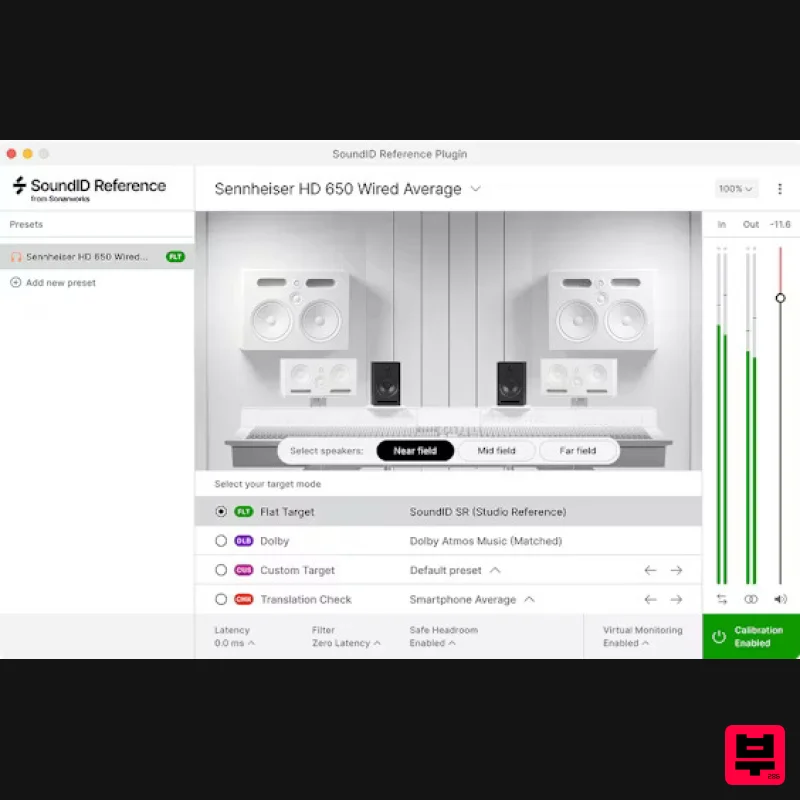
- Produce Superior Mixes on Headphones That Translate Everywhere with Realistic Studio and Device Simulations Realistic simulations - from near
- and far-field speakers calibrated to a reliable flat reference sound
- to spatial simulations of cars
- laptops
- and 3 speaker simulations: near
- and far-field 7 consumer device simulations: Phone
- Laptop
- and more. 3 car simulation presets Requires any of 500+ Sonarworks-supported headphones Features Includes a permanent SoundID Reference for Headphones license Work in a reliable flat-reference studio environment that reveals every detail of your mix. Mix confidently knowing your sound remains consistent across any playback system Quickly test how your mix holds up on real-world setups like cars
- laptops
- and TVs Hear through realistic near-
- mid-
- and far-field monitor environments with precision Requires any of 500+ Sonarworks-supported headphones macOS 10.14 - 13 (64-bit only) Windows 10 or later (64-bit only) 2 GB RAM
- 1024 x 768 display Audio interface - +48v Phantom Power and 44.1 kHz sample rate capability Sonarworks supported or Sonarworks individually calibrated headphones required. Registration 1. Go to https: //www.sonarworks.com/account/signup > Enter your email address & password > Click 'Sign up'. 2. You will have received a confirmation email from Sonarworks > Go to your email and click 'Verify this email address'. 3. From within your Sonarworks account
- click 'Register key or code ->' or go to https: //www.sonarworks.com/account/add-license 4. Enter the 24-digit key found in the serial number section of your Plugin Boutique User Account > Click 'Add'. Mac Installation 1. Download the installer from within your Plugin Boutique User Account and open the .dmg file > Double-click the installer icon to begin the installation. 2. Enter your computer username and password > Click 'Ok'. 3. Click 'Install SoundID Reference'. 4. Click 'Accept'. 5. Click 'Install' for the purchased product that you wish to install. 6. Click 'Launch SoundID Reference'. 7. Click 'Sign in to SoundID Reference'. 8. From within your Sonarworks Account
- click 'Activate on this device'. Your software is now activated and ready to use. Windows Installation 1. Download the installer from within your Plugin Boutique User Account and double-click the zip file to extract the contents > Open the .exe file to begin the installation > Click 'Install SoundID Reference'. 2. Click 'Accept'. 3. Click 'Install' for the purchased product that you wish to install. 4. Click 'Install'. 5. Click 'Launch SoundID Reference'. 6. Click 'Sign in to SoundID Reference'. 7. From within your Sonarworks Account
- click 'Activate on this device'. Your software is now activated and ready to use.
Additional Information
About the Sonarworks SoundID Reference Virtual Monitoring
The Sonarworks SoundID Reference Virtual Monitoring combines traditional design with modern performance for Utility enthusiasts.
Why Choose the Sonarworks SoundID Reference Virtual Monitoring?
- •Authentic Sonarworks craftsmanship and design
- •Versatile sound suitable for multiple musical genres
- •Professional build quality and reliable performance
- •Part of Sonarworks's respected Utility lineup
Compare & Explore
Browse our complete selection of Sonarworks instruments or explore other Utility options. Use our comparison tools to find the perfect match for your musical style and budget.
Similar Products

Blue Cat Audio Blue Cat's Connector
Utility

DDMF TheStrip
Utility

Acoustica Spin It Again
Utility

Inphonik RX950
Utility

Audible Genius Building Blocks 1
Utility

Tonalic Tonalic Arranger - 30 Day Subscription
Utility

Audible Genius Building Blocks 2
Utility

Soundspear Luxor
Utility

