
Softube Weiss DS5 Multiband Compressor
Professional music gear - detailed information and where to buy
Softube
Weiss DS5 Multiband Compressor
Product Info
* Prices may vary. Check retailer for current pricing and availability.
Product Description
- The gold standard in dynamics – times five The highly requested evolution of the preeminent mastering processor is here. Developed through the close partnership between Softube and Weiss Engineering
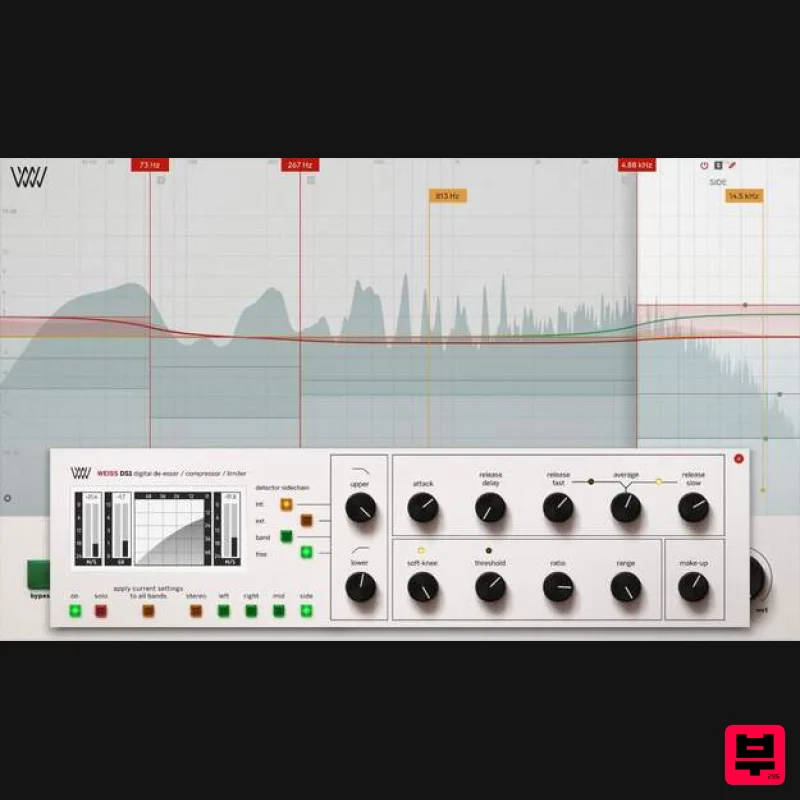
- Weiss DS5 Multiband Compressor delivers something impossible in hardware form and only available in software form: the gold standard in dynamics – times five. This translates to a line-by-line code-ported
- award-winning Weiss DS1 on all five bands of this multiband compressor for complete control over compression across specific frequency ranges
- in mastering
- and on mix busses
- vocals
- drums
- and more – all with the famous transparency of Weiss Engineering. Macro magic The Weiss DS5 Multiband Compressor macro controls and presets deliver Weiss DS1 to the power of five with absolute ease of use. The presets – designed by prominent engineers Bob Katz
- Jonathan Wyner
- Maor Appelbaum
- and Philippe Weiss – are jumping-off points made to be tweaked. While the more advanced controls are set in the preset
- users can click the DS1 button to open each band’s Weiss DS1-MK3 and see all the available options. In most cases
- however
- it will be the macro controls that help the user find the sound they are after. With the unique ability to control five powerful bands of five DS1-MK3 units with one macro
- the potential is potent and palpable. High on transparency
- low on latency Weiss is renowned for transparency
- so the main objective for Softube
- regarding the filter design
- was in keeping with this. The Weiss DS5 Multiband Compressor’s filters and compression are made to be as transparent as possible
- and the filters were designed to be fast
- with pre- and post-ringing artifacts reduced to a mathematical minimum. The cross-over filters are phase compensated 24 dB/octave filters that can be activated in three different modes: Dynamic Phase
- Static Phase
- and Linear Phase. The Weiss DS5 Multiband Compressor has also been designed for low latency use – from the Dynamic and Static Phase modes to the newly designed safety limiter. Features Five times the dynamics gold standard A line-by-line code port of the DS1 on every band Macro controls for ease of use In-depth control of each band for maximum tweakability Three filter modes designed for transparency: Static Phase
- Dynamic Phase
- and Linear Phase Low latency Important Note: Spring Reverb is used as the example Installation Video <iframe frameborder="0" height="315" src="https://www.youtube.com/embed/8bY_0kx5bzw" width="560"></iframe> Note: Before starting the installation
- you are required to create a FREE iLok user ID and install the iLok License Manager. Please take a look at this Help Centre Guide for more information. Registration 1. Click 'DOWNLOAD' in your Plugin Boutique Account. This will direct you to the Softube login page. 2. Enter your details > tick the Privacy Policy box > click 'Sign up' to create an account. (If you already have a Softube account
- please log in and skip to step 5). 3. Go to your email account > find the Softube registration email > click 'ACTIVATE MY ACCOUNT'. (Your account has now been successfully created) 4. Go back to www.softube.com (you should now be logged in) > click 'MY ACCOUNT'. 5. Click 'REGISTER LICENSE'. 6. Enter the License Code (referred to as serial number on our site) found in your Plugin Boutique User Account > click 'REGISTER LICENSE'. 7. Click 'GO FOR IT!'. Your product is now registered. Mac 1. On the My Products page
- click 'MAC' > you will be directed to the Mac Installation page. 2. Click 'HERE (highlighted in orange) to start downloading Softube Central. 3. Once it has downloaded
- open the Softube Central PKG file > click 'Continue'. 4. Read through the Software License Agreement > click 'Continue'. 5. Click 'Agree'. 6. Click 'Install'. 7. Enter your password > click 'Install Software'. 8. Click 'Close'. 9. Open Softube Central > click 'INSTALL' to install all the necessary iLok licensing components. (This may take a few minutes) 10. Sign in to your Softube account. 11. Your product will now be displayed in Softube Central. Please note: if it says 'DISCONNECTED' at the top of the window
- please go to the settings and click 'RESTART'
- close Softube Central and then open it again. Your software is now activated and ready for use within your DAW. Windows 1. On the My Products page
- click 'WINDOWS' > you will be directed to the Windows Installation page. 2. Click 'here' (highlighted in orange) to start downloading Softube Central. 3. Once it has downloaded
- open the Softube Central download > click 'Yes'. 4. Read through the Software License Agreement > click 'I Agree'. 5. Softube Central will now open > click 'Install' to download the necessary iLok licensing components. 6. Please wait for the iLok licensing components to download. (This may take up to 5 minutes). 7. Click 'Yes' > the Softube Installer Helper Setup will now run. 8. Click 'Next >'. 9. Read through the License Agreement > click 'I Agree'. 10. Click 'Next >'. 11. Choose the VST file path (we recommend the default location) > click 'Install'. 12. Click 'Finish'. 13. Softube Central has now been successfully installed > click 'START'. 14. Sign in to your Softube account. 15. Click 'INSTALL'. Your software is now activated and ready for use within your DAW.
Additional Information
About the Softube Weiss DS5 Multiband Compressor
Discover the distinctive sound and feel of the Softube Weiss DS5 Multiband Compressor, a standout choice among Compressor.
Why Choose the Softube Weiss DS5 Multiband Compressor?
- •Authentic Softube craftsmanship and design
- •Versatile sound suitable for multiple musical genres
- •Professional build quality and reliable performance
- •Part of Softube's respected Compressor lineup
Compare & Explore
Browse our complete selection of Softube instruments or explore other Compressor options. Use our comparison tools to find the perfect match for your musical style and budget.
Similar Products

PSP Audioware PSP Vintage Warmer 2
Compressor

MeldaProduction MEssentialsFXBundle
Compressor

DDMF Comprezzore
Compressor

Initial Audio IA-LA1
Compressor

W. A. Production BIGGIFIER
Compressor

Soundspear Supertube
Compressor

DDMF LinComp
Compressor

Korneff Audio Pawn Shop Comp
Compressor

