
Softube TSAR-1 Reverb
Professional music gear - detailed information and where to buy
Product Description
- The TSAR-1 Reverb is not an emulation. It's not a stock design. It's not a static snapshot of a space. The TSAR-1 is a powerful
- modern reverb algorithm. It's alive and vibrant
- it's gentle and dreamy
- and above all - it's natural and believable. The TSAR-1 is the better-sounding alternative to the established
- traditional reverb products. At a fraction of the price. The True Stereo Algorithm inside the TSAR-1 is what gives it its magic. The strength lies in its sophisticated sound and versatility
- no matter whether it's used on strings and brass or rock drums and lead vocals
- it always shines. All this while still having a comprehensive and easy-to-use interface that is unparallelled in other high-end reverb products. The TSAR-1 has been designed with ease of use in mind. Instead of a myriad of controls
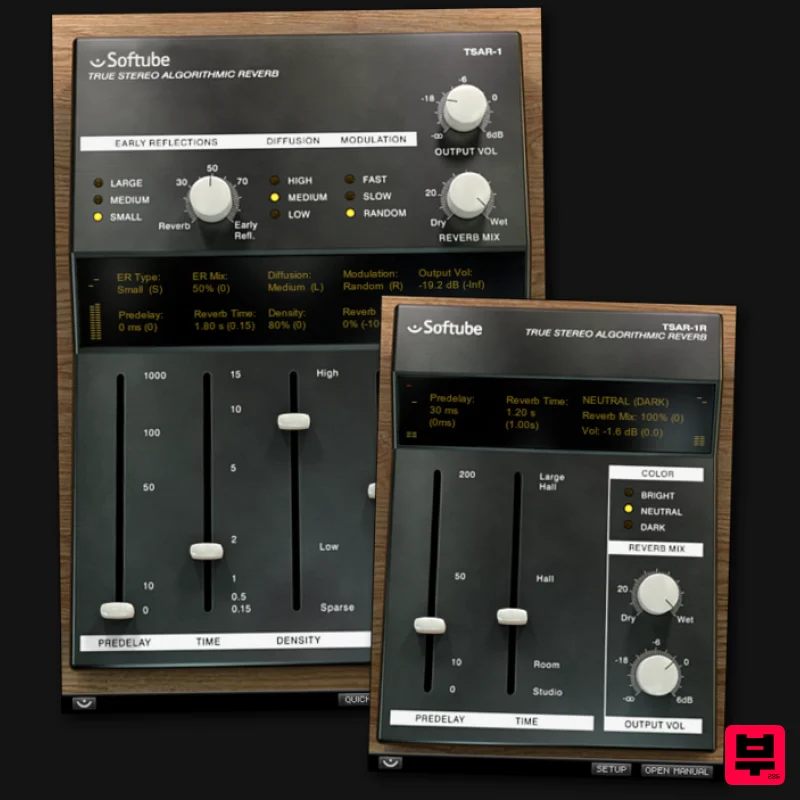
- we gave the user interface five sliders and a couple of switched options. But you may very well find you never need to use even these simple controls. Because we included a solid bank of presets
- which will cover most of your needs. The presets are clearly named for their intended use
- so find a setting you like
- maybe tweak a little - and you're good to go. In Short: True Stereo Algorithm Extraordinary versatility Comprehensive user interface Modern and powerful high-end reverb Extensive preset library Also includes the TSAR-1R Reverb Features Predelay Use it as a rhythmic effect or to carefully match the tail with the early reflections Time Longer or shorter reverb tail. Where do you want to go today? Density modern and dense
- or sparse
- lush and vintage Tone Dark or bright? No need to adjust dozens of knobs to get the character you need High Cut Too much sizzle? Cut the highs Early Reflections Type Large
- Medium or What room do you want to place your tracks in? Early Reflections Mix Already got a good sounding room and just need some longer reverb? Turn down the earlies with the mix knob Diffusion Need that extra on your snare? Modulation A vintage style chorus-y modulation
- or a modern and classy modulation? Reverb Mix and Output Volume They just have to be there
- right? Interactive Display: Show both current and previous settings
- and toggle between those by clicking on each of the parameter value displays. Extensive Preset Library: 41 well designed presets
- categorized into a "modern" and a "vintage" set. The modern set focuses on the classy reverb sounds of today
- while the vintage set mimics the characters of old school reverbs we still love to use. All presets are well documented with examples of intended use cases. System Requirements macOS Big Sur 11
- Monterey 12
- Ventura 13 Windows 10 (64-bit)
- Windows 11 Softube account iLok account Computer with AU
- VST3
- and/or AAX-compatible DAW host software Internet access (for downloading installers and managing licenses) Supported CPU Families Apple macOS computers with Intel Core i3/i5/i7 or Apple silicon (M1 or newer) CPU. Apple silicon is supported natively. Windows computers with quad-core Intel Core i3/i5/i7 or AMD quad-core processors with SSE 4.2 support. Other Intel processors (Celeron
- Pentium
- and Xeon) are compatible if they support SSE 4.2 instructions. Supported Host Software (DAW) Any 64-bit VST
- VST3
- or AAX (Pro Tools 11.0.2 or higher) compatible host application should work. However
- due to plug-in host differences between DAWs—and our rigorous standards—Softube only officially test their plug-ins and instruments in the most recent versions of Pro Tools
- Logic Pro
- Cubase
- Ableton Live
- Studio One
- and Reaper. Softube plug-ins are not tested regularly in non-listed systems. They will likely work if the system requirements are met. However
- the manufacturer cannot guarantee a solution for issues in unsupported systems. Softube strongly recommend using VST3
- as some of their plug-ins have features that are not present in the older VST format. Supported sample rates: 44.1
- 88.2
- 176.4
- and 192 kHz
- in both mono and stereo. The most recent maintenance release of your DAW application is recommended. AAX DSP is not currently in active development. TDM/VENUE/RTAS are no longer supported. See Legacy Installers. Important Note: Make sure that you always use the latest iLok License Manager. It is not included in the Softube installer but can be downloaded from www.ilok.com Fabian Marasciullo "Man!!!!!! Incredible incredible incredible!!!!! Just mixed Lil' Waynes new single How to Love and so sweeeet my TSAR-1 Reverbs are sounding right now. If I had four hands I'd give four thumbs up!" Patrik Berger "When it comes to reverbs
- I want fast access to the key parameters like time
- pre delay
- tone
- etc. These are all there
- and the reverb also happens to sound beautiful. The TSAR-1 just sounds big!" Fab Dupont "I put the TSAR-1 on one track of a song 'just to see if I liked it' and I ended up using it exclusively for the rest of the mix." Important Note: Spring Reverb is used as the example Installation Video <iframe frameborder="0" height="315" src="https://www.youtube.com/embed/8bY_0kx5bzw" width="560"></iframe> Note: Before starting the installation
- you are required to create a FREE iLok user ID and install the iLok License Manager. Please take a look at this Help Centre Guide for more information. Registration 1. Click 'DOWNLOAD' in your Plugin Boutique Account. This will direct you to the Softube login page. 2. Enter your details > tick the Privacy Policy box > click 'Sign up' to create an account. (If you already have a Softube account
- please log in and skip to step 5). 3. Go to your email account > find the Softube registration email > click 'ACTIVATE MY ACCOUNT'. (Your account has now been successfully created) 4. Go back to www.softube.com (you should now be logged in) > click 'MY ACCOUNT'. 5. Click 'REGISTER LICENSE'. 6. Enter the License Code (referred to as serial number on our site) found in your Plugin Boutique User Account > click 'REGISTER LICENSE'. 7. Click 'GO FOR IT!'. Your product is now registered. Mac 1. On the My Products page
- click 'MAC' > you will be directed to the Mac Installation page. 2. Click 'HERE (highlighted in orange) to start downloading Softube Central. 3. Once it has downloaded
- open the Softube Central PKG file > click 'Continue'. 4. Read through the Software License Agreement > click 'Continue'. 5. Click 'Agree'. 6. Click 'Install'. 7. Enter your password > click 'Install Software'. 8. Click 'Close'. 9. Open Softube Central > click 'INSTALL' to install all the necessary iLok licensing components. (This may take a few minutes) 10. Sign in to your Softube account. 11. Your product will now be displayed in Softube Central. Please note: if it says 'DISCONNECTED' at the top of the window
- please go to the settings and click 'RESTART'
- close Softube Central and then open it again. Your software is now activated and ready for use within your DAW. Windows 1. On the My Products page
- click 'WINDOWS' > you will be directed to the Windows Installation page. 2. Click 'here' (highlighted in orange) to start downloading Softube Central. 3. Once it has downloaded
- open the Softube Central download > click 'Yes'. 4. Read through the Software License Agreement > click 'I Agree'. 5. Softube Central will now open > click 'Install' to download the necessary iLok licensing components. 6. Please wait for the iLok licensing components to download. (This may take up to 5 minutes). 7. Click 'Yes' > the Softube Installer Helper Setup will now run. 8. Click 'Next >'. 9. Read through the License Agreement > click 'I Agree'. 10. Click 'Next >'. 11. Choose the VST file path (we recommend the default location) > click 'Install'. 12. Click 'Finish'. 13. Softube Central has now been successfully installed > click 'START'. 14. Sign in to your Softube account. 15. Click 'INSTALL'. Your software is now activated and ready for use within your DAW.
Additional Information
About the Softube TSAR-1 Reverb
Discover the distinctive sound and feel of the Softube TSAR-1 Reverb, a standout choice among Reverb.
Why Choose the Softube TSAR-1 Reverb?
- •Authentic Softube craftsmanship and design
- •Versatile sound suitable for multiple musical genres
- •Professional build quality and reliable performance
- •Part of Softube's respected Reverb lineup
Compare & Explore
Browse our complete selection of Softube instruments or explore other Reverb options. Use our comparison tools to find the perfect match for your musical style and budget.
Similar Products

PSP Audioware PSP Pianoverb 2
Reverb
$30
PSP PianoVerb2 is a redesigned and improved creative resonant reverb plug-in based on our famous and beloved freeware...

PSP Audioware PSP EasyVerb
Reverb
$30
PSP EasyVerb is a reverberation effect plug-in (VST, RTAS and AAX for Windows; VST, AudioUnit, RTAS and AAX for Mac OS...

PSP Audioware PSP Nexcellence
Reverb
$30
PSP Nexcellence is a rich-sounding, spring reverb emulation inspired by and modeled after classic “necklace-type”...

XHUN Audio ShineVerb
Reverb
$30
Creative Reverb Processor ShineVerb is a creative tool specially designed for reverberation, spatialization and sound...

Initial Audio AR1 Reverb
Reverb
$30
Quality Algorithmic Reverb Plugin AR1 is an algorithmic reverb plugin designed to sound great on all types of...

Vegas Audio Fabricverb
Reverb
$30
Get the signature sound of the UK’s most famous nightclub on your digital audio workstation! Our new convolution...

DDMF Envelope
Reverb
$30
Envelope is a true stereo reverb plugin featuring 8 different room simulations, all of which can be adjusted for size,...

DDMF MagicVerb
Reverb
$30
MagicVerb is the latest result of the collaboration between MagicDeathEye aka Ian Sefchick and DDMF. This journey was...
Frequently Asked Questions
The Softube TSAR-1 Reverb stands out for its exceptional Softube craftsmanship and innovative design.
Yes! With its affordable price point and quality construction, it's perfect for learning reverb.
Browse the similar products section to see how it stacks up against other reverb.

