
Softube Summit Audio TLA-100A Compressor
Professional music gear - detailed information and where to buy
Softube
Summit Audio TLA-100A Compressor
Product Info
* Prices may vary. Check retailer for current pricing and availability.
Product Description
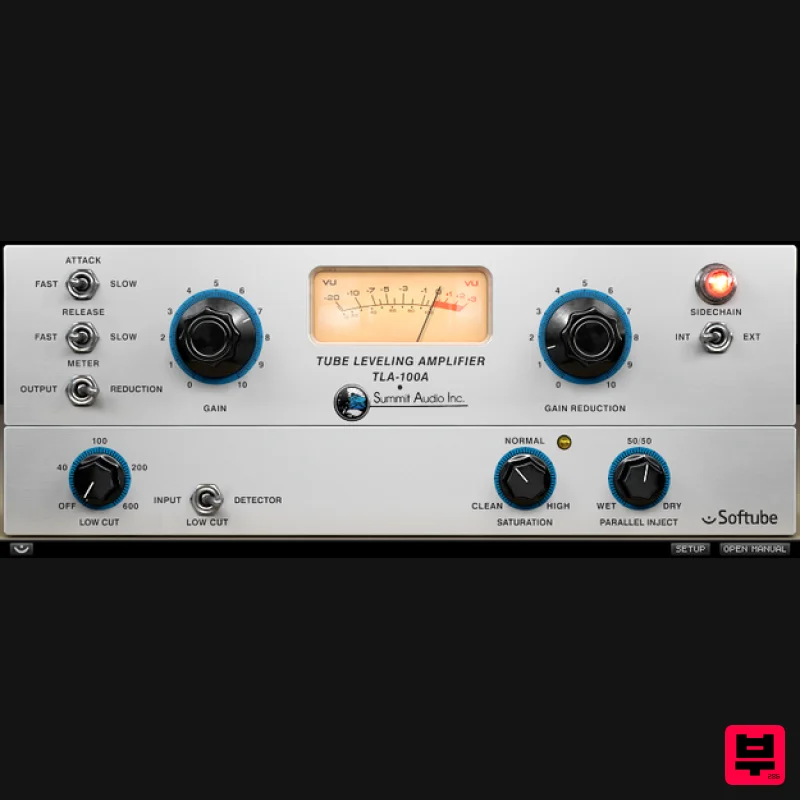
- This classic compressor is all about gentle and natural sounding gain reduction. It effortlessly keeps your material's dynamics controlled without ever strangling the sound. Everything you put into the TLA-100A comes out the other end big and compact sounding. The Summit Audio TLA-100A works in a program dependent manner
- meaning it does a lot of the thinking for you. It's tremendously easy to use and basically impossible to make it sound bad. It will however give you some soft and warm distortion if you drive it really hard. For ease of use
- Softubes TLA-100A plug-in has a Saturation knob that the original unit lacks. This lets you blend in just the right amount of distortion to your signal. The TLA-100A shows the same basic behavior on any type of material. Its transparency and strong but gentle grab of the sound source makes it a popular choice for placing vocals and bass just where they need to be in the mix. The TLA-100A is also well suited for tasks like softening a spiky acoustic guitar that demands too much attention
- or providing some 'glue' on a drum buss or a full mix. Features Controls your audio dynamics with mild authority Easy to use Built-in parallel compression and detector filtering (Low Cut filter switchable to signal input) Each and every component carefully modeled Modeled output distortion
- easily controlled with the Saturation knob Extremely analog behavior of frequencies
- phase
- distortion
- attack
- release
- etc Softube makes the only Summit Audio plug-ins System Requirements macOS Big Sur 11
- Monterey 12
- Ventura 13 Windows 10 (64-bit)
- Windows 11 Softube account iLok account Computer with AU
- VST3
- and/or AAX-compatible DAW host software Internet access (for downloading installers and managing licenses) Supported CPU Families Apple macOS computers with Intel Core i3/i5/i7 or Apple silicon (M1 or newer) CPU. Apple silicon is supported natively. Windows computers with quad-core Intel Core i3/i5/i7 or AMD quad-core processors with SSE 4.2 support. Other Intel processors (Celeron
- Pentium
- and Xeon) are compatible if they support SSE 4.2 instructions. Supported Host Software (DAW) Any 64-bit VST
- VST3
- or AAX (Pro Tools 11.0.2 or higher) compatible host application should work. However
- due to plug-in host differences between DAWs—and our rigorous standards—Softube only officially test their plug-ins and instruments in the most recent versions of Pro Tools
- Logic Pro
- Cubase
- Ableton Live
- Studio One
- and Reaper. Softube plug-ins are not tested regularly in non-listed systems. They will likely work if the system requirements are met. However
- the manufacturer cannot guarantee a solution for issues in unsupported systems. Softube strongly recommend using VST3
- as some of their plug-ins have features that are not present in the older VST format. Supported sample rates: 44.1
- 88.2
- 176.4
- and 192 kHz
- in both mono and stereo. The most recent maintenance release of your DAW application is recommended. AAX DSP is not currently in active development. TDM/VENUE/RTAS are no longer supported. See Legacy Installers. Important Note: Make sure that you always use the latest iLok License Manager. It is not included in the Softube installer but can be downloaded from www.ilok.com Zach McNees "Softube has outdone itself. The TLA-100A plug-in is a testament to what can be achieved in hardware modeling when attention is paid to the details of design." Koen Heldens "Summit Audio TLA-100A is ideal to control bass or vocals
- much like its cousins LA2A and LA3A. Just set and forget." Steve Levine "It's probably worth pointing out that the Summit Audio TLA-100A Compressor isn't just an LA-2A. It's good on the same type of jobs
- but it's a more modern concept and has a different sound and feel to it." Important Note: Spring Reverb is used as the example Installation Video <iframe frameborder="0" height="315" src="https://www.youtube.com/embed/8bY_0kx5bzw" width="560"></iframe> Note: Before starting the installation
- you are required to create a FREE iLok user ID and install the iLok License Manager. Please take a look at this Help Centre Guide for more information. Registration 1. Click 'DOWNLOAD' in your Plugin Boutique Account. This will direct you to the Softube login page. 2. Enter your details > tick the Privacy Policy box > click 'Sign up' to create an account. (If you already have a Softube account
- please log in and skip to step 5). 3. Go to your email account > find the Softube registration email > click 'ACTIVATE MY ACCOUNT'. (Your account has now been successfully created) 4. Go back to www.softube.com (you should now be logged in) > click 'MY ACCOUNT'. 5. Click 'REGISTER LICENSE'. 6. Enter the License Code (referred to as serial number on our site) found in your Plugin Boutique User Account > click 'REGISTER LICENSE'. 7. Click 'GO FOR IT!'. Your product is now registered. Mac 1. On the My Products page
- click 'MAC' > you will be directed to the Mac Installation page. 2. Click 'HERE (highlighted in orange) to start downloading Softube Central. 3. Once it has downloaded
- open the Softube Central PKG file > click 'Continue'. 4. Read through the Software License Agreement > click 'Continue'. 5. Click 'Agree'. 6. Click 'Install'. 7. Enter your password > click 'Install Software'. 8. Click 'Close'. 9. Open Softube Central > click 'INSTALL' to install all the necessary iLok licensing components. (This may take a few minutes) 10. Sign in to your Softube account. 11. Your product will now be displayed in Softube Central. Please note: if it says 'DISCONNECTED' at the top of the window
- please go to the settings and click 'RESTART'
- close Softube Central and then open it again. Your software is now activated and ready for use within your DAW. Windows 1. On the My Products page
- click 'WINDOWS' > you will be directed to the Windows Installation page. 2. Click 'here' (highlighted in orange) to start downloading Softube Central. 3. Once it has downloaded
- open the Softube Central download > click 'Yes'. 4. Read through the Software License Agreement > click 'I Agree'. 5. Softube Central will now open > click 'Install' to download the necessary iLok licensing components. 6. Please wait for the iLok licensing components to download. (This may take up to 5 minutes). 7. Click 'Yes' > the Softube Installer Helper Setup will now run. 8. Click 'Next >'. 9. Read through the License Agreement > click 'I Agree'. 10. Click 'Next >'. 11. Choose the VST file path (we recommend the default location) > click 'Install'. 12. Click 'Finish'. 13. Softube Central has now been successfully installed > click 'START'. 14. Sign in to your Softube account. 15. Click 'INSTALL'. Your software is now activated and ready for use within your DAW.
Additional Information
About the Softube Summit Audio TLA-100A Compressor
Discover the distinctive sound and feel of the Softube Summit Audio TLA-100A Compressor, a standout choice among Compressor.
Why Choose the Softube Summit Audio TLA-100A Compressor?
- •Authentic Softube craftsmanship and design
- •Versatile sound suitable for multiple musical genres
- •Professional build quality and reliable performance
- •Part of Softube's respected Compressor lineup
Compare & Explore
Browse our complete selection of Softube instruments or explore other Compressor options. Use our comparison tools to find the perfect match for your musical style and budget.
Similar Products

DDMF Comprezzore
Compressor

PSP Audioware PSP Vintage Warmer 2
Compressor

Soundspear Supertube
Compressor

W. A. Production BIGGIFIER
Compressor

Korneff Audio Pawn Shop Comp
Compressor

DDMF LinComp
Compressor

Initial Audio IA-LA1
Compressor

MeldaProduction MEssentialsFXBundle
Compressor

