
Softube OPTO Compressor
Professional music gear - detailed information and where to buy
Softube
OPTO Compressor
Product Info
* Prices may vary. Check retailer for current pricing and availability.
Product Description
- A Prime Compressor
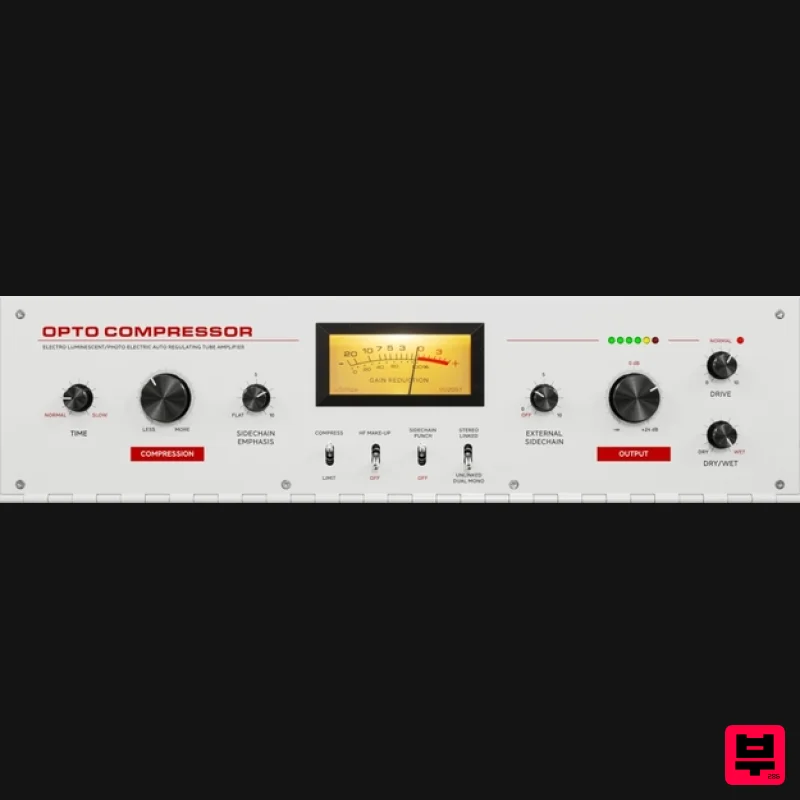
- Optimized For Modern Times The hardware Softube modeled OPTO Compressor on is lauded as the most classic compressor. It's well-known for its nuanced tube character and how it delicately enhances the fainter parts of a performance in a natural-sounding way. While the warm and tones remain
- OPTO Compressor offers some crucial
- new DAW-friendly features. Their OPTO Compressor plug-in ensures that you get the legendary magic of the early-60s T4 Opto Cell original
- plus the added control and flexibility of a modern mixing and production workflow. All with Softube-quality sound. Designed by Experts
- Built on Legacy Softube have been emulating professional audio gear for two decades. With partnerships with premium brands like Tube-Tech
- Solid State Logic
- Chandler Limited
- and Marshall Amplification
- they have a strong record of accurately recreating analog standards in software form. OPTO Compressor builds on this legacy
- delivering nothing less than the same classic character as the original hardware
- superior sound quality
- and added modern features. More Than Meets The Eye OPTO Compressor offers the slow attack and character of pro audio's go-to optical tube compressor
- plus added modern features for a DAW-based workflow. Dry/Wet and a Sidechain section deliver more control and improved versatility for mixing and mastering. Drive allows you to decide the amount of distortion and character of the original unit separately from the gain reduction
- making OPTO Compressor more useful in a mixing situation than the original hardware. The High Frequency Make-up feature allows you to compensate for the minor loss of higher frequencies when compressing sound sources. With the Stereo Link switch
- you can toggle from Stereo Linked mode
- with linked Left and Right gain reduction
- to Unlinked Dual Mono for independent gain reduction for Left and Right channels. OPTO Compressor is perfect for vocals
- guitar
- and bass or as a second gain reduction stage after the FET Compressor Mk II on a vocal track. In Short An expert emulation of the most classic analog compressor in the world Renowned for its warmth
- and ability to add character to the sound Added modern features
- such as Drive
- Stereo Link
- a Sidechain section
- the High Frequency Make-up feature
- and Dry/Wet Authentically modeled subtle tube distortion character System Requirements macOS Big Sur 11
- Monterey 12
- Ventura 13 Windows 10 (64-bit)
- Windows 11 Softube account iLok account Computer with AU
- VST3
- and/or AAX-compatible DAW host software Internet access (for downloading installers and managing licenses) Supported CPU Families Apple macOS computers with Intel Core i3/i5/i7 or Apple silicon (M1 or newer) CPU. Apple silicon is supported natively. Windows computers with quad-core Intel Core i3/i5/i7 or AMD quad-core processors with SSE 4.2 support. Other Intel processors (Celeron
- Pentium
- and Xeon) are compatible if they support SSE 4.2 instructions. Supported Host Software (DAW) Any 64-bit VST
- VST3
- or AAX (Pro Tools 11.0.2 or higher) compatible host application should work. However
- due to plug-in host differences between DAWs—and our rigorous standards—Softube only officially test their plug-ins and instruments in the most recent versions of Pro Tools
- Logic Pro
- Cubase
- Ableton Live
- Studio One
- and Reaper. Softube plug-ins are not tested regularly in non-listed systems. They will likely work if the system requirements are met. However
- the manufacturer cannot guarantee a solution for issues in unsupported systems. Softube strongly recommend using VST3
- as some of their plug-ins have features that are not present in the older VST format. Supported sample rates: 44.1
- 88.2
- 176.4
- and 192 kHz
- in both mono and stereo. The most recent maintenance release of your DAW application is recommended. AAX DSP is not currently in active development. TDM/VENUE/RTAS are no longer supported. See Legacy Installers. Important Note: Make sure that you always use the latest iLok License Manager. It is not included in the Softube installer but can be downloaded from www.ilok.com Important Note: Spring Reverb is used as the example Installation Video <iframe frameborder="0" height="315" src="https://www.youtube.com/embed/8bY_0kx5bzw" width="560"></iframe> Note: Before starting the installation
- you are required to create a FREE iLok user ID and install the iLok License Manager. Please take a look at this Help Centre Guide for more information. Registration 1. Click 'DOWNLOAD' in your Plugin Boutique Account. This will direct you to the Softube login page. 2. Enter your details > tick the Privacy Policy box > click 'Sign up' to create an account. (If you already have a Softube account
- please log in and skip to step 5). 3. Go to your email account > find the Softube registration email > click 'ACTIVATE MY ACCOUNT'. (Your account has now been successfully created) 4. Go back to www.softube.com (you should now be logged in) > click 'MY ACCOUNT'. 5. Click 'REGISTER LICENSE'. 6. Enter the License Code (referred to as serial number on our site) found in your Plugin Boutique User Account > click 'REGISTER LICENSE'. 7. Click 'GO FOR IT!'. Your product is now registered. Mac 1. On the My Products page
- click 'MAC' > you will be directed to the Mac Installation page. 2. Click 'HERE (highlighted in orange) to start downloading Softube Central. 3. Once it has downloaded
- open the Softube Central PKG file > click 'Continue'. 4. Read through the Software License Agreement > click 'Continue'. 5. Click 'Agree'. 6. Click 'Install'. 7. Enter your password > click 'Install Software'. 8. Click 'Close'. 9. Open Softube Central > click 'INSTALL' to install all the necessary iLok licensing components. (This may take a few minutes) 10. Sign in to your Softube account. 11. Your product will now be displayed in Softube Central. Please note: if it says 'DISCONNECTED' at the top of the window
- please go to the settings and click 'RESTART'
- close Softube Central and then open it again. Your software is now activated and ready for use within your DAW. Windows 1. On the My Products page
- click 'WINDOWS' > you will be directed to the Windows Installation page. 2. Click 'here' (highlighted in orange) to start downloading Softube Central. 3. Once it has downloaded
- open the Softube Central download > click 'Yes'. 4. Read through the Software License Agreement > click 'I Agree'. 5. Softube Central will now open > click 'Install' to download the necessary iLok licensing components. 6. Please wait for the iLok licensing components to download. (This may take up to 5 minutes). 7. Click 'Yes' > the Softube Installer Helper Setup will now run. 8. Click 'Next >'. 9. Read through the License Agreement > click 'I Agree'. 10. Click 'Next >'. 11. Choose the VST file path (we recommend the default location) > click 'Install'. 12. Click 'Finish'. 13. Softube Central has now been successfully installed > click 'START'. 14. Sign in to your Softube account. 15. Click 'INSTALL'. Your software is now activated and ready for use within your DAW.
Additional Information
About the Softube OPTO Compressor
The Softube OPTO Compressor combines traditional design with modern performance for Compressor enthusiasts.
Why Choose the Softube OPTO Compressor?
- •Authentic Softube craftsmanship and design
- •Versatile sound suitable for multiple musical genres
- •Professional build quality and reliable performance
- •Part of Softube's respected Compressor lineup
Compare & Explore
Browse our complete selection of Softube instruments or explore other Compressor options. Use our comparison tools to find the perfect match for your musical style and budget.
Similar Products

PSP Audioware PSP Vintage Warmer 2
Compressor

MeldaProduction MEssentialsFXBundle
Compressor

Soundspear Supertube
Compressor

W. A. Production BIGGIFIER
Compressor

Korneff Audio Pawn Shop Comp
Compressor

DDMF LinComp
Compressor

DDMF Comprezzore
Compressor

Initial Audio IA-LA1
Compressor

