
Softube Modular Add-On: Intellijel Rubicon
Professional music gear - detailed information and where to buy
Product Description
- This product is an expansion for Softube Modular. If you do not currently own Modular
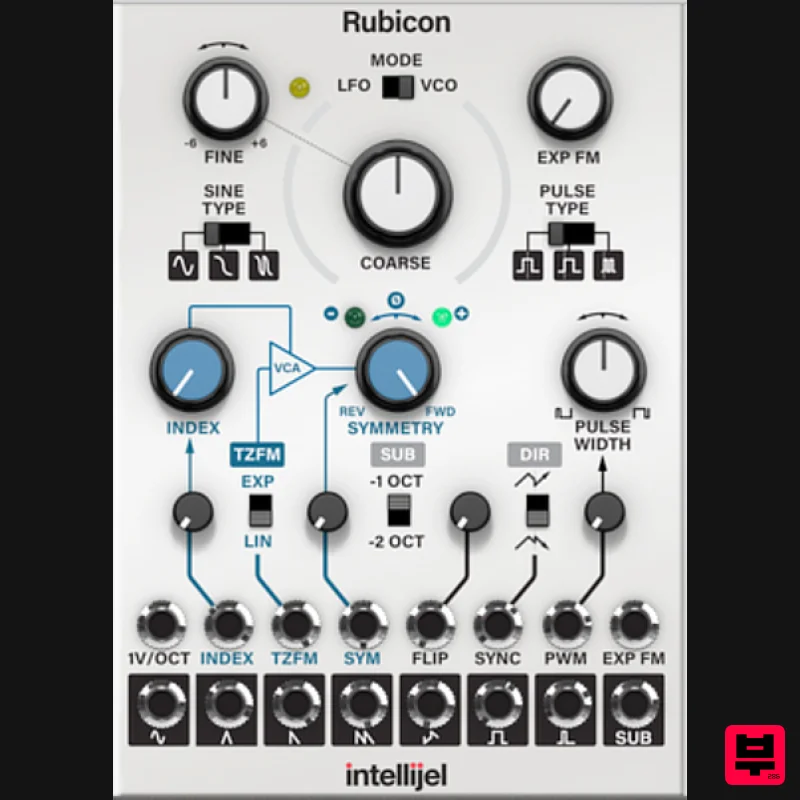
- you can purchase it HERE. The thru-zero frequency modulation of Rubicon is ideal for experimenting with FM synthesis. Rubicon is an analog VCO design masterpiece
- originially created by Dave Dixon with Intellijel. It is a unique Eurorack module
- now offered as an add-on module for Modular. Please Note: MODULAR (cross-platform modular synthesizer) is required to run this software! Features: High precision emulated Triangle core Switchable linear and (for the first time in any module) exponential TZFM (through-zero FM) Linear index VCA for dynamic control of TZFM depth Symmetry control (full clockwise is normal
- full counter-clockwise gives reversed waveforms
- centered the VCO is at 0 Hz) with CV 12 primary waveform types: sine
- sigmoid
- double sigmoid
- triangle
- double saw
- zigzag
- square
- pulse (center modulated)
- pulse (edge modulated)
- double pulse Suboctave circuit with -1 and -2 octaves. The suboctave output is affected by fm just like the main signals Soft sync (also known as reversing sync) with attenuator Hard sync with selectable reset direction (determines if the triangle starts moving up or down after a reset
- very useful in LFO mode) Pulse-width modulation and exponential FM with dedicated attenuators Requires Modular System Requirements macOS Big Sur 11
- Monterey 12
- Ventura 13 Windows 10 (64-bit)
- Windows 11 Softube account iLok account Computer with AU
- VST3
- and/or AAX-compatible DAW host software Internet access (for downloading installers and managing licenses) Supported CPU Families Apple macOS computers with Intel Core i3/i5/i7 or Apple silicon (M1 or newer) CPU. Apple silicon is supported natively. Windows computers with quad-core Intel Core i3/i5/i7 or AMD quad-core processors with SSE 4.2 support. Other Intel processors (Celeron
- Pentium
- and Xeon) are compatible if they support SSE 4.2 instructions. Supported Host Software (DAW) Any 64-bit VST
- VST3
- or AAX (Pro Tools 11.0.2 or higher) compatible host application should work. However
- due to plug-in host differences between DAWs—and our rigorous standards—Softube only officially test their plug-ins and instruments in the most recent versions of Pro Tools
- Logic Pro
- Cubase
- Ableton Live
- Studio One
- and Reaper. Softube plug-ins are not tested regularly in non-listed systems. They will likely work if the system requirements are met. However
- the manufacturer cannot guarantee a solution for issues in unsupported systems. Softube strongly recommend using VST3
- as some of their plug-ins have features that are not present in the older VST format. Supported sample rates: 44.1
- 88.2
- 176.4
- and 192 kHz
- in both mono and stereo. The most recent maintenance release of your DAW application is recommended. AAX DSP is not currently in active development. TDM/VENUE/RTAS are no longer supported. See Legacy Installers. Softube Modular is required to run this software. Make sure that you always use the latest iLok License Manager. It is not included in the Softube installer but can be downloaded from www.ilok.com Jan Hennig "The Rubicon is a true desert island module as each of the seven waveforms sound full and warm. And if thru-zero FM with 3 different sine and pulse types is still not enough
- the Rubicon can also double as a LFO." Fredrik Mjelle a k a Beem "Rubicon and µFold are lovely combined
- together they make a great complex oscillator. Super flexible in timbre and easy to work with. The sound sucks you in
- with a lot of depth and presence" John Tejada "Thru-zero frequency modulation is fantastic and being able to take multiple Rubicon's with me on the go with Modular is amazing. Having the same hardware module and sound that I'm used to working with in Modular is a real dsp game changer for me and my workflow." Important Note: Spring Reverb is used as the example Installation Video <iframe frameborder="0" height="315" src="https://www.youtube.com/embed/8bY_0kx5bzw" width="560"></iframe> Note: Before starting the installation
- you are required to create a FREE iLok user ID and install the iLok License Manager. Please take a look at this Help Centre Guide for more information. Registration 1. Click 'DOWNLOAD' in your Plugin Boutique Account. This will direct you to the Softube login page. 2. Enter your details > tick the Privacy Policy box > click 'Sign up' to create an account. (If you already have a Softube account
- please log in and skip to step 5). 3. Go to your email account > find the Softube registration email > click 'ACTIVATE MY ACCOUNT'. (Your account has now been successfully created) 4. Go back to www.softube.com (you should now be logged in) > click 'MY ACCOUNT'. 5. Click 'REGISTER LICENSE'. 6. Enter the License Code (referred to as serial number on our site) found in your Plugin Boutique User Account > click 'REGISTER LICENSE'. 7. Click 'GO FOR IT!'. Your product is now registered. Mac 1. On the My Products page
- click 'MAC' > you will be directed to the Mac Installation page. 2. Click 'HERE (highlighted in orange) to start downloading Softube Central. 3. Once it has downloaded
- open the Softube Central PKG file > click 'Continue'. 4. Read through the Software License Agreement > click 'Continue'. 5. Click 'Agree'. 6. Click 'Install'. 7. Enter your password > click 'Install Software'. 8. Click 'Close'. 9. Open Softube Central > click 'INSTALL' to install all the necessary iLok licensing components. (This may take a few minutes) 10. Sign in to your Softube account. 11. Your product will now be displayed in Softube Central. Please note: if it says 'DISCONNECTED' at the top of the window
- please go to the settings and click 'RESTART'
- close Softube Central and then open it again. Your software is now activated and ready for use within your DAW. Windows 1. On the My Products page
- click 'WINDOWS' > you will be directed to the Windows Installation page. 2. Click 'here' (highlighted in orange) to start downloading Softube Central. 3. Once it has downloaded
- open the Softube Central download > click 'Yes'. 4. Read through the Software License Agreement > click 'I Agree'. 5. Softube Central will now open > click 'Install' to download the necessary iLok licensing components. 6. Please wait for the iLok licensing components to download. (This may take up to 5 minutes). 7. Click 'Yes' > the Softube Installer Helper Setup will now run. 8. Click 'Next >'. 9. Read through the License Agreement > click 'I Agree'. 10. Click 'Next >'. 11. Choose the VST file path (we recommend the default location) > click 'Install'. 12. Click 'Finish'. 13. Softube Central has now been successfully installed > click 'START'. 14. Sign in to your Softube account. 15. Click 'INSTALL'. Your software is now activated and ready for use within your DAW.
Additional Information
About the Softube Modular Add-On: Intellijel Rubicon
The Softube Modular Add-On: Intellijel Rubicon combines traditional design with modern performance for Synth enthusiasts.
Why Choose the Softube Modular Add-On: Intellijel Rubicon?
- •Authentic Softube craftsmanship and design
- •Versatile sound suitable for multiple musical genres
- •Professional build quality and reliable performance
- •Part of Softube's respected Synth lineup
Compare & Explore
Browse our complete selection of Softube instruments or explore other Synth options. Use our comparison tools to find the perfect match for your musical style and budget.
Similar Products

discoDSP Discovery Pro
Synth
$30
discoDSP’s Discovery was one of the company’s first and finest efforts. Heavily inspired by Clavia’s Nord Lead...

ThaLoops Templetone
Synth
$30
The Ultimate Hip-Hop Production Plugin – Featuring a Vast Collection of Hip-Hop Sounds. Choose between wild drums,...

discoDSP Discovery
Synth
$30
Discovery is a virtual analog Nord Lead 2 inspired synthesizer featuring multi-layering, a morphing engine, high...

Reflekt Audio Xonex
Synth
$30
Xonex is a futuristic plugin that we have used time and time again to make a variety of beats. Xonex has offered me a...

discoDSP OB-Xd
Synth
$30
OB-Xd is based on the Oberheim OB-X. It attempts to recreate its sound and behavior, but as the original was very...

Thenatan Audio Poizen VST
Synth
$30
Thenatan and Global Audio Tools have teamed up again to bring music makers across the globe a jam packed powerful tool...

AngelicVibes ELITE PIANIST
Synth
$30
Your next go-to virtual instrument. Real piano recordings with unique sound and effects 50 high-quality presets for...

discoDSP OPL
Synth
$30
The OPL is a digital sound synthesis chip developed by Yamaha in the mid 1980s. Among other products, it was used in...
Frequently Asked Questions
The Softube Modular Add-On: Intellijel Rubicon stands out for its exceptional Softube craftsmanship and innovative design.
Yes! With its affordable price point and quality construction, it's perfect for learning synth.
Browse the similar products section to see how it stacks up against other synth.

