
Slate Digital Custom Opto
Professional music gear - detailed information and where to buy
Slate Digital
Custom Opto
Product Info
* Prices may vary. Check retailer for current pricing and availability.
Product Description
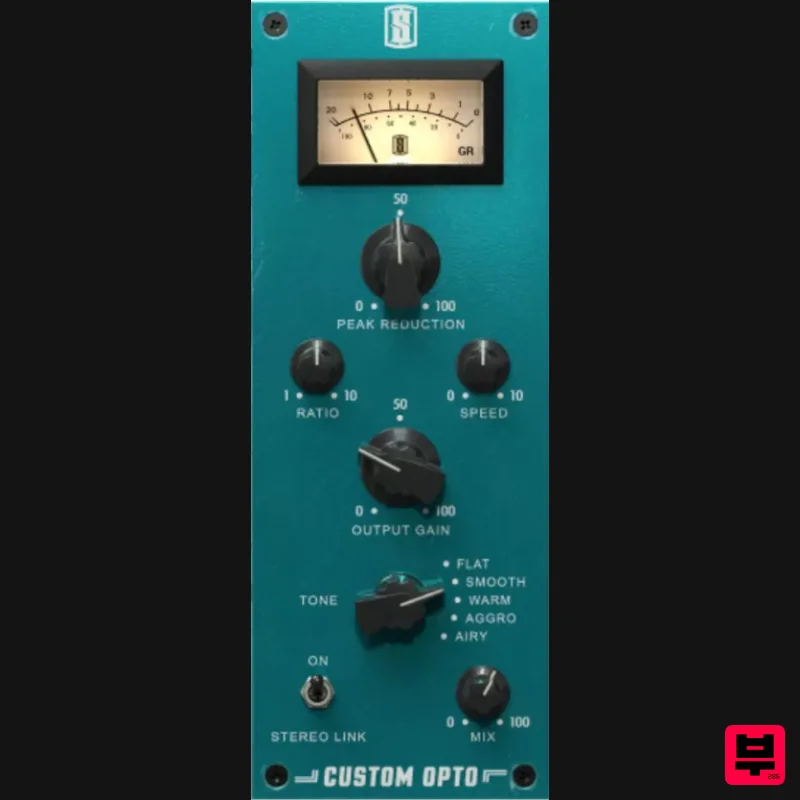
- Shape It. Fast. A legendary Opto comp
- cranked to 11. Custom timing
- ratio
- and four bold tone modes let you shape
- slam
- and style your mix in seconds. Hot Rod Your Sound Decide how quickly the circuit responds with Speed
- and dial in just the right amount of compression with Ratio. Get all the of a Classic Opto with the controls you need to hot rod your sound. Dial In Your Tone Choose from 4 new custom vibes to breathe life into your mix. Open up your top end with Airy. Take out harsh frequencies with Bring snap & punch with Aggro. Add vintage fatness with Warm. The Tone knob is your new best friend. Built for Virtual Mix Rack Custom Opto brings modern muscle to vintage tone. With adjustable timing
- ratio
- and four bold tone settings
- this Opto compressor lets you dial in warmth
- punch
- or control—all inside VMR. Pair it with your favorite EQs
- saturators
- and other VMR modules to build a powerful
- mix-ready chain in seconds. One rack. Endless combinations. Total control. macOS Minimum OS - macOS 13 or later Processor / RAM - Intel or Apple Silicon
- 4GB RAM Plugin Formats - AU
- VST2
- AAX (64-bit host) Windows Operating System - Windows 10 or Windows 11 Processor / RAM - Intel or AMD Processor
- 4GB RAM Plugin Formats - VST2
- VST3
- AAX (64-bit host) Important note: A free iLok license manager account is required to run Slate Digital software. Important notes: A free iLok cloud account is needed to use this product. MetaTune is used as the example. The installation process is identical for all Slate Digital products. 1. Click Download in your Plugin Boutique Library or go to https://app.completeaccess.audio/authenticate/sign-up > sign up for an account or login 2. Click the blue person icon > click Profile > click iLok account > add your iLok user ID 3. Go to https://app.completeaccess.audio/gift > enter your Voucher code / License found in your Plugin Boutique Library > click Redeem 4. Check the box > click Get this product 5. Click Install 6. Download the install file for your OS > install the plugin 7. Open iLok License Manager > right click the plugin name > click Activate 8. Select a location > click Activate 9. Click OK Your plugin is now installed and ready to use. Enjoy!
Additional Information
About the Slate Digital Custom Opto
Discover the distinctive sound and feel of the Slate Digital Custom Opto, a standout choice among Compressor.
Why Choose the Slate Digital Custom Opto?
- •Authentic Slate Digital craftsmanship and design
- •Versatile sound suitable for multiple musical genres
- •Professional build quality and reliable performance
- •Part of Slate Digital's respected Compressor lineup
Compare & Explore
Browse our complete selection of Slate Digital instruments or explore other Compressor options. Use our comparison tools to find the perfect match for your musical style and budget.
Similar Products

DDMF Comprezzore
Compressor

W. A. Production BIGGIFIER
Compressor

PSP Audioware PSP Vintage Warmer 2
Compressor

Initial Audio IA-LA1
Compressor

MeldaProduction MEssentialsFXBundle
Compressor

Soundspear Supertube
Compressor

DDMF LinComp
Compressor

Korneff Audio Pawn Shop Comp
Compressor

