
Signum Audio SKYE Dynamics (Surround)
Professional music gear - detailed information and where to buy
Signum Audio
SKYE Dynamics (Surround)
Product Info
* Prices may vary. Check retailer for current pricing and availability.
Product Description
- Multi-Stage Dynamics Processor Plugin Note: This product is the Surround version. The Stereo version of SKYE Dynamics is also available. Its name derived from the beautiful
- naturally sculpted Scottish isle
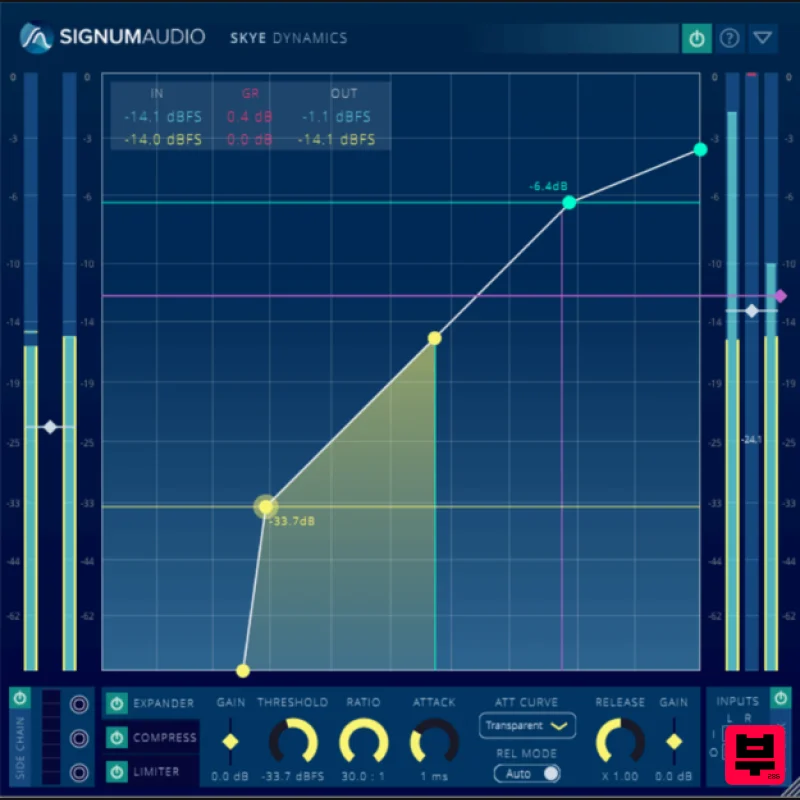
- SKYE Dynamics is a multi-stage
- three-in-one dynamics processor comprising an Expander
- Compressor and Limiter designed for music production. Signum Audio’s Dynamics DSP Algorithms are intended to provide clean and transparent processing with exceptionally low levels of distortion and saturation for a natural sound. With adaptive auto-Release and selection of 5 preset envelopes
- SKYE Dynamics makes mixing and mastering simpler. SKYE Dynamics includes a comprehensive array of features for creative uses. Each effect in the chain can be individually bypassed
- gain staging can be done at any point in the chain
- and each effect has its individual side chain. All of this can be automated. A channel linking system allows further tailoring of the input and output of the plugin. SKYE Dynamics focuses on workflow optimization and is completely interactive. The plugin boasts a unique user interface that lets the user configure the whole effect chain intuitively from one view. The dynamic range of the metering and effects configuration can be freely scaled for precision work
- while the plugin window can be freely resized and offers a streamlined compact view. Clean and Transparent With algorithms specifically designed for transparency
- SKYE Dynamics delivers exceptionally low levels of distortion and saturation. SKYE Dynamics also features an advanced adaptive auto release and a selection of 5 envelope presets for each processor
- making it a standout tool for mixing and mastering music. Get Creative SKYE Dynamics includes a comprehensive array of features for creative uses. Each effect in the chain can be individually bypassed
- gain staging can be done at any point in the chain
- and each effect has its individual side chain. All of this can be automated. A channel linking system allows further tailoring of the input and output of the plugin. SKYE Dynamics opens up completely new creative possibilities. Streamlined and Intuitive The plugin boasts a unique user interface that lets the user configure the whole effect chain intuitively from a single view. Metering and configuration automatically update and switch to the selected processor. SKYE Dynamics focuses on workflow optimization and is completely interactive. The dynamic range of the metering and the graphical effects configuration can be zoomed and out to cater for different material. The plugin window can also be freely resized and offers a streamlined compact view. Ready For All Spatial Mixing The Surround version of SKYE Dynamics is compatible with setups up to 7.1.4. With full surround support for the channel linking feature
- you can also get creative with spatial mixing. Features A plugin for multi-staged dynamics processing Three dynamics effects - Exander
- Compressor
- Limiter Ultra transparent processing Linear
- Natural
- Transparent
- and Pumping envelopes Advanced adaptive auto-release Individual Side Chains to each processor Individual bypass for each processor Channel Linking (up to 7.1.4 configuration in the Surround version) Gain Stage at any point Intuitive node based UI to configure effects chain Dynamic range for metering and effects configuration can be freely scaled Full and compact view for optimising screen space Fully resizable/scalable plugin window Multichannel input/output metering for effects chain and individual effects (Surround version) System Requirements PC Windows 7 or higher VST / VST3 / AAX 64-bit only Available in 2 versions - Stereo or Surround (additional support up to Atmos 7.1.2 support) Mac Mac OSx 10.9 Lion or higher VST / VST3 / AU / AAX 64-bit only Available in 2 versions - Stereo or Surround (additional support up to Atmos 7.1.2 support) Note: Bute Loudness Suite Stereo is used as the example. Mac Registration 1. Go to your Plugin Boutique User Account and find the URL located in the box labelled 'Serial Number' > Copy and paste the URL into your web browser and press enter. 2. You will be redirected to a shopping cart on the Signum Audio website. Check the product is correct > Click 'Checkout'. 3. Click 'Register'. 4. Enter your personal details by filling out all the fields with an asterisk (*) next to them > Click 'Register'. Note: Be sure to scroll down the page and fill out all of the relevant fields. 5. Click 'Continue'. 6. You will then be redirected back to the same checkout page as step 2 of the registration process > Click 'Checkout'. 7. Click 'Confirm'. 8. Click 'Continue'. Installation 1. You will have received an email from Signum Audio containing your license key and product download link > Go to your email and click 'Download Link'. 2. Click 'Download for Mac'. 3. Go to your downloaded installer
- double click the zip file to extract the contents and open the .pkg file to begin the installation > Click 'Continue'. 4. Click 'Continue'. 5. Click 'Agree'. 6. Click 'Continue'. 7. Click 'Continue'. 8. Click 'Install'. 9. Enter your computer Username and Password > Click 'Install Software'. 10. Click 'Close'. Activation 1. Open your newly installed plugin in your DAW > Enter your license key
- found in your email from Signum Audio and click 'Ok'. Your software is now activated and ready to use in your DAW. Windows Registration 1. Go to your Plugin Boutique User Account and find the URL located in the box labelled 'Serial Number' > Copy and paste the URL into your web browser and press enter' 2. You will be redirected to a shopping cart on the Signum Audio website. Check the product is correct > Click 'Checkout'. 3. Click 'Register'. 4. Enter your personal details by filling out all the fields with an asterisk (*) next to them > Click 'Register'. Note: Be sure to scroll down the page and fill out all of the relevant fields. 5. Click 'Continue'. 6. You will then be redirected back to the same checkout page as step 2 of the registration process > Click 'Checkout'. 7. Click 'Confirm'. 8. Click 'Continue'. Installation 1. You will have received an email from Signum Audio containing your license key and product download link > Go to your email and click 'Download Link'. 2. Click 'Download for Windows'. 3. Go to your downloaded installer
- double click the zip file to extract the contents and open the .exe file to begin the installation > Select 'I accept the agreement' and click 'Next'. 4. Click 'Next'. 5. Click 'Next'. 6. Click 'Install'. 7. Click 'Finish'. Activation 1. Open your newly installed plugin in your DAW > Enter your license key
- found in your email from Signum Audio and click 'Ok'. Your software is now activated and ready to use in your DAW.
Additional Information
About the Signum Audio SKYE Dynamics (Surround)
The Signum Audio SKYE Dynamics (Surround) represents excellent craftsmanship in the Compressor category.
Why Choose the Signum Audio SKYE Dynamics (Surround)?
- •Authentic Signum Audio craftsmanship and design
- •Versatile sound suitable for multiple musical genres
- •Professional build quality and reliable performance
- •Part of Signum Audio's respected Compressor lineup
Compare & Explore
Browse our complete selection of Signum Audio instruments or explore other Compressor options. Use our comparison tools to find the perfect match for your musical style and budget.
Similar Products

MeldaProduction MEssentialsFXBundle
Compressor

W. A. Production BIGGIFIER
Compressor

DDMF Comprezzore
Compressor

Soundspear Supertube
Compressor

Korneff Audio Pawn Shop Comp
Compressor

DDMF LinComp
Compressor

PSP Audioware PSP Vintage Warmer 2
Compressor

Initial Audio IA-LA1
Compressor

