
Signum Audio SKYE Clipper
Professional music gear - detailed information and where to buy
Signum Audio
SKYE Clipper
Product Info
* Prices may vary. Check retailer for current pricing and availability.
Product Description
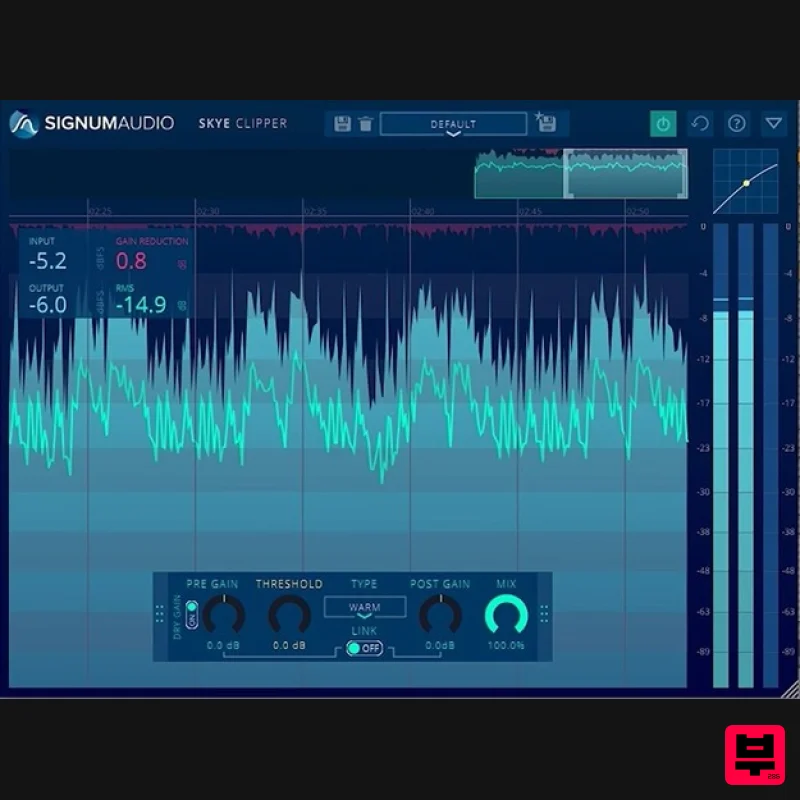
- Multi-Stage Dynamics Processor Plugin Note: This product is the Stereo version. The Surround Sound version of SKYE Clipper is also available. SKYE Clipper is a clipper and saturator that can be used for mixing
- mastering and creative sound design. It includes 7 different clipping types
- utilising Signum Audio's sophisticated proprietary real-time anti-aliasing algorithms
- with a sleek
- feature rich and yet simple user interface. Clippers are a great way to add perceived volume to your tracks by shaving off the peaks and adding more body by introducing harmonic saturation that can create a rich
- punchy and fuller sound. They also work great as saturators to add some grit and crunch on your instruments. SKYE Clipper lets you choose between different clipping styles to help control peaks
- add loudness to your mix
- or to add saturation to your audio. This means it can be used in a variety of scenarios like taming a snare
- bus processing
- or to add texture to a synthesiser. You can look back over your audio to check your processing with its scalable history view for precision work. Drop it on the master and push the signal into clipping to emulate A-D Convertor clipping. Remove Unwanted Aliasing Artefacts SKYE Clipper uses Signum Audio's proprietary real time anti-aliasing algorithms to drastically reduce the amount of aliasing artefacts produced by clipping. This removes the need to use high upsampling ratios that are known to cause an increase in CPU usage that slows down performance. Automated Parameters SKYE Clipper has a control panel where you can control its Pre-gain
- Threshold
- Clipping Type
- Gain Link
- Post-Gain and Dry-Wet Mix. All parameters are fully automatable in your DAW and all controls can also be fine tuned by holding the shift modifier while dragging. Get the Surround Version for Spatial Mixing With ambisonic mixing becoming more prevalent
- Signum Audio have ensured that their plugins are prepared. SKYE Clipper Surround is compatible with up to 7.1.4 surround sound including Dolby Atmos
- as well as Stereo and Mono configurations. Features A plugin for hard & soft clipping Seven clipping types Real time proprietary anti aliasing technology Resizable History view for timeline of processing Pre & Post gain linking Preset Manager Controls for Pre-gain
- Threshold
- Clipping Type
- Gain Link
- Post-Gain and Dry-Wet Mix Dynamic range for metering can be freely scaled Mix control for easy parallel processing Full and compact view for optimising screen space Stereo and Surround versions for multichannel configurations Compatible with Mac OS or Windows Compatible with VST / VST3 / AU / AAX formats System Requirements PC Windows 7 or higher VST / VST3 / AAX 64-bit only Available in 2 versions - Stereo or Surround (additional support up to Atmos 7.1.2 support) Mac Mac OSx 10.9 Lion or higher VST / VST3 / AU / AAX 64-bit only Available in 2 versions - Stereo or Surround (additional support up to Atmos 7.1.2 support) Note: Bute Loudness Suite Stereo is used as the example. Mac Registration 1. Go to your Plugin Boutique User Account and find the URL located in the box labelled 'Serial Number' > Copy and paste the URL into your web browser and press enter. 2. You will be redirected to a shopping cart on the Signum Audio website. Check the product is correct > Click 'Checkout'. 3. Click 'Register'. 4. Enter your personal details by filling out all the fields with an asterisk (*) next to them > Click 'Register'. Note: Be sure to scroll down the page and fill out all of the relevant fields. 5. Click 'Continue'. 6. You will then be redirected back to the same checkout page as step 2 of the registration process > Click 'Checkout'. 7. Click 'Confirm'. 8. Click 'Continue'. Installation 1. You will have received an email from Signum Audio containing your license key and product download link > Go to your email and click 'Download Link'. 2. Click 'Download for Mac'. 3. Go to your downloaded installer
- double click the zip file to extract the contents and open the .pkg file to begin the installation > Click 'Continue'. 4. Click 'Continue'. 5. Click 'Agree'. 6. Click 'Continue'. 7. Click 'Continue'. 8. Click 'Install'. 9. Enter your computer Username and Password > Click 'Install Software'. 10. Click 'Close'. Activation 1. Open your newly installed plugin in your DAW > Enter your license key
- found in your email from Signum Audio and click 'Ok'. Your software is now activated and ready to use in your DAW. Windows Registration 1. Go to your Plugin Boutique User Account and find the URL located in the box labelled 'Serial Number' > Copy and paste the URL into your web browser and press enter' 2. You will be redirected to a shopping cart on the Signum Audio website. Check the product is correct > Click 'Checkout'. 3. Click 'Register'. 4. Enter your personal details by filling out all the fields with an asterisk (*) next to them > Click 'Register'. Note: Be sure to scroll down the page and fill out all of the relevant fields. 5. Click 'Continue'. 6. You will then be redirected back to the same checkout page as step 2 of the registration process > Click 'Checkout'. 7. Click 'Confirm'. 8. Click 'Continue'. Installation 1. You will have received an email from Signum Audio containing your license key and product download link > Go to your email and click 'Download Link'. 2. Click 'Download for Windows'. 3. Go to your downloaded installer
- double click the zip file to extract the contents and open the .exe file to begin the installation > Select 'I accept the agreement' and click 'Next'. 4. Click 'Next'. 5. Click 'Next'. 6. Click 'Install'. 7. Click 'Finish'. Activation 1. Open your newly installed plugin in your DAW > Enter your license key
- found in your email from Signum Audio and click 'Ok'. Your software is now activated and ready to use in your DAW.
Additional Information
About the Signum Audio SKYE Clipper
Discover the distinctive sound and feel of the Signum Audio SKYE Clipper, a standout choice among Compressor.
Why Choose the Signum Audio SKYE Clipper?
- •Authentic Signum Audio craftsmanship and design
- •Versatile sound suitable for multiple musical genres
- •Professional build quality and reliable performance
- •Part of Signum Audio's respected Compressor lineup
Compare & Explore
Browse our complete selection of Signum Audio instruments or explore other Compressor options. Use our comparison tools to find the perfect match for your musical style and budget.
Similar Products

DDMF Comprezzore
Compressor

W. A. Production BIGGIFIER
Compressor

Korneff Audio Pawn Shop Comp
Compressor

Initial Audio IA-LA1
Compressor

PSP Audioware PSP Vintage Warmer 2
Compressor

DDMF LinComp
Compressor

MeldaProduction MEssentialsFXBundle
Compressor

Soundspear Supertube
Compressor

