
Sampleson Sandstorm
Professional music gear - detailed information and where to buy
Sampleson
Sandstorm
Product Info
* Prices may vary. Check retailer for current pricing and availability.
Product Description
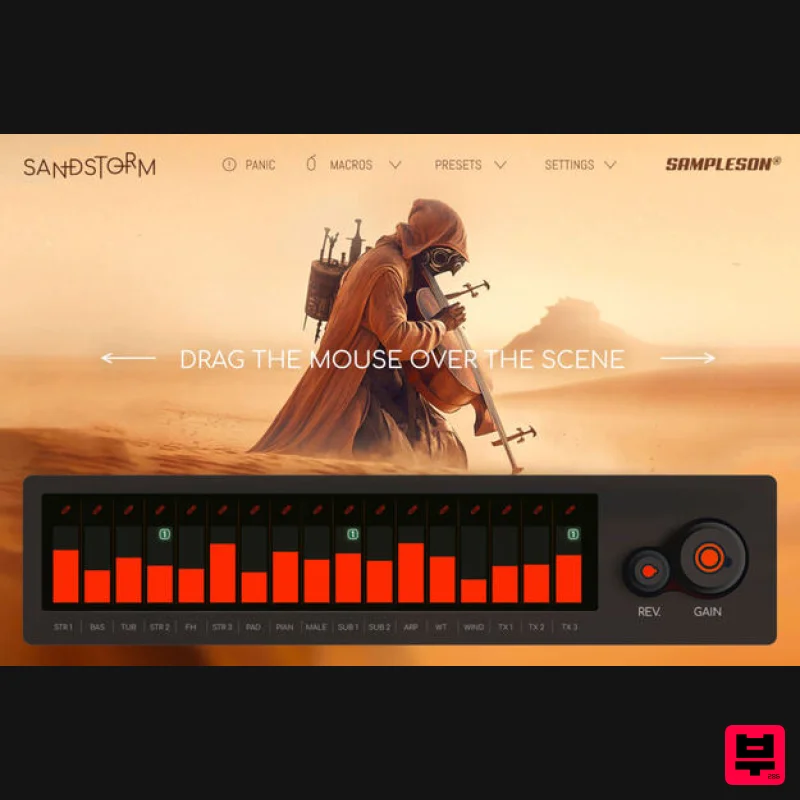
- Evolving Soundscapes Builder Sandstorm is a massive soundscape and atmosphere creator that produces huge and evolving ambients and textures by stacking up to 17 high-quality layers of sound. From Orchestral Instruments to Analog Synths
- Granular and Wavetable modules
- Sandstorm can create impressive textures and ambients in seconds. Sound Huge in a Second Sandstorm can create unique multi source sounds that will allow you to rapidly try many variations and ideas for a movie passage or game scene. Available as a VST/AU plugin and standalone software for both Windows and Mac
- Sandstorm is a cutting-edge tool for generating complex and evolving soundscapes. Featuring up to 17 high-quality sound sources
- Sandstorm offers a wide range of sonic possibilities that are perfect for modern underscores and sound production. With Sandstorm
- you can experiment with a variety of sound sources
- including orchestral instruments
- analog synths
- granular
- and wavetable modules. Its intuitive interface and flexible routing options give you complete control over your sound
- allowing you to shape and mold it to your exact specifications. All of its sounds are assignable to the mouse macro control. This will help you create new colors every time you drag the mouse over the interface. Whether you're a professional sound designer or a beginner
- Sandstorm is an essential tool for any film or gaming production setup. With its high-quality sound sources
- versatile features
- and intuitive interface
- Sandstorm is the ultimate tool for creating dynamic and engaging soundscapes and textures. Layers List Strings 1 [STR1] Bassoons [BAS] Tubas [TUB] Strings 2 [STR2] French Horns [FH] Strings 3 [STR3] Pad Synthesiser [PAD] Upright Piano [PIAN] Male Voices [MALE] Sub Synthesiser [SUB 1] Sub Synthesiser [SUB 2] Wavetable Arpeggiator [ARP] Wavetable Synthesiser [WT] Wind Noise Synthesizer [WIND] Granular Synthesiser 1 [TX1] Granular Synthesiser 2 [TX2] Granular Synthesiser 3 [TX3] Features Cinematic Instrument for music scoring. Ambient
- Arps
- Drones
- Melodic and Textures Modules. ~200 MB. Low CPU usage. 17 sound engines. 88 presets. Automated parameters for DAWs. Granular
- Wavetable
- Oscillator and Sampling Engines. Scalable HD interface. Controls/FX: Ambient Reverb Master Gain Modules Reverb System Requirements Mac Standalone App
- VST3 and AU included. OSX 10.7 or later (Catalina
- Big Sur and Monterey ready). Host must support VSTi or AU plugins. 200 MB HDD. 4GB RAM. 64 bits Plugin and Standalone. Windows Standalone 64 bits App and VST3 included. Windows 7 or later. Host must support VSTi plugins. 200 MB HDD. 4GB RAM. 64 bits Plugin and Standalone. Important Note: Pro Tools is not supported. Please Note: Stage54 is used as an example. Mac Download Installer 1. Navigate to your Plugin Boutique User Account and locate Stage54 > Click the blue 'DOWNLOAD' button. 2. Click 'I want this!'. 3. Enter your email address > Click 'Get'. 4. Click 'View content' to proceed straight to your downloads > Alternatively
- enter a password to create an account for future access to your download > Click 'Sign Up'. 5. Locate the 'Stage54 Mac Installer' > Click 'Download'. Installation 1. Navigate to your Downloads folder and locate the 'Stage54 Mac Installer.pkg' > Launch the installer. 2. Click 'Continue'. 3. Click 'Continue'. 4. Click 'Continue'. 5. Click 'Agree'. 6. Click 'Continue'. 7. Click 'Install'. 8. Enter your system password > Click 'Install Software'. 9. Click 'Close'. 10. Launch your DAW > Create a new Virtual Instrument track > Insert Stage54 onto the channel > Paste your 16 digit serial number found within your Plugin Boutique User Account into the box > Click 'Authorise'. Stage54 is now installed
- activated
- and ready to use within your DAW. Windows Download Installer 1. Navigate to your Plugin Boutique User Account and locate Stage54 > Click the blue 'DOWNLOAD' button. 2. Click 'I want this!'. 3. Enter your email address > Click 'Get'. 4. Click 'View content' to proceed straight to your downloads > Alternatively
- enter a password to create an account for future access to your download > Click 'Sign Up'. 5. Locate the 'Stage54 Win Installer' > Click 'Download'. Installation 1. Navigate to your Downloads folder and locate the 'Stage54 Win Installer.exe' > Launch the installer. 2. Click 'Next'. 3. Click 'Next'. 4. Click 'Next'. 5. Click 'Next'. 6. Click 'Install'. 7. Click 'Finish'. 8. Launch your DAW > Create a new Virtual Instrument track > Insert Stage54 onto the channel > Paste your 16 digit serial number found within your Plugin Boutique User Account into the box > Click 'Authorise'. Stage54 is now installed
- activated
- and ready to use within your DAW.
Additional Information
About the Sampleson Sandstorm
The Sampleson Sandstorm represents excellent craftsmanship in the Virtual Instruments category.
Why Choose the Sampleson Sandstorm?
- •Authentic Sampleson craftsmanship and design
- •Versatile sound suitable for multiple musical genres
- •Professional build quality and reliable performance
- •Part of Sampleson's respected Virtual Instruments lineup
Compare & Explore
Browse our complete selection of Sampleson instruments or explore other Virtual Instruments options. Use our comparison tools to find the perfect match for your musical style and budget.
Similar Products

Boom SWAMPS - 3D Surround
Virtual Instruments

MeldaProduction Electric Keys - Tines
Virtual Instruments

UJAM BEAUTYFLUTE Pro
Virtual Instruments

Safari Audio Cubby
Virtual Instruments

ZAK Sound Lyra
Virtual Instruments

MNTRA Instruments Nagual
Virtual Instruments

ZAK Sound Asteroid
Virtual Instruments

Audiomodern Opacity 2: Soundbox Instrument
Virtual Instruments

