
Sampleson Haptic Perc
Professional music gear - detailed information and where to buy
Sampleson
Haptic Perc
Product Info
* Prices may vary. Check retailer for current pricing and availability.
Product Description
- Turn Any Object Into A Percussion Instrument Make everyday objects (such as a jar
- a plate or anything you want) sound like a conga
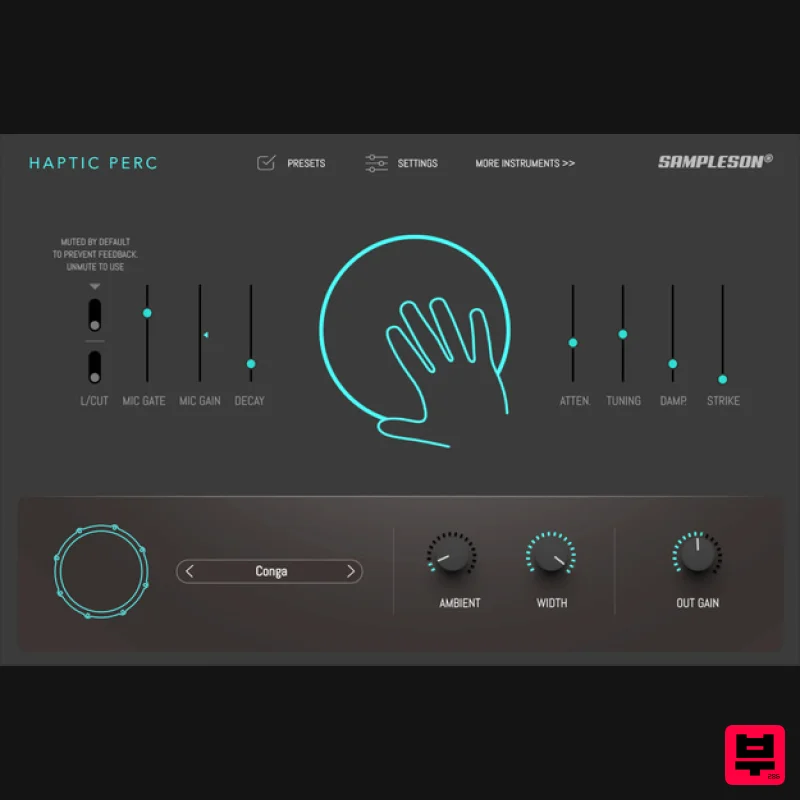
- a djembe or any other percussion instrument. Haptic Perc is a cutting-edge plug-in that uses microphone input to excite physical percussion models. Creating a hands-on sensation closely resembling the authentic touch of real instruments. Haptic Perc comes in two flavors: as Effect Plug-in and as Midi Synth Plug-in. Both are included in your purchase. Everything Is Possible With Haptic Perc
- you can turn everyday objects into percussion instruments. It's equipped with six parameters that allow you to tweak the underlying physical models to create the surface
- resonance
- and size you want for your new instrument. Use Any Mic
- Even The One On Your Laptop <iframe allow="accelerometer; autoplay; clipboard-write; encrypted-media; gyroscope; picture-in-picture; web-share" allowfullscreen="" frameborder="0" height="315" src="https: //www.youtube.com/embed/PHQNjg3xkko?si=mzwSCHEqXXZKQhRm" title="YouTube video player" width="560"></iframe> Presets Included These presets are included by default. You can create an unlimited number of them by adjusting the physical model parameters to achieve the surface
- resonance
- and size you desire. Conga Hi Bongo Cuban Bongo Repique Surdo Large Pot Orchestral Triangle Old Phone Glass Bar Metal Click Tic Toc Two Flavors - FX And Midi Synth Haptic Perc as FX Plug-in: You can use Haptic Perc as an FX plug-in on any audio channel. Connect a mic and voilà! Any microphone will be enough. Even the one that is built-in your laptop. Despite this
- we recommend to use a studio-grade mic or any piezoelectric or contact mic for more sound quality. Haptic Perc as Virtual Instrument Plug-in: You can also use it as a virtual instrument. Load it on any midi track and control it with midi controller (a keyboard or a midi controller od a midi multi pad interface). Features Physical modeled percussion Two flavors: VST Effect and VSTi Instrument. Compatible with your regular built-in laptop microphone. Only 35 MB. Automatable parameters in your DAW. Controls / FX Built-in ambient HQ reverb. Six parameters to fine-tune the physical model details. System Requirements MacOS Supported on Apple Silicon (Native) and Intel Macs. Standalone App
- VST3 and AU included. Works on OSX 10.7 or later. Host must support VSTi or AU plugins. 4GB RAM. 64 bits Plugin and Standalone. Windows Standalone 64 bits App and VST3 included. Windows 7 or later. Host must support VSTi plugins. 4GB RAM. 64 bits Plug-in and Standalone. Important Note: Pro Tools is not supported. Please Note: Stage54 is used as an example. Mac Download Installer 1. Navigate to your Plugin Boutique User Account and locate Stage54 > Click the blue 'DOWNLOAD' button. 2. Click 'I want this!'. 3. Enter your email address > Click 'Get'. 4. Click 'View content' to proceed straight to your downloads > Alternatively
- enter a password to create an account for future access to your download > Click 'Sign Up'. 5. Locate the 'Stage54 Mac Installer' > Click 'Download'. Installation 1. Navigate to your Downloads folder and locate the 'Stage54 Mac Installer.pkg' > Launch the installer. 2. Click 'Continue'. 3. Click 'Continue'. 4. Click 'Continue'. 5. Click 'Agree'. 6. Click 'Continue'. 7. Click 'Install'. 8. Enter your system password > Click 'Install Software'. 9. Click 'Close'. 10. Launch your DAW > Create a new Virtual Instrument track > Insert Stage54 onto the channel > Paste your 16 digit serial number found within your Plugin Boutique User Account into the box > Click 'Authorise'. Stage54 is now installed
- activated
- and ready to use within your DAW. Windows Download Installer 1. Navigate to your Plugin Boutique User Account and locate Stage54 > Click the blue 'DOWNLOAD' button. 2. Click 'I want this!'. 3. Enter your email address > Click 'Get'. 4. Click 'View content' to proceed straight to your downloads > Alternatively
- enter a password to create an account for future access to your download > Click 'Sign Up'. 5. Locate the 'Stage54 Win Installer' > Click 'Download'. Installation 1. Navigate to your Downloads folder and locate the 'Stage54 Win Installer.exe' > Launch the installer. 2. Click 'Next'. 3. Click 'Next'. 4. Click 'Next'. 5. Click 'Next'. 6. Click 'Install'. 7. Click 'Finish'. 8. Launch your DAW > Create a new Virtual Instrument track > Insert Stage54 onto the channel > Paste your 16 digit serial number found within your Plugin Boutique User Account into the box > Click 'Authorise'. Stage54 is now installed
- activated
- and ready to use within your DAW.
Additional Information
About the Sampleson Haptic Perc
The Sampleson Haptic Perc combines traditional design with modern performance for Virtual Instruments enthusiasts.
Why Choose the Sampleson Haptic Perc?
- •Authentic Sampleson craftsmanship and design
- •Versatile sound suitable for multiple musical genres
- •Professional build quality and reliable performance
- •Part of Sampleson's respected Virtual Instruments lineup
Compare & Explore
Browse our complete selection of Sampleson instruments or explore other Virtual Instruments options. Use our comparison tools to find the perfect match for your musical style and budget.
Similar Products

MeldaProduction Electric Keys - Tines
Virtual Instruments

Audiomodern Opacity 2: Soundbox Instrument
Virtual Instruments

UJAM BEAUTYFLUTE Pro
Virtual Instruments

ZAK Sound Asteroid
Virtual Instruments

ZAK Sound Lyra
Virtual Instruments

Boom SWAMPS - 3D Surround
Virtual Instruments

Safari Audio Cubby
Virtual Instruments

MNTRA Instruments Nagual
Virtual Instruments

