
Safari Audio The Herd
Professional music gear - detailed information and where to buy
Safari Audio
The Herd
Product Info
* Prices may vary. Check retailer for current pricing and availability.
Product Description
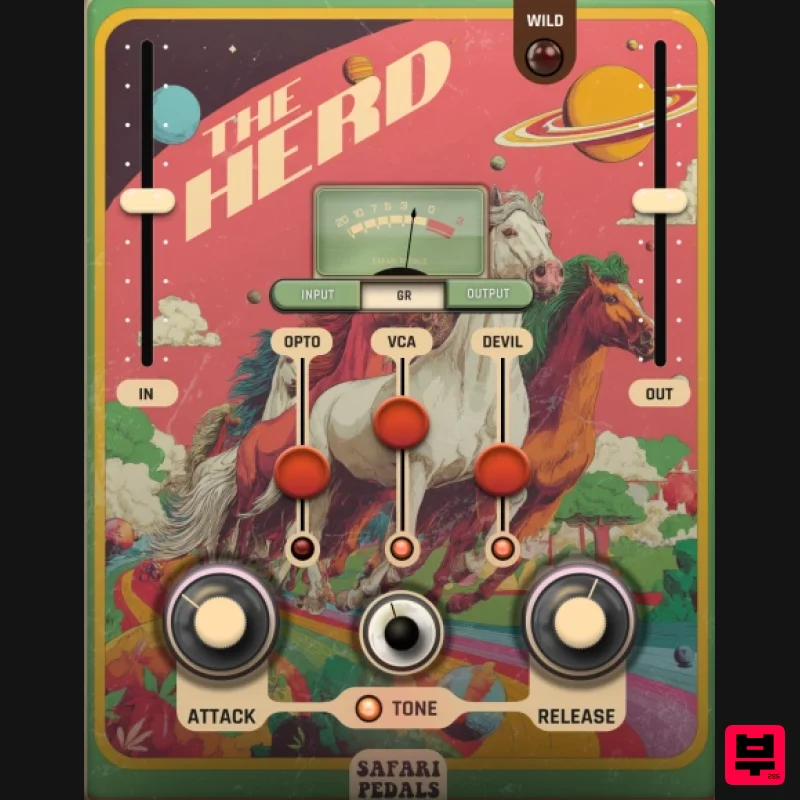
- Parallel Compressor Gone Wild The Herd is Safari’s triple-engine compressor built for musical glue
- character
- and chaos. Ride with Opto VCA punch
- or unleash the Devil for gritty analog bite. It’s warm
- wild
- and wonderfully unpredictable; perfect for taming mixes or setting them free. What It Does Opto Mode — and musical
- ideal for vocals and bus glue. VCA Mode — Fast
- punchy compression for drums and transients. Devil Mode — Adds grit
- harmonic color
- and wild saturation. Attack / Release — Shape your compression response from tight snap to soft bloom. Tone — Tilt-style control to warm or brighten the signal. Wild Switch — Engage Safari’s signature analog-style mayhem for more attitude. In / Out Sliders — Fast gain staging for precision control. Meter — Classic-style GR display for instant feedback. Auto-Gain — Keeps perceived loudness steady as you push harder. Why Producers Love It Three iconic compression flavors in one plugin Glue your mix or break it apart creatively Warm analog tone with Safari’s playful visual style Perfect on vocals
- mix bus
- drums
- and guitars Formats: Mac VST3 / AU / AAX
- Windows 64-bit VST3 / AAX CPU: 1 GHz dual-core or better RAM: 4 GB minimum (8 GB recommended) OS: macOS 10.15+ or Windows 8+ Installation guide 1. Click DOWNLOAD in your Plugin Boutique User Account or head to https://safaripedals.com/pages/downloads 2. Click Download for your operating system 3. Open the downloaded folder For Mac users: Select the plugins you would like to install. The included installer should install the plugin’s VST3
- and AAX formats automatically
- you may need to restart your DAW to see the plugin listed. For Windows users: You will have to manually move the desired plugin formats into their respective folders. Common locations for each format are as follows: VST3: C:\Program Files\Common Files\VST3 AAX: C:\Program Files\Common Files\Avid\Audio\Plug-Ins If after restarting your DAW
- you still don’t see the plugin listed
- check your DAW’s plugin folder settings
- and be sure that the plugin is in the proper location for your software. 4. Open your DAW > launch the plugin. 5. Enter the serial number found in your Plugin Boutique User Account > click Activate Your plugin is authorised and ready to use. Enjoy!
Additional Information
About the Safari Audio The Herd
The Safari Audio The Herd represents excellent craftsmanship in the Compressor category.
Why Choose the Safari Audio The Herd?
- •Authentic Safari Audio craftsmanship and design
- •Versatile sound suitable for multiple musical genres
- •Professional build quality and reliable performance
- •Part of Safari Audio's respected Compressor lineup
Compare & Explore
Browse our complete selection of Safari Audio instruments or explore other Compressor options. Use our comparison tools to find the perfect match for your musical style and budget.
Similar Products

Soundspear Supertube
Compressor

Initial Audio IA-LA1
Compressor

DDMF LinComp
Compressor

MeldaProduction MEssentialsFXBundle
Compressor

PSP Audioware PSP Vintage Warmer 2
Compressor

Korneff Audio Pawn Shop Comp
Compressor

DDMF Comprezzore
Compressor

W. A. Production BIGGIFIER
Compressor

