
Safari Audio Flamingo Verb
Professional music gear - detailed information and where to buy
Safari Audio
Flamingo Verb
Product Info
* Prices may vary. Check retailer for current pricing and availability.
Product Description
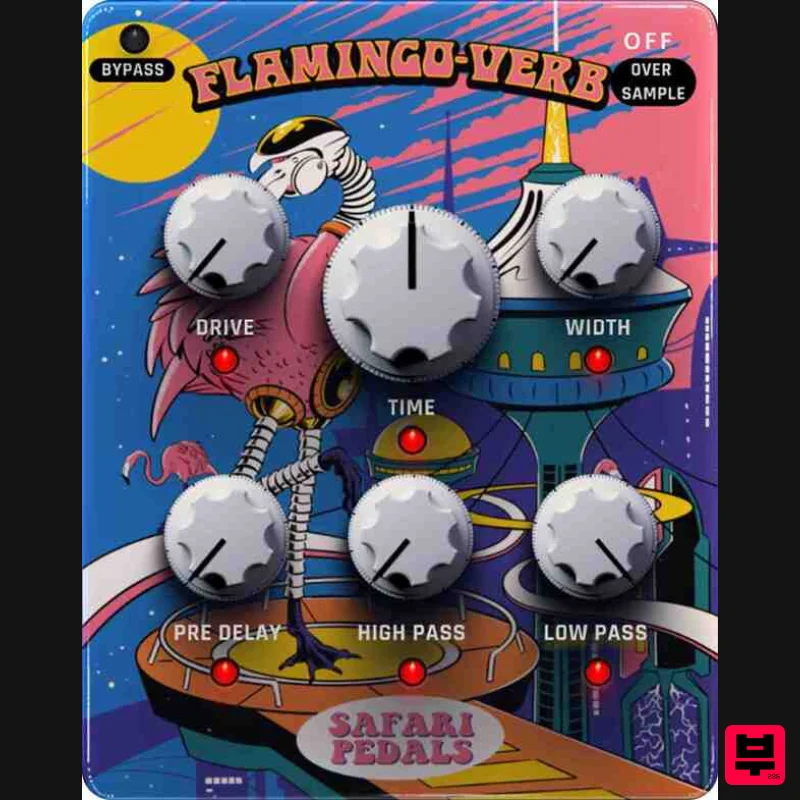
- A Unique Approach to Reverb The Flamingo Verb redefines reverb with four custom-recorded impulse responses (IRs). Turn the Time knob to seamlessly transition between distinct spaces: a tight studio lobby room
- a short plate
- a classic RE-201 spring
- and a lush
- dreamy 480 hall. Designed for flexibility
- it also features high & low-pass filters
- a stereo width control
- and a gritty overdrive for extra character. Features Drive Knob & Output Trim Adjustable High & Low-Pass Filters Oversampling (x2
- x4) options for drive knob (You're welcome
- Wytse!) Four IR sounds
- blendable in pairs Widener for enhanced stereo imaging Pre-delay (1ms to 100ms) Blend Knob Each feature can be toggled on or off
- allowing creative use as a delay
- filter set
- or color box System Requirements Formats: MacOS (VST3
- AAX) | Windows 64-bit (VST3
- AAX) Processor: 1 GHz Intel Dual Core or AMD equivalent RAM: 4GB minimum OS: Mac OS X 10.15+ (11+ recommended) / Windows 8 & Above Installation guide 1. Click DOWNLOAD in your Plugin Boutique User Account or head to https://safaripedals.com/pages/downloads 2. Click Download for your operating system 3. Open the downloaded folder For Mac users: Select the plugins you would like to install. The included installer should install the plugin’s VST3
- and AAX formats automatically
- you may need to restart your DAW to see the plugin listed. For Windows users: You will have to manually move the desired plugin formats into their respective folders. Common locations for each format are as follows: VST3: C:\Program Files\Common Files\VST3 AAX: C:\Program Files\Common Files\Avid\Audio\Plug-Ins If after restarting your DAW
- you still don’t see the plugin listed
- check your DAW’s plugin folder settings
- and be sure that the plugin is in the proper location for your software. 4. Open your DAW > launch the plugin. 5. Enter the serial number found in your Plugin Boutique User Account > click Activate Your plugin is authorised and ready to use. Enjoy!
Additional Information
About the Safari Audio Flamingo Verb
The Safari Audio Flamingo Verb represents excellent craftsmanship in the Reverb category.
Why Choose the Safari Audio Flamingo Verb?
- •Authentic Safari Audio craftsmanship and design
- •Versatile sound suitable for multiple musical genres
- •Professional build quality and reliable performance
- •Part of Safari Audio's respected Reverb lineup
Compare & Explore
Browse our complete selection of Safari Audio instruments or explore other Reverb options. Use our comparison tools to find the perfect match for your musical style and budget.
Similar Products

DDMF Envelope
Reverb
$30
Envelope is a true stereo reverb plugin featuring 8 different room simulations, all of which can be adjusted for size,...

Vegas Audio Fabricverb
Reverb
$30
Get the signature sound of the UK’s most famous nightclub on your digital audio workstation! Our new convolution...

DDMF MagicVerb
Reverb
$30
MagicVerb is the latest result of the collaboration between MagicDeathEye aka Ian Sefchick and DDMF. This journey was...

PSP Audioware PSP Nexcellence
Reverb
$30
PSP Nexcellence is a rich-sounding, spring reverb emulation inspired by and modeled after classic “necklace-type”...

PSP Audioware PSP Pianoverb 2
Reverb
$30
PSP PianoVerb2 is a redesigned and improved creative resonant reverb plug-in based on our famous and beloved freeware...

Initial Audio AR1 Reverb
Reverb
$30
Quality Algorithmic Reverb Plugin AR1 is an algorithmic reverb plugin designed to sound great on all types of...

XHUN Audio ShineVerb
Reverb
$30
Creative Reverb Processor ShineVerb is a creative tool specially designed for reverberation, spatialization and sound...

PSP Audioware PSP EasyVerb
Reverb
$30
PSP EasyVerb is a reverberation effect plug-in (VST, RTAS and AAX for Windows; VST, AudioUnit, RTAS and AAX for Mac OS...
Frequently Asked Questions
The Safari Audio Flamingo Verb stands out for its exceptional Safari Audio craftsmanship and innovative design.
Yes! With its affordable price point and quality construction, it's perfect for learning reverb.
Browse the similar products section to see how it stacks up against other reverb.

