
Safari Audio Dirty Dog Reverb
Professional music gear - detailed information and where to buy
Safari Audio
Dirty Dog Reverb
Product Info
* Prices may vary. Check retailer for current pricing and availability.
Product Description
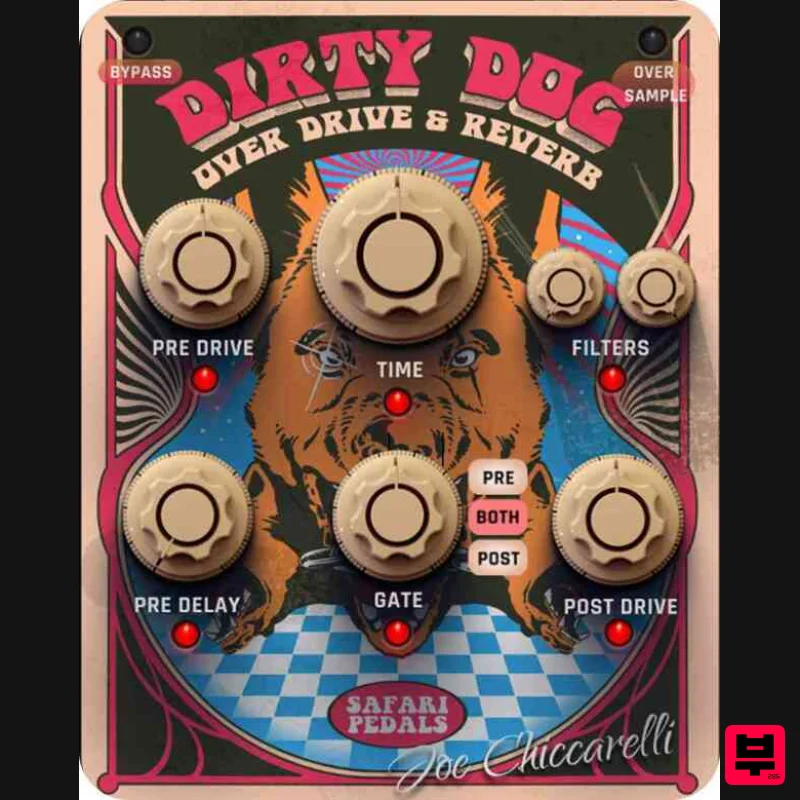
- A Wild Reverb & Overdrive Collaboration with Joe Chiccarelli Dirty Dog is not your typical reverb - it's a distorted reverb powerhouse
- developed in collaboration with 11-time Grammy-winning producer & engineer Joe Chiccarelli (The White Stripes
- The Strokes
- Morrissey
- Little Dragon
- The Killers). It blends reverb
- overdrive (pre & post)
- filters
- and gating
- creating a raw
- aggressive
- and dynamic sound that adds power and energy to any track. Features Blend Knob for full control over reverb intensity Pre-delay from 1ms to 130ms Two distinct overdrive types (pre & post reverb) Auto Gain built into the overdrive section Selectable Oversampling options Reverb time adjustable from 140ms to 4000ms Dual Gate System (Pre Reverb
- Post Reverb
- or Both) Handpicked presets from top engineers: Carlos de la Garza (Paramore
- Ziggy Marley) & Ken Sluiter (James Blunt
- Weezer
- OK GO) System Requirements Formats: MacOS (VST3
- AAX) | Windows 64-bit (VST3
- AAX) Processor: 2 GHz Intel Dual Core or AMD equivalent RAM: 8GB minimum (16GB recommended) OS: Mac OS X 10.15+ (11+ recommended) / Windows 8 & Above Installation guide 1. Click DOWNLOAD in your Plugin Boutique User Account or head to https://safaripedals.com/pages/downloads 2. Click Download for your operating system 3. Open the downloaded folder For Mac users: Select the plugins you would like to install. The included installer should install the plugin’s VST3
- and AAX formats automatically
- you may need to restart your DAW to see the plugin listed. For Windows users: You will have to manually move the desired plugin formats into their respective folders. Common locations for each format are as follows: VST3: C:\Program Files\Common Files\VST3 AAX: C:\Program Files\Common Files\Avid\Audio\Plug-Ins If after restarting your DAW
- you still don’t see the plugin listed
- check your DAW’s plugin folder settings
- and be sure that the plugin is in the proper location for your software. 4. Open your DAW > launch the plugin. 5. Enter the serial number found in your Plugin Boutique User Account > click Activate Your plugin is authorised and ready to use. Enjoy!
Additional Information
About the Safari Audio Dirty Dog Reverb
The Safari Audio Dirty Dog Reverb combines traditional design with modern performance for Reverb enthusiasts.
Why Choose the Safari Audio Dirty Dog Reverb?
- •Authentic Safari Audio craftsmanship and design
- •Versatile sound suitable for multiple musical genres
- •Professional build quality and reliable performance
- •Part of Safari Audio's respected Reverb lineup
Compare & Explore
Browse our complete selection of Safari Audio instruments or explore other Reverb options. Use our comparison tools to find the perfect match for your musical style and budget.
Similar Products

XHUN Audio ShineVerb
Reverb

PSP Audioware PSP Nexcellence
Reverb

Vegas Audio Fabricverb
Reverb

PSP Audioware PSP EasyVerb
Reverb

DDMF Envelope
Reverb

PSP Audioware PSP Pianoverb 2
Reverb

DDMF MagicVerb
Reverb

Initial Audio AR1 Reverb
Reverb

