
Relab Development Q82
Professional music gear - detailed information and where to buy
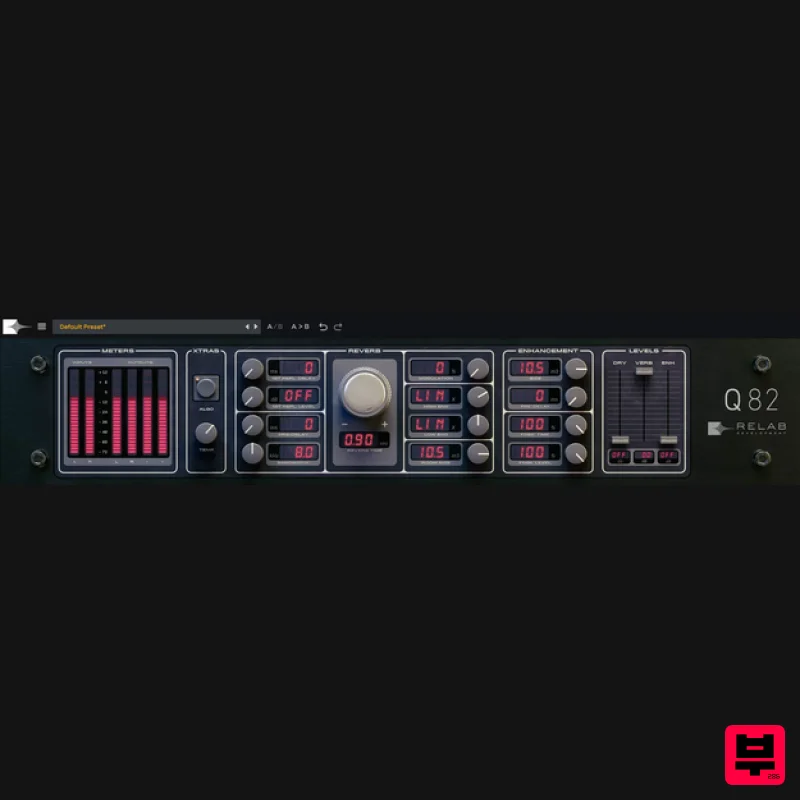
Relab Development
Q82
Product Info
* Prices may vary. Check retailer for current pricing and availability.
Product Description
- Dive into the Depths of This Long-Adored Classic Reverb Like Never Before Q82 2.0 is the world’s only dual-engine premium re-creation of a beloved 80’s hardware reverb
- revered for its highly realistic ambience and long reverb times. This legendary resonance reverb
- once the cornerstone of many world-class studios
- has been meticulously re-created. Feel the authenticity in every tweak: Relab’s advanced machine learning captures every nuance
- giving you the sound AND feel of the legendary hardware
- quirks included. Shape your sound with precision: Relab’s unique dual-engine design of Q82 enables real-time fine-tuning of reverb width and “front-to-back” depth for unparalleled sound sculpting. Enhance your mixes with ease: With hand-tuned 8-voice modulation
- first reflection channel swapping and expanded bandwidth control
- Q82 makes crafting complex
- textured reverbs fast and simple. System Requirements Mac OS 10.15 + above. M1 native. Format: VST3/AU/AAX (64bit) PC Windows 10 + above. Format: VST3/AAX (64bit) Compatible with all major DAWs. Free PACE account required. No hardware dongle is required to authorize Relab products. You can choose between local computer authorization OR the ilok USB key (V2 or above). However
- a free PACE iLok account
- internet connection and the latest PACE drivers are required at the time of product activation. Please Note: Q82 Essentials is used as an example. Important Note: If you don't have iLok installed
- please follow the links below to install and activate it. iLok is required to use this plugin. Getting Started with the iLok License Manager Getting Started with the iLok License Manager: Windows Installation Guide Getting Started with the iLok License Manager: macOS Installation Guide Activation 1. Go to https://shop.relabdevelopment.com/redeem or click download in your Plugin Boutique User Account. 2. Enter your email address and iLok User ID > Click 'Validate Account'. 3. Go to your email inbox and locate the email from Relab Development > Click 'Verify Email'. 4. Enter the serial code found in your Plugin Boutique User Account > Click 'Validate Code'. 5. Tick the relevant boxes > Click 'REDEEM'. 6. Go back to your email inbox > You will have received an email with the download links > Click step 2's 'Available Here'. 7. Download the relevant installer. Installation Mac 1. Double click the .pkg file to begin installation. 2. Click 'Continue'. 3. Click 'Continue'. 4. Click 'Agree'. 5. Click 'Install'. 6. Click 'Close'. Your software is now installed and ready for use in your DAW! PC 1. Double click the .exe file to begin installation. 2. Click 'I accept the agreement' > Click 'Next'. 3. Click 'Next'. 4. Click 'Next'. 5. Click 'Install'. 6. Click 'Finish'. Your software is now installed and ready for use in your DAW!
Additional Information
About the Relab Development Q82
Discover the distinctive sound and feel of the Relab Development Q82, a standout choice among Reverb.
Why Choose the Relab Development Q82?
- •Authentic Relab Development craftsmanship and design
- •Versatile sound suitable for multiple musical genres
- •Professional build quality and reliable performance
- •Part of Relab Development's respected Reverb lineup
Compare & Explore
Browse our complete selection of Relab Development instruments or explore other Reverb options. Use our comparison tools to find the perfect match for your musical style and budget.
Similar Products

DDMF MagicVerb
Reverb

PSP Audioware PSP Pianoverb 2
Reverb

PSP Audioware PSP EasyVerb
Reverb

Initial Audio AR1 Reverb
Reverb

Vegas Audio Fabricverb
Reverb

PSP Audioware PSP Nexcellence
Reverb

XHUN Audio ShineVerb
Reverb

DDMF Envelope
Reverb

