
Pulsar Audio VM-COMP
Professional music gear - detailed information and where to buy
Pulsar Audio
VM-COMP
Product Info
* Prices may vary. Check retailer for current pricing and availability.
Product Description
- An Industry-standard Tube Compressor The most faithful emulation of a modern yet legendary tube compressor/limiter – perfect glue for mixing and mastering. Variable-bias tube compressors deliver transparent gain control
- and naturally “glue” buses
- mixes
- and masters together. Unfortunately
- the original hardware is expensive and difficult to integrate with in-the-box workflows. Software emulations exist
- but most owners of the hardware agree that they cannot be compared to the original unit
- as there’s always “something” missing. With its unique Topology Preservation Technology
- Pulsar VM-COMP sounds objectively identical to the hardware in every production context
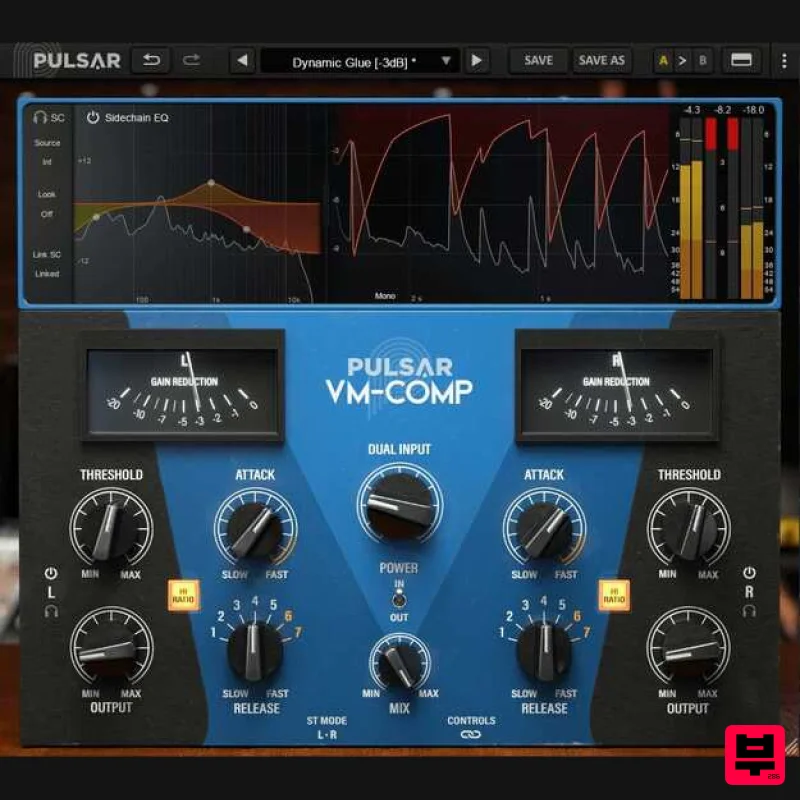
- but also introduces improvements such as visual sidechain EQ editing and extended timing ranges. <iframe allow="accelerometer; autoplay; clipboard-write; encrypted-media; gyroscope; picture-in-picture; web-share" allowfullscreen="" frameborder="0" height="315" src="https: //www.youtube.com/embed/4SEx_cj0sFo?si=9P7ibwHm-stAzKNL" title="YouTube video player" width="560"></iframe> A Modern Take on a Legendary Compressor Pulsar VM-COMP is a stereo compressor operating in either Left/Right or Mid/Side modes
- designed with mixing and mastering applications in mind
- but also flexible enough for tracking. It can be used for levelling
- limiting
- or just to add a bit of analog warmth with its emulated tube signal path. Real-Time Visuals While reproducing the accurate SIFAM metering of the original unit
- Pulsar VM-COMP also provides a more modern visualization mode for fine-tuning compression settings
- representing the waveform and gain reduction both over time and instantaneously. Full-featured Sidechain EQ Pulsar Mu also offers various options that apply to the sidechain signal. A popular mod of the original device was to add a high-pass filter
- but Mu goes even further
- offering a more complete equalization section
- enabling to precisely adjust the compressor’s response to bass
- midrange and treble using only four knobs. And you can now freely edit the Pulsar VM-COMP sidechain EQ with an on-screen curve editor. Master Transients with Total Timing Control Another addition is the possibility of advancing (look-ahead) or delaying (look-behind) the sidechain signal. This enables you to take ultimate control over transients
- letting the compressor start to react before they happen
- or even after they happen
- opening up all kinds of creative uses. Extended Attacks and Releases Faster attacks and releases let you dial in a more aggressive
- mid-forward timbre
- impossible to achieve with the original unit. Discover even more creative uses of this powerful “color box” that is the VM-COMP. How Does It Sound? Transparent but musical: The sound of Pulsar VM-COMP is impressively transparent with a touch of warmth. It manages transients in a soft and musical way
- even with extreme settings
- unlike a FET or VCA compressor. With VM-COMP
- you can add movement while respecting the natural dynamics of a source. Mastering: The most classic use of VM-COMP is in mastering: it brings the discreet "polish" and "glue" to subtly warm up any mix. It can be used either transparently as a leveller (with long attack and release)
- as a compressor to add glue (slow attack with fast release)
- or as a limiter (fast attack and fast release). Using VM-COMP in Mid/Side mode gives you another way to increase stereo image
- or to curtail an overly wide mix. Drum buss: Pulsar VM-COMP can quickly create the “glue” needed for cohesive drum buss processing
- while still respecting transients – even those of a kick drum. Depending on the chosen gain reduction and release time
- it can restore the room ambience essential for certain styles of music – especially when used as a parallel compressor. Acoustic guitar: On an acoustic guitar
- with a relatively low gain reduction setting
- Pulsar VM-COMP creates a nice organic groove
- while respecting the transients of the instrument. This subtlety is useful for livening up a dull
- stiff guitar track
- giving it edge and personality. Snare drum: Pulsar VM-COMP can give body and consistency to thin snare drums sounds
- even while preserving their transients
- which are essential for helping them break through the mix. When pushed a little harder
- Mu can help you recover sustain
- harmonics
- or even ambience. Vocals: Pulsar VM-COMP sounds particularly good on vocals – especially with fairly high input and medium attack and release. It gives them the analog-style warmth to help them sit naturally
- even in a dense mix. Features Topology Preservation Technology Powerful sidechain EQ Advanced metering section Look ahead
- look behind Mid-Side processing Extended Attacks and Releases External sidechain Low CPU consumption Windows Windows 7 with SP1 / Windows 8.1 / Windows 10 (all 64-bit only) CPU: Intel Core i3 / i5 / i7 / i9 / Xeon or AMD Quad-Core minimum Memory: 4 GB RAM & 1 GB free disk space GPU: OpengGL 2.0 compatible GPU Monitor: Minimum 1024×768 Resolution (recommended 1920×1080) & 60 Hz Refresh rate Compatible Plugin Formats (32 & 64-bit): AAX Native VST 2.4 VST 3 Mac macOS10.9 and higher (M1 Apple Silicon supported) (64-bit only) CPU: Intel Core i3 / i5 / i7 / Xeon / Apple Silicon (M1) Memory: 4 GB RAM & 1 GB free disk space GPU: OpengGL 2.0 compatible GPU Monitor: Minimum 1024×768 Resolution (recommended 1920×1080) & 60 Hz Refresh rate Compatible Plugin Formats (64-bit only): AAX Native Audio Unit VST 2.4 VST 3 Activation: You need to have an account at ilok.com to be able to use Pulsar software. The Mac version of this software is 64-bit only and will not function on 32-bit systems. Important - You need to have an account at ilok.com to be able to use Pulsar software. Please note: Pulsar is used as an example. Mac iLok Registration 1. Go to the iLok website and create a new account if you are not currently registered and do not have the iLok License Manager installed on your computer. Note: Skip to the 'Pulsar Software Installation' procedure if you are already an iLok registered user. 2. Download and install the iLok License Manager. Pulsar Software Installation 1. Download the .dmg file from within your Plugin Boutique User Account and open it > Double-click the .pkg file to begin the installation. 2. Click 'Continue'. 3. Click 'Continue'. 4. Click 'Agree'. 5. Click 'Install'. 6. Enter your computer Username and Password > Click 'Install Software'. 7. Click 'Close'. iLok Activation 1. Open the iLok License Manager > Click 'Sign In'. 2. Enter your iLok User ID and Password > Click 'Sign In'. 3. Click the redeem icon in the top right-hand corner of the iLok License Manager window. 4. Enter the Activation Code in of your Plugin Boutique User Account > Click 'Next'. 5. Select your account that you wish to redeem your product to > Click 'Redeem'. 6. Click 'Ok'. 7. Select your redeemed product > Click the tick icon in the top-right hand corner of the iLok License Manager. 8. Select your computer from the list of activation locations > Click 'Activate'. 9. Click 'Ok'. Your product is now activated and ready to use within your DAW. Windows iLok Registration 1. Go to the iLok website and create a new account if you are not currently registered and do not have the iLok License Manager installed on your computer. Note: Skip to the 'Pulsar Software Installation' procedure if you are already an iLok registered user. 2. Download and install the iLok License Manager. Pulsar Software Installation 1. Download the installer file from your Plugin Boutique User Account. 2. Double-click the .zip folder to reveal the installer file > Double-click the .exe installer file to begin the installation process. 3. Select 'I Accept the Agreement' > Click 'Next'. 4. Select the components you wish to install > Click 'Next'. (Note: Untick 'PACE iLok license support' if you already have it installed on your computer). 5. Click 'Next'. 6. Click 'Install'. 7. Click 'Finish'. iLok Activation 1. Open the iLok License Manager > Click 'Sign In'. 2. Enter your iLok User ID and Password > Click 'Sign In'. 3. Click the redeem icon in the top right-hand corner of the iLok License Manager window. 4. Enter the Activation Code in of your Plugin Boutique User Account > Click 'Next'. 5. Select your account that you wish to redeem your product to > Click 'Redeem'. 6. Click 'Ok'. 7. Select your redeemed product > Click the tick icon in the top-right hand corner of the iLok License Manager. 8. Select your computer from the list of activation locations > Click 'Activate'. 9. Click 'Ok'. Your product is now activated and ready to use within your DAW.
Additional Information
About the Pulsar Audio VM-COMP
The Pulsar Audio VM-COMP combines traditional design with modern performance for Compressor enthusiasts.
Why Choose the Pulsar Audio VM-COMP?
- •Authentic Pulsar Audio craftsmanship and design
- •Versatile sound suitable for multiple musical genres
- •Professional build quality and reliable performance
- •Part of Pulsar Audio's respected Compressor lineup
Compare & Explore
Browse our complete selection of Pulsar Audio instruments or explore other Compressor options. Use our comparison tools to find the perfect match for your musical style and budget.
Similar Products

Initial Audio IA-LA1
Compressor

DDMF LinComp
Compressor

MeldaProduction MEssentialsFXBundle
Compressor

Korneff Audio Pawn Shop Comp
Compressor

Soundspear Supertube
Compressor

W. A. Production BIGGIFIER
Compressor

DDMF Comprezzore
Compressor

PSP Audioware PSP Vintage Warmer 2
Compressor

