
Pulsar Audio Smasher
Professional music gear - detailed information and where to buy
Pulsar Audio
Smasher
Product Info
* Prices may vary. Check retailer for current pricing and availability.
Product Description
- Straightforward but Extreme “British Mode” Compression A faithful emulation of a uniquely modified 1176. All Buttons In
- All the Time is an unprecedented custom modification of the classic Urei 1176 compressor circuit
- a unique formula that the Pulsar team stumbled upon while fine-tuning other algorithms. The original 1176 compressor hardware offered a selection of four ratios
- but studio engineers soon discovered that pressing them all at once led to a distorted
- explosive and highly compressed sound. It’s this “All buttons in” or “British” mode that was painstakingly designed to recreate. While remaining very close to the original circuitry
- the modifications Pulsar have built into will add definition to transients and make your tone more aggressive. Pulsar love using it to enhance the ambience in drum busses
- but there are many more creative uses too. won’t work on every single track
- but where it does
- it works magic. excels at raw and gritty sounds
- calling to mind bands like Vulfpeck
- The Whitefield Brothers and The Black Keys. Why It's Unique Based on an internal feedback configuration
- FET compressor designs like the Urei 1176 are known for their super-quick attack times and a colourful tonal response that ranges from soft limiting to heavy saturation. When running in all-buttons-in mode
- several things happen to the 1176’s circuit
- including changes to the bias voltages. In all these phenomena have been perfectly reproduced for the first time using Pulsar's proprietary Topology Preservation Technology
- bringing the full sonic capability of this classic effect to your DAW. With its unique tuning and beautiful
- uncomplicated interface
- gives this mythical circuit a new personality. How does it sound? can add thickness and grit to any drum or bass track
- or completely crush a bus
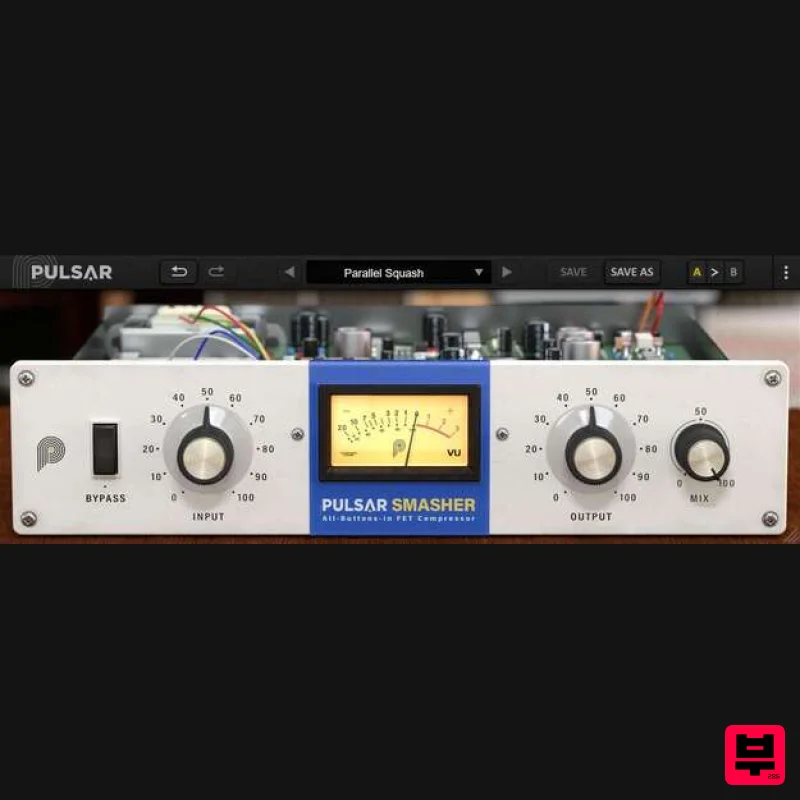
- producing an aggressive sound that’s impossible to achieve with other plugins. On a drum buss: imbues drum mixes with the typical sound of the 1176’s all-buttons-in mode. You get that signature delayed transient squashing and an explosive sound which instantly propels your drums to the front of the mix. On a snare drum: Add body and sustain to bring out a snare’s tone. Try thickening your snare drum by reaching between -6 and -10dB of gain reduction
- then mix a few percent of the resulting huge snare drum sound back into your original dry sound. On a bass: Since bass often requires a combination of compression and saturation
- is the ideal tool to get it dirty
- letting you control precisely how much grit to add. Use the Mix knob to add just a amount of fuzzy saturation. On lead vocals: Please don’t try this at home. Main Features Topology Preservation Technology Pulsar's proprietary modelling technology guarantees a perfect emulation of the original 1176’s behaviour. From the saturation of the magnetic flux in the inductors to the precise response of the transistors and the tiny calibration effects
- everything is perfectly reproduced. Low CPU Consumption Pulsar have spent ages optimizing to consume as few system resources as possible while keeping the same complex sonic results. takes full advantage of modern CPUs to do more with less but also allows oversampling at rates up to 384kHz. Parallel Compression Mix knob lets you blend in the original unprocessed signal. This means that you can really squash the transients with extreme compression
- then bring back just a hint of the processed signal to add sustain to a sound without compromising its dynamic qualities. Linked Sidechain On a stereo bus
- channels are usually compressed independently to get control of dynamics… but when you’re compressing audio more brutally
- it’s essential to keep the stereo image stable. That’s why uses a single detector to process a stereo track. System Requirements Windows Windows 7 with SP1 / Windows 8.1 / Windows 10 (all 64-bit only) CPU: Intel Core i3 / i5 / i7 / i9 / Xeon or AMD Quad-Core minimum Memory: 4 GB RAM & 1 GB free disk space GPU: OpengGL 2.0 compatible GPU Monitor: Minimum 1024×768 Resolution (recommended 1920×1080) & 60 Hz Refresh rate Compatible Plugin Formats (32 & 64-bit): AAX Native VST 2.4 VST 3 Mac macOS 10.9 and higher (M1 Apple Silicon supported) (64-bit only) CPU: Intel Core i3 / i5 / i7 / Xeon Memory: 4 GB RAM & 1 GB free disk space GPU: OpengGL 2.0 compatible GPU Monitor: Minimum 1024×768 Resolution (recommended 1920×1080) & 60 Hz Refresh rate Compatible Plugin Formats (64-bit only): AAX Native Audio Unit VST 2.4 VST 3 Activation: You need to have an account at ilok.com to be able to use Pulsar software. The Mac version of this software is 64-bit only and will not function on 32-bit systems. Warren Huart "I can see me using this all over the place for energy parts on guitars." Glenn Fricker "This is designed to be loud
- rude and obscene
- which is exactly how I like a lot of my compression to be
- especially when it comes to drums!" To obtain for free
- follow the steps below: 1. Copy the URL link from your Plugin Boutique account into your browser > Hit return to follow the link 2. Make sure the coupon has been successfully applied > click Proceed to Checkout 3. Enter all necessary details (marked with a red asterisk) > click box to agree to terms and condition > click Place Order 4. Your license key will be available at the bottom of the next page as well as downloads for both Mac and Windows versions of Important Note: You need to have an account at ilok.com to be able to use Pulsar software. Please note: is used as an example as the installation process is the same for all Pulsar Audio products. Mac iLok Registration 1. Go to the iLok website and create a new account if you are not currently registered and do not have the iLok License Manager installed on your computer. Note: Skip to the 'Pulsar Software Installation' procedure if you are already an iLok registered user. 2. Download and install the iLok License Manager. Pulsar Software Installation 1. Download the .dmg file from within your Plugin Boutique User Account and open it > Double-click the .pkg file to begin the installation. 2. Click 'Continue'. 3. Click 'Continue'. 4. Click 'Agree'. 5. Click 'Install'. 6. Enter your computer Username and Password > Click 'Install Software'. 7. Click 'Close'. iLok Activation 1. Open the iLok License Manager > Click 'Sign In'. 2. Enter your iLok User ID and Password > Click 'Sign In'. 3. Click the redeem icon in the top right-hand corner of the iLok License Manager window. 4. Enter the Activation Code in of your Plugin Boutique User Account > Click 'Next'. 5. Select your account that you wish to redeem your product to > Click 'Redeem'. 6. Click 'Ok'. 7. Select your redeemed product > Click the tick icon in the top-right hand corner of the iLok License Manager. 8. Select your computer from the list of activation locations > Click 'Activate'. 9. Click 'Ok'. Your product is now activated and ready to use within your DAW. Windows iLok Registration 1. Go to the iLok website and create a new account if you are not currently registered and do not have the iLok License Manager installed on your computer. Note: Skip to the 'Pulsar Software Installation' procedure if you are already an iLok registered user. 2. Download and install the iLok License Manager. Pulsar Software Installation 1. Download the installer file from your Plugin Boutique User Account. 2. Double-click the .zip folder to reveal the installer file > Double-click the .exe installer file to begin the installation process. 3. Select 'I Accept the Agreement' > Click 'Next'. 4. Select the components you wish to install > Click 'Next'. (Note: Untick 'PACE iLok license support' if you already have it installed on your computer). 5. Click 'Next'. 6. Click 'Install'. 7. Click 'Finish'. iLok Activation 1. Open the iLok License Manager > Click 'Sign In'. 2. Enter your iLok User ID and Password > Click 'Sign In'. 3. Click the redeem icon in the top right-hand corner of the iLok License Manager window. 4. Enter the Activation Code in of your Plugin Boutique User Account > Click 'Next'. 5. Select your account that you wish to redeem your product to > Click 'Redeem'. 6. Click 'Ok'. 7. Select your redeemed product > Click the tick icon in the top-right hand corner of the iLok License Manager. 8. Select your computer from the list of activation locations > Click 'Activate'. 9. Click 'Ok'. Your product is now activated and ready to use within your DAW.
Additional Information
About the Pulsar Audio Smasher
Experience the quality and tone that makes the Pulsar Audio Smasher a popular choice for musicians.
Why Choose the Pulsar Audio Smasher?
- •Authentic Pulsar Audio craftsmanship and design
- •Versatile sound suitable for multiple musical genres
- •Professional build quality and reliable performance
- •Part of Pulsar Audio's respected Compressor lineup
Compare & Explore
Browse our complete selection of Pulsar Audio instruments or explore other Compressor options. Use our comparison tools to find the perfect match for your musical style and budget.
Similar Products

DDMF Comprezzore
Compressor

DDMF LinComp
Compressor

Korneff Audio Pawn Shop Comp
Compressor

Initial Audio IA-LA1
Compressor

MeldaProduction MEssentialsFXBundle
Compressor

PSP Audioware PSP Vintage Warmer 2
Compressor

W. A. Production BIGGIFIER
Compressor

Soundspear Supertube
Compressor

